'%3e%3cg%20clip-path='url(%23roundHexB)'%3e%3cpath%20fill='%236D5DFC'%20d='M256%2040%20443%20148%20443%20364%20256%20472%2069%20364%2069%20148Z'/%3e%3cpath%20fill='%239C93FB'%20d='M69%20148%20256%2040%20443%20148%20256%20256Z'/%3e%3cpath%20fill='%234A3FD1'%20d='M256%20256%20443%20148%20443%20364%20256%20472Z'/%3e%3c/g%3e%3c!--%20top%20face:%20filled%20round%20magnifier%20--%3e%3cg%20transform='matrix(0.8660254,-0.5,0.8660254,0.5,69,148)'%3e%3cg%20transform='matrix(0.935,0,0,0.935,7.02,7.02)'%3e%3ccircle%20cx='88'%20cy='88'%20r='52'%20fill='%23FFFFFF'/%3e%3ccircle%20cx='88'%20cy='88'%20r='28'%20fill='%239C93FB'/%3e%3cpath%20d='M124%20124%20164%20164'%20stroke='%23FFFFFF'%20stroke-width='26'%20stroke-linecap='round'/%3e%3c/g%3e%3c/g%3e%3cg%20transform='matrix(0.8660254,0.5,0,1,69,148)'%3e%3cpath%20d='M96.1,61.08%20L45.9,128.92%20Q34,145%2054,145%20L162,145%20Q182,145%20170.1,128.92%20L119.9,61.08%20Q108,45%2096.1,61.08%20Z'%20fill='%23FFFFFF'/%3e%3c/g%3e%3c!--%20right%20face:%20filled%20bubble%20--%3e%3cg%20transform='matrix(0.8660254,-0.5,0,1,256,256)'%3e%3cg%20transform='matrix(0.855,0,0,0.855,15.66,15.66)'%3e%3cpath%20d='M60%2042H156a28%2028%200%200%201%2028%2028V158Q184%20168%20174.47%20164.96L124.53%20149.04Q115%20146%20105%20146H60a28%2028%200%200%201-28-28V70a28%2028%200%200%201%2028-28Z'%20fill='%23FFFFFF'/%3e%3c/g%3e%3c/g%3e%3c/g%3e%3c/svg%3e)
 創ノ可想
創ノ可想상품 설명
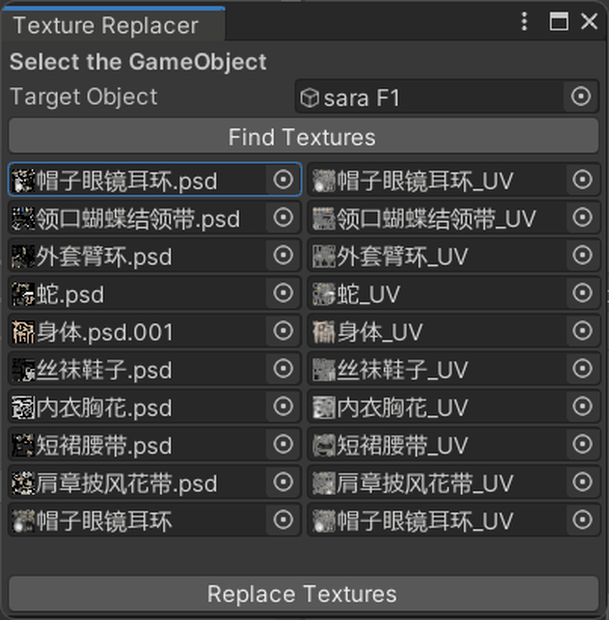
If you got too much materials and most of them are the same textures, use this tool to help you!
### English
1. **Open the Tool**
- Go to `Tools > Texture Replacer` in the Unity menu.
2. **Select the GameObject**
- Drag and drop the GameObject you want to modify into the "Target Object" field.
3. **Find Textures**
- Click the "Find Textures" button to list all textures in the selected GameObject's materials, excluding those under "Face" and "Hair" objects.
4. **Replace Textures**
- For each listed texture, drag a new texture into the right-hand field if you want to replace it.
5. **Execute Replacement**
- Click "Replace Textures" to apply the changes. The console will display which textures were changed and which were not.
### Japanese
1. **ツールを開く**
- Unityメニューの `Tools > Texture Replacer` を選択します。
2. **GameObjectを選択する**
- 変更したいGameObjectを「Target Object」フィールドにドラッグ&ドロップします。
3. **テクスチャを検索する**
- 「Find Textures」ボタンをクリックして、「Face」と「Hair」オブジェクト以外のすべてのテクスチャをリストします。
4. **テクスチャを置き換える**
- リストされた各テクスチャに対して、新しいテクスチャを右側のフィールドにドラッグして置き換えます。
5. **置き換えを実行する**
- 「Replace Textures」ボタンをクリックして変更を適用します。コンソールには、変更されたテクスチャと変更されなかったテクスチャが表示されます。
모든 리뷰
더보기리뷰 등록
리뷰를 작성하려면 로그인이 필요합니다.
로그인하고 리뷰 쓰기