'%3e%3cg%20clip-path='url(%23roundHexB)'%3e%3cpath%20fill='%236D5DFC'%20d='M256%2040%20443%20148%20443%20364%20256%20472%2069%20364%2069%20148Z'/%3e%3cpath%20fill='%239C93FB'%20d='M69%20148%20256%2040%20443%20148%20256%20256Z'/%3e%3cpath%20fill='%234A3FD1'%20d='M256%20256%20443%20148%20443%20364%20256%20472Z'/%3e%3c/g%3e%3c!--%20top%20face:%20filled%20round%20magnifier%20--%3e%3cg%20transform='matrix(0.8660254,-0.5,0.8660254,0.5,69,148)'%3e%3cg%20transform='matrix(0.935,0,0,0.935,7.02,7.02)'%3e%3ccircle%20cx='88'%20cy='88'%20r='52'%20fill='%23FFFFFF'/%3e%3ccircle%20cx='88'%20cy='88'%20r='28'%20fill='%239C93FB'/%3e%3cpath%20d='M124%20124%20164%20164'%20stroke='%23FFFFFF'%20stroke-width='26'%20stroke-linecap='round'/%3e%3c/g%3e%3c/g%3e%3cg%20transform='matrix(0.8660254,0.5,0,1,69,148)'%3e%3cpath%20d='M96.1,61.08%20L45.9,128.92%20Q34,145%2054,145%20L162,145%20Q182,145%20170.1,128.92%20L119.9,61.08%20Q108,45%2096.1,61.08%20Z'%20fill='%23FFFFFF'/%3e%3c/g%3e%3c!--%20right%20face:%20filled%20bubble%20--%3e%3cg%20transform='matrix(0.8660254,-0.5,0,1,256,256)'%3e%3cg%20transform='matrix(0.855,0,0,0.855,15.66,15.66)'%3e%3cpath%20d='M60%2042H156a28%2028%200%200%201%2028%2028V158Q184%20168%20174.47%20164.96L124.53%20149.04Q115%20146%20105%20146H60a28%2028%200%200%201-28-28V70a28%2028%200%200%201%2028-28Z'%20fill='%23FFFFFF'/%3e%3c/g%3e%3c/g%3e%3c/g%3e%3c/svg%3e)
 udon-cat-works
상품 설명
※VRモード限定のギミックになります。
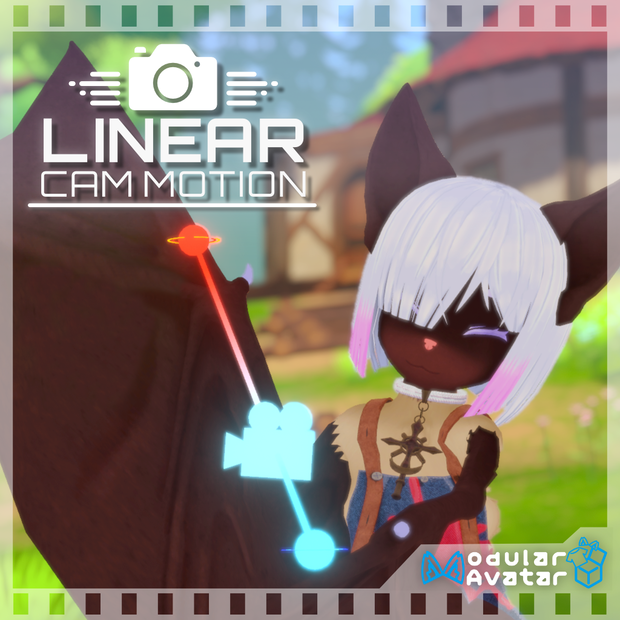
カメラが直線移動する動画を撮影するためのアバターギミックです。
ModularAvatar対応で簡単に導入が可能です。
スピードやズームなどの基本的な設定が可能となっており、複数のカメラモードでいろんな場面に適した撮影も可能となっています。
カメラの角度は常に水平になっているため、細かい角度を気にせず設定できます。
また、基本的に他人には見えないギミックですが、一時的に他の人にも見えるようにすることも可能です。
-------------------------------------------
※It will be a gimmick only for VR mode.
An avatar gimmick for shooting video in which the camera moves in a straight line.
It is compatible with ModularAvatar and can be easily installed.
Basic settings such as speed and zoom are available, and multiple camera modes can be used to take pictures suitable for various situations.
The camera angle is always horizontal, so you can set it without worrying about fine angles.
Also, although the gimmick is basically invisible to others, it is possible to make it temporarily visible to others.
サンプルワールド
こちらでお試しアバターが使えます
詳細
ExpressionMenuからギミックを呼び出して使用します。
ギミックを呼び出すと3つの制御点が出てきます(青色の始点、赤色の終点、緑色の注目点)
また、ギミックを呼び出すとカメラに映る映像がギミック内のカメラが映す映像に上書きされます。
なお、このギミックは初期状態ではカメラに映らず、他人には見えません。
各制御点はピックアップの要領で掴むことが出来るため、任意の位置に設定してからギミックを再生することで直線移動する動画を撮影できます。
※正確には各手のFist、HandOpenを検知してピックアップしています。Gesture Toggleで固定していると正しく動作しないためご注意ください。
-------------
ExpressionMenuの内容を順に説明していきます。
・LinearCamMotion
このギミックを導入した際に追加される操作がまとまっています。
以下で解説する内容はすべてこの中に入っています。
・Enable
ギミックを出現させます。
出現し直すと各制御店の位置はリセットされます。
・Speed
カメラの移動速度を調整します。
最速で1秒、最遅で50秒でカメラが移動します。
・Zoom
カメラのズーム率を調整します。
画角を1~119で調整します。
デフォルトは50%のときで画角60になっています。
・Check
カメラを手動で再生させます。
カメラの再生途中の場所での映り方の確認ができます。
・Play
カメラを再生させます。
再生中に再度選択することで停止します。
・Options
より細かい設定ができる内容が入っています。
-------------
以下Optionsの内容
・Loop
再生時にループするかを設定します。
ループ設定にするとカメラが再生し終わった際に再生時の倍の速度で始点に戻り再度再生します。
・Constant Velocity
カメラの再生時の速度を一定にします
(デフォルトではイーズイン・アウトしています)
・Rotation locked
カメラの回転を現在の角度で固定します
・Camera mode
上級者向けのカメラ設定方法3つ含まれています。
詳細は後述
・Visible menu
ギミック自体の見え方を調整する内容が含まれています。
-------------
以下Visible menuの内容
・Invisible
ギミックを見えない状態にします。
位置はリセットされません
・Hide in play
再生している間だけギミックを見えないようにします。
・Override off
カメラの上書きを一時的にオフにします。
この状態だと通常のカメラにギミックが映るようになります
・Visible to others
他人にもギミックが見えるようになります。
設置後にjoinした人には位置ズレが起きることがあります。
-------------
以下Camera modeの内容
上級者向けの設定ですが、使い方自体は難しくありません。
使いこなせば表現の幅が広がるかと思います。
・Add LookPoint
注目点2つ目を追加します。
カメラが始点から終点に移動するに連れ、カメラは初期注目点から注目点2つ目を見るようにカメラの向きが変わります。
・Look at player
カメラが常にプレイヤーの方を見るようになります。
・Pick up rotation
各制御点を持った際にカメラの向きを設定できます。
カメラの角度は始点の向きから終点の向きに徐々に変わっていきます。
--------------
Details
The gimmick is invoked from the ExpressionMenu.
When the gimmick is called, three control points appear (a blue start point, a red end point, and a green point of interest).
Also, when the gimmick is called, the image on the camera will be overwritten by the image shown by the camera in the gimmick.
Note that the gimmick is initially invisible to the camera and cannot be seen by others.
Since each control point can be grabbed like a pickup, you can set it to any position and then play the gimmick to capture a video of a straight line movement.
Please note that the gimmick will not work correctly if the gimmick is fixed with the Gesture Toggle.
-------------
The contents of ExpressionMenu are explained in the following order.
LinearCamMotion
This is a collection of operations that are added when this gimmick is introduced.
All of the operations described below are included in this section.
Enable
Enables the gimmick to appear.
When the gimmick reappears, the position of each control store is reset.
Speed
Adjusts the speed at which the camera moves.
The camera moves in 1 second at the fastest and 50 seconds at the slowest.
Zoom
Adjusts the zoom rate of the camera.
The angle of view can be adjusted from 1 to 119.
The default setting is 60° angle of view at 50%.
Check
Check the camera to playback the image manually.
You can check the camera's image in the middle of playback.
Play
Playback the camera.
Selecting again during playback will stop the camera.
Options
Contains more detailed settings.
-------------
Contents of Options
Loop
Sets whether the camera loops during playback.
If set to loop, when the camera finishes playback, it will return to the starting point at twice the speed of playback and play it again.
Constant Velocity
Sets a constant velocity for the camera during playback (defaults to Ease In/Out).
(By default, the camera eased in and out.)
Rotation locked
Fixes the camera rotation at the current angle (default is eased in/out).
Camera mode
Includes three camera settings for advanced users.
See below for details.
Visible menu
Contains information for adjusting the visibility of the gimmick itself.
-------------
Contents of Visible menu
Invisible
Makes the gimmick invisible.
The position is not reset.
Hide in play
Hide the gimmick only during playback.
Override off
Temporarily turns off camera override.
In this state, the gimmick will be visible to the normal camera.
Visible to others
The gimmick will be visible to others.
This may cause misalignment for people who join after the gimmick has been installed.
-------------
Below are the contents of Camera mode.
This is a setting for advanced users, but it is not difficult to use.
If you master it, you will be able to broaden the range of your expression.
Add LookPoint
Add a second look point.
As the camera moves from the start point to the end point, the camera will change direction from the initial point of interest to look at the second point of interest.
Look at player
The camera will always look at the player.
Pick up rotation
The direction of the camera can be set for each control point.
The camera angle gradually changes from the start point to the end point.
--------------
모든 리뷰
더보기리뷰 등록
리뷰를 작성하려면 로그인이 필요합니다.
로그인하고 리뷰 쓰기