'%3e%3cg%20clip-path='url(%23roundHexB)'%3e%3cpath%20fill='%236D5DFC'%20d='M256%2040%20443%20148%20443%20364%20256%20472%2069%20364%2069%20148Z'/%3e%3cpath%20fill='%239C93FB'%20d='M69%20148%20256%2040%20443%20148%20256%20256Z'/%3e%3cpath%20fill='%234A3FD1'%20d='M256%20256%20443%20148%20443%20364%20256%20472Z'/%3e%3c/g%3e%3c!--%20top%20face:%20filled%20round%20magnifier%20--%3e%3cg%20transform='matrix(0.8660254,-0.5,0.8660254,0.5,69,148)'%3e%3cg%20transform='matrix(0.935,0,0,0.935,7.02,7.02)'%3e%3ccircle%20cx='88'%20cy='88'%20r='52'%20fill='%23FFFFFF'/%3e%3ccircle%20cx='88'%20cy='88'%20r='28'%20fill='%239C93FB'/%3e%3cpath%20d='M124%20124%20164%20164'%20stroke='%23FFFFFF'%20stroke-width='26'%20stroke-linecap='round'/%3e%3c/g%3e%3c/g%3e%3cg%20transform='matrix(0.8660254,0.5,0,1,69,148)'%3e%3cpath%20d='M96.1,61.08%20L45.9,128.92%20Q34,145%2054,145%20L162,145%20Q182,145%20170.1,128.92%20L119.9,61.08%20Q108,45%2096.1,61.08%20Z'%20fill='%23FFFFFF'/%3e%3c/g%3e%3c!--%20right%20face:%20filled%20bubble%20--%3e%3cg%20transform='matrix(0.8660254,-0.5,0,1,256,256)'%3e%3cg%20transform='matrix(0.855,0,0,0.855,15.66,15.66)'%3e%3cpath%20d='M60%2042H156a28%2028%200%200%201%2028%2028V158Q184%20168%20174.47%20164.96L124.53%20149.04Q115%20146%20105%20146H60a28%2028%200%200%201-28-28V70a28%2028%200%200%201%2028-28Z'%20fill='%23FFFFFF'/%3e%3c/g%3e%3c/g%3e%3c/g%3e%3c/svg%3e)
 Dottrov
상품 설명
「ライラック」
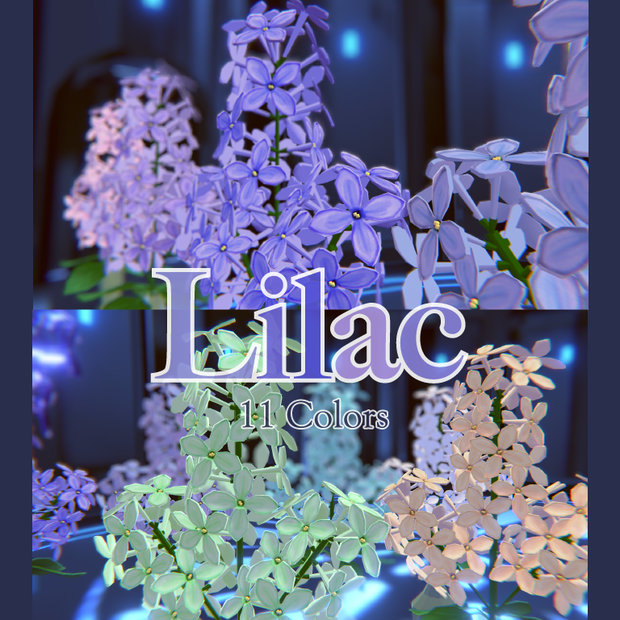
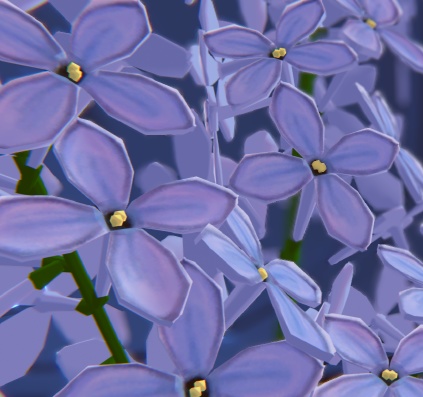
VRChatワールド配置を想定したオリジナル3Dモデル。11色(青、緑、ライトブルー、オレンジ、ピンク、紫、紫2、赤、白、黄色、宝石)のライラックの花をセットにしました。
💎データ内容
1 モデル本体
Lilac.fbx 1点(△26,740 Maya2025)
2 テクスチャ
Lilac_Blue_Texture.png
Lilac_Green_Texture.png
Lilac_LightBlue_Texture.png
Lilac_Mask01.png
Lilac_Mask02.png
Lilac_Orange_Texture.png
Lilac_Pink_Texture.png
Lilac_Purple_Texture.png
Lilac_Purple2_Texture.png
Lilac_Red_Texture.png
Lilac_White_Texture.png
Lilac_Yellow_Texture.png
12点(2048×2048)
3 Unityパッケージ
Lilac.unitypackage 1点(2022.3.22f1)
💎シェーダー
lilToon(https://lilxyzw.booth.pm/items/3087170)を使用しております。
💎利用規約
利用可能範囲
・VRChatなどのVRコンテンツ
・ゲームアセット
・動画配信への映り込み
・2Dイラストのトレース素材として
・モデル改変(形、色、アバターへの改変など自由に)
以下、禁止事項です。
・元データ及び改変データの販売、再配布
・政治的、宗教的活動での利用
・その他公序良俗に反する行為
利用規約の内容は変更される場合があり、最新バージョンを優先します。
本データを利用したことによって生じる損害、トラブルに対し、一切責任を負いかねます。また、ダウンロード商品という性質上、購入後のキャンセルおよび料金のご返金には対応できませんので予めご了承ください。
本データを購入する際、上記の規約に同意したものとみなします。
💎導入方法
VCC(VRChat Creator Companion)の使用を想定しています。
1 シェーダー liltoon をUnityのプロジェクトにインポート
2 【Lilac.unitypackage】 をプロジェクトにインポート
3 ライラック各色のフォルダから 01_Prefab フォルダ内にある 【Lilac_色名(Prefab Asset)】データを、HierarchyもしくはSceneにドラッグして完了
💎クレジット
写真撮影には下記のワールドを使用させていただいております。
【VRChatワールド】Hall(https://booth.pm/ja/items/4119600)
*******************************************
"Lilac"
An original 3D model designed for placement in VRChat worlds. A set of 11 lilac flowers in various colors: blue, green, light blue, orange, pink, purple, purple 2, red, white, yellow, and gem.
💎Contents of the Data
1 Model:
Lilac.fbx (1 file, △26,740, Maya2025)
2 Texture:
Lilac_Blue_Texture.png
Lilac_Green_Texture.png
Lilac_LightBlue_Texture.png
Lilac_Mask01.png
Lilac_Mask02.png
Lilac_Orange_Texture.png
Lilac_Pink_Texture.png
Lilac_Purple_Texture.png
Lilac_Purple2_Texture.png
Lilac_Red_Texture.png
Lilac_White_Texture.png
Lilac_Yellow_Texture.png
(12 files, size 2048×2048)
3 Unity Package:
Lilac.unitypackage (1 file, Unity 2022.3.22f1)
💎Shader
Uses lilToon (https://lilxyzw.booth.pm/items/3087170)
💎Terms of Use
Permitted Uses:
VR content such as VRChat
Game assets
Appearance in video streaming
As a tracing material for 2D illustrations
Model modifications (shape, color, conversion to avatars, etc.)
Prohibited Uses:
Sale and redistribution of the original or modified data
Use in political or religious activities
Any actions that violate public order and morals
The terms of use are subject to change, and the latest version will take precedence. I shall not be held liable for any damages or issues arising from the use of this data. Due to the nature of downloadable products, cancellations and refunds are not accepted after purchase. By purchasing this data, you agree to the above terms.
💎How to use
This assumes the use of VCC (VRChat Creator Companion).
1 Import the liltoon shader into the Unity project.
2 Import the "Lilac.unitypackage" into the project.
3 From the folder of each lilac color, drag the "Lilac_ColorName (Prefab Asset)" located in the 01_Prefab folder into the Hierarchy or Scene to complete the setup.
💎 Credits
The following world was used for the photo shoot: 【VRChat World】Hall (https://booth.pm/ja/items/4119600)
모든 리뷰
더보기리뷰 등록
리뷰를 작성하려면 로그인이 필요합니다.
로그인하고 리뷰 쓰기