'%3e%3cg%20clip-path='url(%23roundHexB)'%3e%3cpath%20fill='%236D5DFC'%20d='M256%2040%20443%20148%20443%20364%20256%20472%2069%20364%2069%20148Z'/%3e%3cpath%20fill='%239C93FB'%20d='M69%20148%20256%2040%20443%20148%20256%20256Z'/%3e%3cpath%20fill='%234A3FD1'%20d='M256%20256%20443%20148%20443%20364%20256%20472Z'/%3e%3c/g%3e%3c!--%20top%20face:%20filled%20round%20magnifier%20--%3e%3cg%20transform='matrix(0.8660254,-0.5,0.8660254,0.5,69,148)'%3e%3cg%20transform='matrix(0.935,0,0,0.935,7.02,7.02)'%3e%3ccircle%20cx='88'%20cy='88'%20r='52'%20fill='%23FFFFFF'/%3e%3ccircle%20cx='88'%20cy='88'%20r='28'%20fill='%239C93FB'/%3e%3cpath%20d='M124%20124%20164%20164'%20stroke='%23FFFFFF'%20stroke-width='26'%20stroke-linecap='round'/%3e%3c/g%3e%3c/g%3e%3cg%20transform='matrix(0.8660254,0.5,0,1,69,148)'%3e%3cpath%20d='M96.1,61.08%20L45.9,128.92%20Q34,145%2054,145%20L162,145%20Q182,145%20170.1,128.92%20L119.9,61.08%20Q108,45%2096.1,61.08%20Z'%20fill='%23FFFFFF'/%3e%3c/g%3e%3c!--%20right%20face:%20filled%20bubble%20--%3e%3cg%20transform='matrix(0.8660254,-0.5,0,1,256,256)'%3e%3cg%20transform='matrix(0.855,0,0,0.855,15.66,15.66)'%3e%3cpath%20d='M60%2042H156a28%2028%200%200%201%2028%2028V158Q184%20168%20174.47%20164.96L124.53%20149.04Q115%20146%20105%20146H60a28%2028%200%200%201-28-28V70a28%2028%200%200%201%2028-28Z'%20fill='%23FFFFFF'/%3e%3c/g%3e%3c/g%3e%3c/g%3e%3c/svg%3e)
 F/A インダストリーズ
 【#VRoid R-18 スタンプ付き!】フェティッシュな乳首テクスチャ Fetish&Detailed Nipple
상품 설명
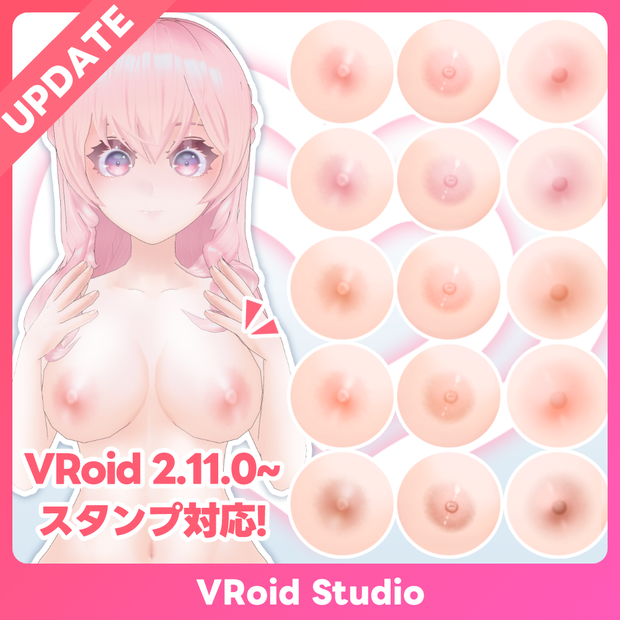
イラストチックでリアルな乳首のテクスチャを製作しました✨️
色々な肌へ使えるように5色のカラバリを同梱しております🎨
また、引き伸ばしを考慮して胸を大きく(小さく)した際に釣り合うように3つのサイズを同梱していますので、まずはノーマルサイズを読み込んでみて、胸の大きさに合わせて他のサイズを読み込んで合わせてみてください。
画像に使われている肌も出品しておりますので、ぜひご一緒にどうぞ✨️
【 #VRoid 4色+色変可 平胸対応】フェティッシュな肌テクスチャ
➡ https://faindustries.booth.pm/items/5148719
2026/02/27 追記:
VRoid 2.11.0にてリリースされたスタンプ機能向けのテクスチャを同梱!従来より位置やサイズをより細かく調整できるようになりました!
◆更新履歴
24/09/19 - パフィーニップル風の販売バリエーションを追加しました!
26/02/27 - v1.1.0 :VRoid Studio v2.11.0以降で利用できるスタンプツール向けテクスチャを追加
◆バリエーションについて
Standard Ver.
→通常の商品です
個人による画像や動画の投稿、配信・VRプラットフォームでの活動などに利用できます。私的・営利利用が可能です。
Boost Ver.
→内容が同一の支援バージョンです
可能であれば応援していただけると励みになります✨️
また、アプリ・ゲーム等への組み込みが可能となります。
※個人によるソフト・ゲーム等への組み込みに利用する場合はこちらをご購入ください。必ず規約にある利用条件をご確認ください。
Corporate Ver.
→全てのバリエーションが同梱された、法人などの企業や団体で利用できるバージョンです。
※企業や団体などの組織内での使用や共有および組み込み用途で利用する場合は、こちらをご購入ください。また、利用事例の報告義務はありませんが、どのように活用いただけるか教えていただけると嬉しいです。
◆内容
※モデルは付属しません
・テクスチャ x15
・スタンプ機能向けテクスチャ x10
◆使用方法
[VRoid Studio]
体型→全身 へテクスチャを読み込んでください
[スタンプ機能を使用する場合 v2.11.0~]
テクスチャ編集画面にてスタンプアイコンツールを選択し、同梱のテクスチャを読み込んでください。
その後、位置や角度を調整し配置してください。
スタンプツールの使い方 - VRoid
◆Fetish & Detailed Nipple for VRoid Studio
've created a nipple texture that blends an illustrated feel with realism ✨️
To suit various skin tones, I've included five different color variations 🎨
Additionally, I've included three sizes to ensure the nipple size remains proportional when the chest is enlarged (or reduced).
Please start by loading the normal size, and then adjust to the other sizes based on the chest size.
2026/02/27 Update‼️
Now includes textures for the Sticker Tool released in VRoid 2.11.0! You can adjust the position and size more precisely than before.
The skin used in the images is also available for purchase, so feel free to mix and match!
【 #VRoid 4colors+changeable】Fetish and Detailed skin textures
➡ https://faindustries.booth.pm/items/5148719
◆Update History
September 19, 24 - Added new variation featuring puffy nipple textures.
February 27, 2026 - v1.1.0 :Added textures for the Sticker Tool, available in VRoid Studio v2.11.0 and later.
◆About Variations
Standard Ver.
→ This is the regular product.
Boost Ver.
→ This is a support version with identical content.
Your support would be greatly appreciated if possible! ✨️
Please purchase this version if you are an individual using it for embedding in software, games, etc.
Corporate Ver.
→ This version includes all variations and is intended for use within corporations or organizations.
If you plan to use, share, or embed it within a company, organization, or similar entity, please purchase this version.
◆What's included
Model is not included
・Textures x 15
・Stcker Tool (VRoid v2.11.0~) Textures x10
◆How to use
[VRoid Studio]
Load the texture into "Body" -> "Whole Body"
[When using the Sticker Tool v2.11.0 or later]
In the Edit Texture screen, select the tool icon and load the included texture.
Then adjust the position and angle before placing it.
How to Use the Sticker Tool - VRoid
https://vroid.pixiv.help/hc/en-us/articles/55426007561113-How-to-Use-the-Sticker-Tool
利用規約
購入およびダウンロード前に下記のリンク先にある利用規約をご確認ください。
『F/Aインダストリーズ』配布・販売データに関する利用規約 - pixivFANBOX
→ https://faindustries.fanbox.cc/posts/3586042
Terms of Use
Please review the Terms of Use available at the following link before purchasing or downloading.
[ENG]Terms of Use for "F/A Industries" Distribution and Sales Assets - pixivFANBOX
모든 리뷰
더보기리뷰 등록
리뷰를 작성하려면 로그인이 필요합니다.
로그인하고 리뷰 쓰기