'%3e%3cg%20clip-path='url(%23roundHexB)'%3e%3cpath%20fill='%236D5DFC'%20d='M256%2040%20443%20148%20443%20364%20256%20472%2069%20364%2069%20148Z'/%3e%3cpath%20fill='%239C93FB'%20d='M69%20148%20256%2040%20443%20148%20256%20256Z'/%3e%3cpath%20fill='%234A3FD1'%20d='M256%20256%20443%20148%20443%20364%20256%20472Z'/%3e%3c/g%3e%3c!--%20top%20face:%20filled%20round%20magnifier%20--%3e%3cg%20transform='matrix(0.8660254,-0.5,0.8660254,0.5,69,148)'%3e%3cg%20transform='matrix(0.935,0,0,0.935,7.02,7.02)'%3e%3ccircle%20cx='88'%20cy='88'%20r='52'%20fill='%23FFFFFF'/%3e%3ccircle%20cx='88'%20cy='88'%20r='28'%20fill='%239C93FB'/%3e%3cpath%20d='M124%20124%20164%20164'%20stroke='%23FFFFFF'%20stroke-width='26'%20stroke-linecap='round'/%3e%3c/g%3e%3c/g%3e%3cg%20transform='matrix(0.8660254,0.5,0,1,69,148)'%3e%3cpath%20d='M96.1,61.08%20L45.9,128.92%20Q34,145%2054,145%20L162,145%20Q182,145%20170.1,128.92%20L119.9,61.08%20Q108,45%2096.1,61.08%20Z'%20fill='%23FFFFFF'/%3e%3c/g%3e%3c!--%20right%20face:%20filled%20bubble%20--%3e%3cg%20transform='matrix(0.8660254,-0.5,0,1,256,256)'%3e%3cg%20transform='matrix(0.855,0,0,0.855,15.66,15.66)'%3e%3cpath%20d='M60%2042H156a28%2028%200%200%201%2028%2028V158Q184%20168%20174.47%20164.96L124.53%20149.04Q115%20146%20105%20146H60a28%2028%200%200%201-28-28V70a28%2028%200%200%201%2028-28Z'%20fill='%23FFFFFF'/%3e%3c/g%3e%3c/g%3e%3c/g%3e%3c/svg%3e)
 JANet
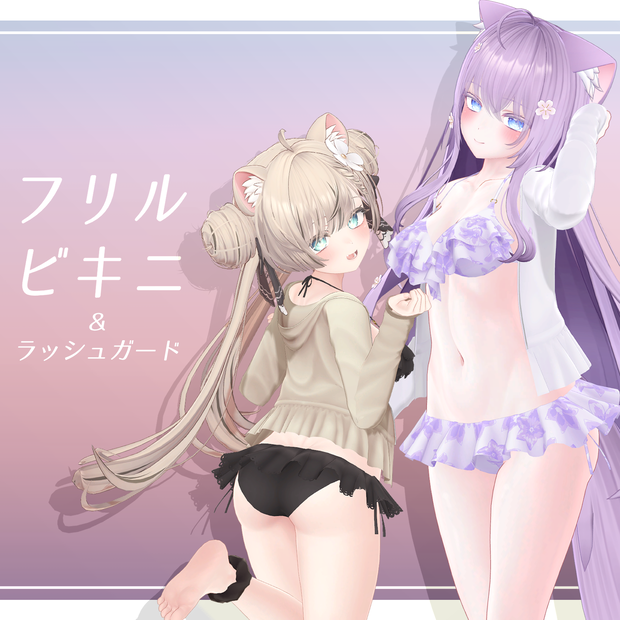
JANet 【7アバター対応】フリルビキニ&ラッシュガード
상품 설명
フリルビキニにラッシュガードとシュシュを追加して、マテリアルも新たにリニューアルしました!
❕注意❕
こちらはこれまで個別だったフリルビキニの販売ページをまとめた新販売ページです。
旧販売ページで購入済みの方は本商品と同じ内容のものを購入履歴またはそれぞれの販売ページからダウンロードできますのでご注意ください。
This is a new sales page that combines the previous individual sales pages for Frill Bikini.
Please note that those who have already purchased a product on the old sales page, you can download the same content as this product from your purchase history or from the respective sales page.
【旧販売ページ old sales page】
フリルビキニ【狐雪用衣装】Frill Bikini for Koyuki
https://janet.booth.pm/items/3818995
フリルビキニ【舞夜用衣装】Frill Bikini for Maya
https://janet.booth.pm/items/3896026
フリルビキニ【桔梗用衣装】Frill Bikini for Kikyo
https://janet.booth.pm/items/3976704
フリルビキニ【凪用衣装】Frill Bikini for Nagi
https://janet.booth.pm/items/5401729
ラッシュガードとシュシュのみの販売もしております。
https://janet.booth.pm/items/5988412
■対応アバター
オリジナル3Dモデル「萌」
https://booth.pm/ja/items/4667400
オリジナル3Dモデル「マヌカ」
https://booth.pm/ja/items/5058077
オリジナル3Dモデル「セレスティア」
https://booth.pm/ja/items/4035411
凪 -Nagi-【オリジナル3Dモデル】
https://booth.pm/ja/items/5345398
オリジナル3Dモデル「桔梗」
https://booth.pm/ja/items/3681787
オリジナル3Dモデル「舞夜」
https://booth.pm/ja/items/3390957
オリジナル3Dモデル「狐雪」
https://booth.pm/ja/items/2554585
■モデル情報
〇メッシュ数:7~8(アバターにより増減)
〇ポリゴン数
・Frill Bikini △約5000(アバターにより増減)
・Rash guard △12914
・Scrunchie △640
合計△約19000
〇胸シェイプキー
完全対応
・萌(Big breasts、Small breasts)
・マヌカ(Breast_big、Breast_big_PLUS)
・セレスティア(Breast_big、Breast_small)
・凪(front_chest_big、front_chest_small)
セミ対応(それぞれの大きさに対応したメッシュが付属します。)
・桔梗(Default、Breasts_small 50、Breasts_big 50、Breasts_big 100)
・舞夜(Default、Big breasts 50、Big breasts 100)
・狐雪(Default、Big breasts 50、Big breasts 100)
〇マテリアル数:2
〇シェーダー:lilToon
〇Modular Avatar設定済み
■商品内容
・FBX
・Unity Package
・Texture(PNG、PSD)
■導入
①Unity Packageフォルダ内のFrill Bikini Material Packをプロジェクトにインポートします。
②Frill Bikini for(アバター名)をプロジェクトにインポートします。
③JANETフォルダ内のprefabをアバターにドラック&ドロップしてください。
Modular Avatarの使用を想定しています。
それ以外のツールでの動作は保証しかねます。
①Import the Frill Bikini Material Pack in the Unity Package folder into your project.
②Import the Frill Bikini for (avatar name) into your project.
③Drag and drop the prefab in the JANET folder onto your avatar.
I recommend using a Modular Avatar for dress-up.
■利用規約 Terms of Use
VN3ライセンスを採用しています。
下記のリンクからご確認ください。
JP
https://drive.google.com/file/d/16lBqW-Fwgkraz9vaVJO_OxHSDCKREuZe/view?usp=drive_link
EN
https://drive.google.com/file/d/1TV67eeZEk9YK55PbB6FoyT7SXuH2GdSx/view?usp=drive_link
KO
https://drive.google.com/file/d/1LJyMPaQOrJOqNtLwMP0rWzVDnqqKEHRi/view?usp=drive_link
ZH
https://drive.google.com/file/d/1djtlW6J0Ycpuq92IF7VizO532CN3eJmg/view?usp=drive_link
※購入した時点で同意したものとみなします。
本商品の再配布は改変の有無、営利非営利問わず禁止です。
Redistribution of this product, with or without modification, for profit or non-profit, is prohibited.
■更新履歴
2024/08/09 リリース
2026/08/17 利用規約更新
■お問い合わせ
BOOTHのメッセージまたはXのDMにてご連絡ください。
모든 리뷰
더보기리뷰 등록
리뷰를 작성하려면 로그인이 필요합니다.
로그인하고 리뷰 쓰기