'%3e%3cg%20clip-path='url(%23roundHexB)'%3e%3cpath%20fill='%236D5DFC'%20d='M256%2040%20443%20148%20443%20364%20256%20472%2069%20364%2069%20148Z'/%3e%3cpath%20fill='%239C93FB'%20d='M69%20148%20256%2040%20443%20148%20256%20256Z'/%3e%3cpath%20fill='%234A3FD1'%20d='M256%20256%20443%20148%20443%20364%20256%20472Z'/%3e%3c/g%3e%3c!--%20top%20face:%20filled%20round%20magnifier%20--%3e%3cg%20transform='matrix(0.8660254,-0.5,0.8660254,0.5,69,148)'%3e%3cg%20transform='matrix(0.935,0,0,0.935,7.02,7.02)'%3e%3ccircle%20cx='88'%20cy='88'%20r='52'%20fill='%23FFFFFF'/%3e%3ccircle%20cx='88'%20cy='88'%20r='28'%20fill='%239C93FB'/%3e%3cpath%20d='M124%20124%20164%20164'%20stroke='%23FFFFFF'%20stroke-width='26'%20stroke-linecap='round'/%3e%3c/g%3e%3c/g%3e%3cg%20transform='matrix(0.8660254,0.5,0,1,69,148)'%3e%3cpath%20d='M96.1,61.08%20L45.9,128.92%20Q34,145%2054,145%20L162,145%20Q182,145%20170.1,128.92%20L119.9,61.08%20Q108,45%2096.1,61.08%20Z'%20fill='%23FFFFFF'/%3e%3c/g%3e%3c!--%20right%20face:%20filled%20bubble%20--%3e%3cg%20transform='matrix(0.8660254,-0.5,0,1,256,256)'%3e%3cg%20transform='matrix(0.855,0,0,0.855,15.66,15.66)'%3e%3cpath%20d='M60%2042H156a28%2028%200%200%201%2028%2028V158Q184%20168%20174.47%20164.96L124.53%20149.04Q115%20146%20105%20146H60a28%2028%200%200%201-28-28V70a28%2028%200%200%201%2028-28Z'%20fill='%23FFFFFF'/%3e%3c/g%3e%3c/g%3e%3c/g%3e%3c/svg%3e)
 CucumberWorks
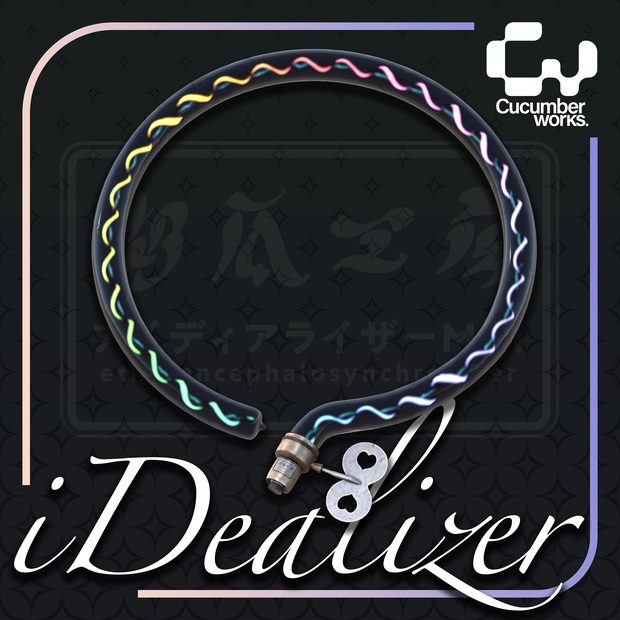
 【VRC想定】【Audiolink】iDealizer / PhysBone設定済み
상품 설명
AudioLink対応、詳しくはサンプル動画をご覧ください。
You can see the effect in action in the sample video.
lilToon、Poiyomi 9.0とAudioLinkを使用しています。事前に導入してください。 This asset uses lilToon, Poiyomi 9.0 and AudioLink. Please import these packages first.
<内容データ Contents>
△6674
Base
・fbxデータ fbx data (1x)
・マテリアル Material (3x)
・テクスチャ Texture
Premium
・マテリアル Material (7x)
・テクスチャ Texture
BaseとPremiumの違いは、4つの追加マテリアルです。Premiumパッケージに含まれるディスクと本体のマテリアルを自由に組み合わせてください。
The Premium version contains 4 additional materials. You can mix and match the materials for the disc and body included in the Premium package.
<使用説明 Instructions>
- lilToon、PoiyomiシェーダーとAudioLinkをインポートします。
- Prefabをアバターヒエラルキーのルート階層にD&D。
- PrefabのInspectorメニューのParent Constraintタブで、'None'をアバターの頭のボーンに変更してください。
- 'Activate'をクリックすると、セットアップが完了します。
- Import lilToon, AudioLink and Poiyomi shader.
- Drag and drop prefab file to the root layer of the hierarchy.
- In the Parent Constraint tab of the prefab's Inspector menu, change the 'None' to the Avatar's Head bone.
- Click "Activate" and the setup is complete.
<規約 Terms>
規約はVN3ライセンステンプレートを使用しております。 The included terms are based on the VN3 license Template.
<その他 Others>
インポート中に問題が発生した場合は、Twitter(X)のDMを使用して私に連絡してください。
If you have issues during importing, please contact me using DM on Twitter(X);
@cucumberworks
撮影協力
Hanami はなみ
@@Hanyamii
おーかみ🐺🦋
@ookami_Gaw_
모든 리뷰
더보기리뷰 등록
리뷰를 작성하려면 로그인이 필요합니다.
로그인하고 리뷰 쓰기