'%3e%3cg%20clip-path='url(%23roundHexB)'%3e%3cpath%20fill='%236D5DFC'%20d='M256%2040%20443%20148%20443%20364%20256%20472%2069%20364%2069%20148Z'/%3e%3cpath%20fill='%239C93FB'%20d='M69%20148%20256%2040%20443%20148%20256%20256Z'/%3e%3cpath%20fill='%234A3FD1'%20d='M256%20256%20443%20148%20443%20364%20256%20472Z'/%3e%3c/g%3e%3c!--%20top%20face:%20filled%20round%20magnifier%20--%3e%3cg%20transform='matrix(0.8660254,-0.5,0.8660254,0.5,69,148)'%3e%3cg%20transform='matrix(0.935,0,0,0.935,7.02,7.02)'%3e%3ccircle%20cx='88'%20cy='88'%20r='52'%20fill='%23FFFFFF'/%3e%3ccircle%20cx='88'%20cy='88'%20r='28'%20fill='%239C93FB'/%3e%3cpath%20d='M124%20124%20164%20164'%20stroke='%23FFFFFF'%20stroke-width='26'%20stroke-linecap='round'/%3e%3c/g%3e%3c/g%3e%3cg%20transform='matrix(0.8660254,0.5,0,1,69,148)'%3e%3cpath%20d='M96.1,61.08%20L45.9,128.92%20Q34,145%2054,145%20L162,145%20Q182,145%20170.1,128.92%20L119.9,61.08%20Q108,45%2096.1,61.08%20Z'%20fill='%23FFFFFF'/%3e%3c/g%3e%3c!--%20right%20face:%20filled%20bubble%20--%3e%3cg%20transform='matrix(0.8660254,-0.5,0,1,256,256)'%3e%3cg%20transform='matrix(0.855,0,0,0.855,15.66,15.66)'%3e%3cpath%20d='M60%2042H156a28%2028%200%200%201%2028%2028V158Q184%20168%20174.47%20164.96L124.53%20149.04Q115%20146%20105%20146H60a28%2028%200%200%201-28-28V70a28%2028%200%200%201%2028-28Z'%20fill='%23FFFFFF'/%3e%3c/g%3e%3c/g%3e%3c/g%3e%3c/svg%3e)
 ∔ShapeshifterClinic∔
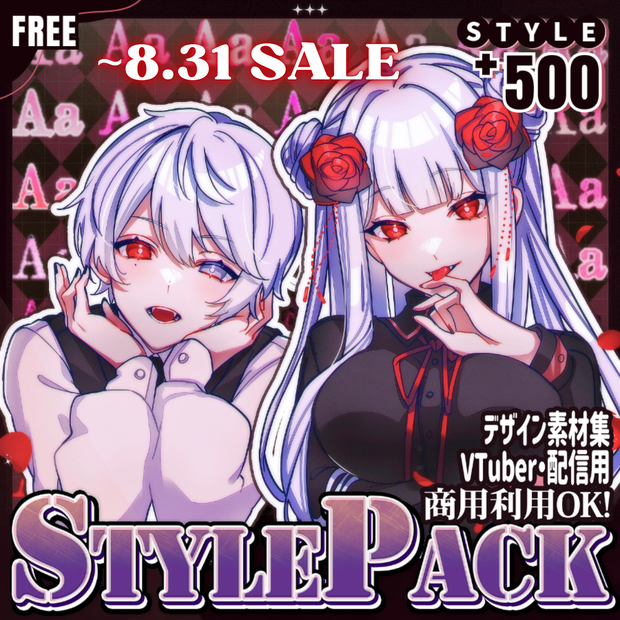
 !!SALE~8.31 !! 💗【FREE/商用OK】+500StylePack❥文字装飾レイヤースタイル
상품 설명
======================================
🏖️𝐒𝐮𝐦𝐦𝐞𝐫 𝐒𝐚𝐥𝐞𝟖.𝟏~𝟖.𝟑𝟏🏖️𝐅𝐔𝐋𝐋𝐏𝐀𝐂𝐊 ¥𝟑,𝟎𝟎𝟎→¥𝟐,𝟓𝟎𝟎
======================================
✦【 𝐍𝐞𝐱𝐭 𝐅𝐫𝐞𝐞 𝐁𝐨𝐧𝐮𝐬 】✦
┊❤︎2000 → 🎁 Get FREE-50style!Next Goal《 230 》
┊※「⁺𝟱𝟬𝟬𝗦𝘁𝘆𝗹𝗲」購入者は引き続きDL可能です。
✦︎✧︎ VTuber・活動者(クリエイター)向け ✧︎✦︎
サムネイル、デザイン、VTuber素材などで活用可能です。
・いいね条件達成で3日間限定無料配布数増加
・買い切り版は順次アップデートで内容追加予定
※有料版購入者も重複なく追加コンテンツを利用可能
✦︎✧︎ Notice ✧︎✦︎
期間限定無料配布50styleをいつでもお手にとっていただけるよう500円で販売開始いたしました。2025/04/07
🖤 𝐎𝐰𝐧𝐞𝐫'𝐬 𝐂𝐡𝐨𝐢𝐜𝐞 🖤
【FREE】悪&光堕ち∔3TouchMysticTattoo↝《MAギミック対応》
https://shapeshiftercl.booth.pm/items/6660949
【FREE/商用OK】撮影向けPoseAnimation ❮ ⁺Max1000 ❯
第1弾 https://shapeshiftercl.booth.pm/items/6485829
第2弾 https://shapeshiftercl.booth.pm/items/8064843
第3弾 男性向けポーズ500種 現在制作中→今年販売予定
【FREE/商用CC0】手描き⁺500-Liltoon MatCap
第1弾 https://shapeshiftercl.booth.pm/items/7100790
第2弾 https://shapeshiftercl.booth.pm/items/7614401
【FREE】いっぱい喋るぷにぷにあばたー & リアルグッズ付き
https://shapeshiftercl.booth.pm/items/6797629
✦︎✧︎ 説明 ✧︎✦︎
✦︎以下の動画は、基本的な導入方法や画像へのレイヤースタイルの適用例を示しています。
文字に対しても同様にスタイルを適用することができます。
✧︎다음 영상은 기본적인 도입 방법과 이미지에 레이어 스타일을 적용한 경우를 보여줍니다.
텍스트에도 같은 방식으로 적용할 수 있습니다.
✦︎The following video demonstrates the basic implementation method and examples of applying layer styles to images.
You can apply styles to text in the same way.
〖 導入方法 〗
① Photoshopを立ち上げ、DLしたZipファイル内の.aslファイル(fxSTYLES)をダブルクリック
② Photoshopのレイヤースタイル→スタイルに【500Style-ShapeshifterClinic】が追加されます。
③ 好みのフォントに適用
〖 スタイル調整方法 〗
▍サイズ調整
・対象レイヤーの[効果]を右クリック
・[効果を拡大・縮小]を選択
・[比率]で調整
▍パターン・カラー調整
・パターンスケール:文字サイズに合わせて比率を変更
・パターン削除:不要なパターンを非表示に
・カラー変更:単色やグラデーションに切り替えることで表現の幅が広がる
〖 𝗣𝗼𝗶𝗻𝘁 〗
・フォントの種類(漢字/ひらがな/カタカナ/英字)で印象が変化
・レイヤーを2~3枚重ねて組み合わせることで表現の幅が広がる
【内容物】
LayerStyle:500TYPE(順次追加予定)
・500Style-ShapeshifterClinic(.asl)
・500Style-Recipe(.psd)
【使用可能環境・用途】
ソフト:Adobe Photoshop
用途:フォントデザイン、文字装飾、テロップ、サムネイル、VTuber素材、Coc、ココフォリア、TRPG素材など
【利用規約】
◎商用利用可、改変可/☓二次配布、転売禁止
✦︎✧︎ 설명 ✧︎✦︎
〖 설치 방법 〗
① 포토샵을 실행하고 다운로드한 Zip 파일 내의 .asl 파일(fxSTYLES)을 더블클릭
② 포토샵의 레이어 스타일→스타일에 【500Style-ShapeshifterClinic】이 추가됩니다
③ 원하는 폰트에 적용
〖 스타일 조정 방법 〗
▍크기 조정
・해당 레이어의 [효과]를 우클릭
・[효과 크기 조절]을 선택
・[비율]로 조정
▍패턴 및 컬러 조정
・패턴 스케일: 글자 크기에 맞춰 비율 변경
・패턴 삭제: 불필요한 패턴 숨기기
・컬러 변경: 단색이나 그라데이션으로 전환하여 표현의 폭을 넓힐 수 있음
〖 내용물 〗
LayerStyle: 500TYPE (순차적 추가 예정)
・500Style-ShapeshifterClinic (.asl)
・500Style-Recipe (.psd)
〖 사용 가능 환경 및 용도 〗
소프트웨어: Adobe Photoshop
용도: 폰트 디자인, 문자 장식, 자막, 썸네일, VTuber 등
〖 이용 규약 〗
◎상업적 이용 가능, 수정 가능/☓ 재배포, 재판매 금지
✦︎✧︎ Explanation ✧︎✦︎
〖 Installation Instructions 〗
1. Launch Photoshop and double-click the .asl file (fxSTYLES) from the downloaded ZIP file
2. The "500Style-ShapeshifterClinic" will be added to Photoshop's Layer Styles panel
3. Apply to your preferred font
〖 Style Adjustment Methods 〗
▍Size Adjustment
・Right-click on the "Effects" of the target layer
・Select "Scale Effects"
・Adjust using the "Scale" parameter
▍Pattern & Color Adjustment
・Pattern Scale: Adjust the ratio to match text size
・Pattern Removal: Hide unnecessary patterns
・Color Changes: Switch between solid colors and gradients for more creative possibilities
〖 Key Points 〗
・The impression changes depending on font types
・Layer combinations (2-3 layers) expand creative possibilities
〖 Package Contents 〗
Layer Style: 500TYPE (more to be added)
・500Style-ShapeshifterClinic (.asl)
・500Style-Recipe (.psd)
〖 System Requirements & Applications 〗
Software: Adobe Photoshop
Uses: Font design, text decoration, video captions, thumbnails, VTuber materials, etc.
〖 Terms of Use 〗
✓Commercial use allowed, Modifications allowed/✗ Redistribution prohibited, Resale prohibited
🖤 Credit 🖤
┊Designer ┊長谷川圭介様 https://x.com/hasegawa1810
┊Designer ┊飯野宗弥様 https://x.com/inosousa
┊Designer ┊こはる ✿ Design様 https://x.com/logo_coharu
┊Designer ┊つみの様 https://x.com/tsuminobeyo
┊Designer ┊かゆいゆいか様 https://x.com/kayuiyuika
┊Designer ┊ささきと様 https://x.com/sskt_s
┊Designer ┊シャケ太郎@Design様 https://x.com/shaketaroo
┊Designer ┊スローブ様 https://x.com/slob_29_
┊Designer ┊Grape Logo Design様 https://x.com/grape_web
┊Designer ┊エンドウシンジ様 https://x.com/mamezone
┊Designer ┊yUtaさん様 https://x.com/_y_UtAa_
┊Designer ┊ぬばたまの様 https://x.com/nubatamano_q
모든 리뷰
더보기리뷰 등록
리뷰를 작성하려면 로그인이 필요합니다.
로그인하고 리뷰 쓰기