'%3e%3cg%20clip-path='url(%23roundHexB)'%3e%3cpath%20fill='%236D5DFC'%20d='M256%2040%20443%20148%20443%20364%20256%20472%2069%20364%2069%20148Z'/%3e%3cpath%20fill='%239C93FB'%20d='M69%20148%20256%2040%20443%20148%20256%20256Z'/%3e%3cpath%20fill='%234A3FD1'%20d='M256%20256%20443%20148%20443%20364%20256%20472Z'/%3e%3c/g%3e%3c!--%20top%20face:%20filled%20round%20magnifier%20--%3e%3cg%20transform='matrix(0.8660254,-0.5,0.8660254,0.5,69,148)'%3e%3cg%20transform='matrix(0.935,0,0,0.935,7.02,7.02)'%3e%3ccircle%20cx='88'%20cy='88'%20r='52'%20fill='%23FFFFFF'/%3e%3ccircle%20cx='88'%20cy='88'%20r='28'%20fill='%239C93FB'/%3e%3cpath%20d='M124%20124%20164%20164'%20stroke='%23FFFFFF'%20stroke-width='26'%20stroke-linecap='round'/%3e%3c/g%3e%3c/g%3e%3cg%20transform='matrix(0.8660254,0.5,0,1,69,148)'%3e%3cpath%20d='M96.1,61.08%20L45.9,128.92%20Q34,145%2054,145%20L162,145%20Q182,145%20170.1,128.92%20L119.9,61.08%20Q108,45%2096.1,61.08%20Z'%20fill='%23FFFFFF'/%3e%3c/g%3e%3c!--%20right%20face:%20filled%20bubble%20--%3e%3cg%20transform='matrix(0.8660254,-0.5,0,1,256,256)'%3e%3cg%20transform='matrix(0.855,0,0,0.855,15.66,15.66)'%3e%3cpath%20d='M60%2042H156a28%2028%200%200%201%2028%2028V158Q184%20168%20174.47%20164.96L124.53%20149.04Q115%20146%20105%20146H60a28%2028%200%200%201-28-28V70a28%2028%200%200%201%2028-28Z'%20fill='%23FFFFFF'/%3e%3c/g%3e%3c/g%3e%3c/g%3e%3c/svg%3e)
상품 설명
[コンテンツ]
ゲームVケッチャン
FBX
PSD
テクスチャ
【仕様】
ポリゴン数: 29,211
総合性能ランク:中
スキンメッシュレンダラー: 8
素材スロット: 9
Pys ボーン変換数: 103
■アバターのインポート方法■
①インポートする前に、VRChat公式サイトからVRC_SDK3-Avatarをダウンロードし、Unityプロジェクトにインポートします。
②GameVketchanのパッケージをフォルダ内にインポートします。
「シーンを開く」をクリックして、アバターが階層上にプリセットされている付属のシーン ファイルを開きます。
③モデルを修正したい場合は、GameVketchanフォルダ内のModelフォルダとTextureフォルダをご利用ください。
テクスチャはpngおよびpsd形式で提供されます。
モデルはfbx形式で提供されます。
■質感について■
clothes.png: 布マテリアルに使用されるテクスチャ
mission.png :布マテリアルに使用するテクスチャ
Hair.png: 髪のマテリアルに使用されるテクスチャ
Jacket.png: ジャケット マテリアルに使用されるテクスチャ
Skin.png :Face、Face_transparent、Skinに使用するテクスチャ
Skin_line.png: Face、Face_transparent、Skin に使用される白黒のテクスチャ
■メッシュについて■
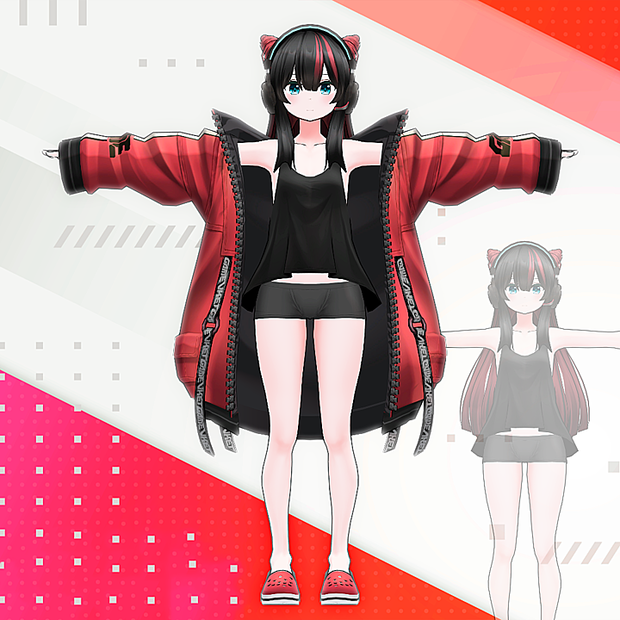
メッシュは 8 つの部分に分かれています。
体
ボトムス
クロックス
髪
ヘッドホン
ジャケット
操体
トップス
さらにメッシュを分割したい場合はFBXファイルをご利用ください。
■シェイプキーについて■
すべてのシェイプキーは顔メッシュ上に設定されます。
リップシンク用のシェイプキー
sil : silのリップシンクシェイプキー
pp :pp用リップシンクシェイプキー
ff : ffのリップシンクシェイプキー
th : thのリップシンクシェイプキー
dd : ddのリップシンクシェイプキー
kk : kkのリップシンクシェイプキー
ch :chのリップシンクシェイプキー
ss :ssのリップシンクシェイプキー
nn :nnのリップシンクシェイプキー
rr : rrのリップシンクシェイプキー
aa : aaのリップシンクシェイプキー
e :eのリップシンクシェイプキー
ih : ih用リップシンクシェイプキー
oh :ohのリップシンクシェイプキー
ou : ouのリップシンクシェイプキー
式シェイプキー
Brow_: 眉毛を動かすためのシェイプキー
Eye_: 目を動かすためのシェイプキー
Pupil_: 生徒を動かすためのシェイプキー
mouth_ : 口を動かすためのシェイプキー
その他: 他の式を表示するシェイプキー
ーーーー
[Contents]
GameVketchan.unitypackage
FBX
PSD
Texture
[Specifications]
Polygons: 29,211
Overall Performance Rank: Medium
Skinned Mesh Renderers: 8
Material Slots: 9
Pys Bone Transform Count: 103
■How to Import Avatar■
①Before importing, download the VRC_SDK3-Avatar from VRChat official website and import it into the Unity project.
②Import the GameVketchan.unitypackage in the folder.
Click "Open Scene" and open the included scene file, where the avatar is pre-set on the Hierarchy.
③If you want to modify the model, please use Model and Texture folders inside the GameVketchan folder.
The textures are provided in png and psd format.
The model is provided in fbx format.
■About Texture■
cloth.png : Texture used for Cloth Material
emission.png : Texture used for Cloth Material
hair.png : Texture used for Hair Material
jacket.png : Texture used for Jacket Material
skin.png : Texture used for Face, Face_transparent, Skin
skin_line.png : Black and white texture used for Face, Face_transparent, Skin
■About Mesh■
The meshes are separated into eight parts.
Body
Bottoms
Crocs
Hair
HeadPhone
Jacket
sotai
Tops
If you want to split the mesh further, please use the FBX file.
■About Shapekeys■
All shapekeys are set on the face mesh.
Shapekeys for Lipsync
sil : Lipsync shapekey for sil
pp : Lipsync shapekey for pp
ff : Lipsync shapekey for ff
th : Lipsync shapekey for th
dd : Lipsync shapekey for dd
kk : Lipsync shapekey for kk
ch : Lipsync shapekey for ch
ss : Lipsync shapekey for ss
nn : Lipsync shapekey for nn
rr : Lipsync shapekey for rr
aa : Lipsync shapekey for aa
e : Lipsync shapekey for e
ih : Lipsync shapekey for ih
oh : Lipsync shapekey for oh
ou : Lipsync shapekey for ou
Expression shapekeys
Brow_ : Shapekey for moving the eyebrows
Eye_ : Shapekey for moving the eyes
Pupil_ : Shapekey for moving the pupils
mouth_ : Shapekey for moving the mouth
Other : Shapekey for showing other expressions
모든 리뷰
더보기리뷰 등록
리뷰를 작성하려면 로그인이 필요합니다.
로그인하고 리뷰 쓰기