'%3e%3cg%20clip-path='url(%23roundHexB)'%3e%3cpath%20fill='%236D5DFC'%20d='M256%2040%20443%20148%20443%20364%20256%20472%2069%20364%2069%20148Z'/%3e%3cpath%20fill='%239C93FB'%20d='M69%20148%20256%2040%20443%20148%20256%20256Z'/%3e%3cpath%20fill='%234A3FD1'%20d='M256%20256%20443%20148%20443%20364%20256%20472Z'/%3e%3c/g%3e%3c!--%20top%20face:%20filled%20round%20magnifier%20--%3e%3cg%20transform='matrix(0.8660254,-0.5,0.8660254,0.5,69,148)'%3e%3cg%20transform='matrix(0.935,0,0,0.935,7.02,7.02)'%3e%3ccircle%20cx='88'%20cy='88'%20r='52'%20fill='%23FFFFFF'/%3e%3ccircle%20cx='88'%20cy='88'%20r='28'%20fill='%239C93FB'/%3e%3cpath%20d='M124%20124%20164%20164'%20stroke='%23FFFFFF'%20stroke-width='26'%20stroke-linecap='round'/%3e%3c/g%3e%3c/g%3e%3cg%20transform='matrix(0.8660254,0.5,0,1,69,148)'%3e%3cpath%20d='M96.1,61.08%20L45.9,128.92%20Q34,145%2054,145%20L162,145%20Q182,145%20170.1,128.92%20L119.9,61.08%20Q108,45%2096.1,61.08%20Z'%20fill='%23FFFFFF'/%3e%3c/g%3e%3c!--%20right%20face:%20filled%20bubble%20--%3e%3cg%20transform='matrix(0.8660254,-0.5,0,1,256,256)'%3e%3cg%20transform='matrix(0.855,0,0,0.855,15.66,15.66)'%3e%3cpath%20d='M60%2042H156a28%2028%200%200%201%2028%2028V158Q184%20168%20174.47%20164.96L124.53%20149.04Q115%20146%20105%20146H60a28%2028%200%200%201-28-28V70a28%2028%200%200%201%2028-28Z'%20fill='%23FFFFFF'/%3e%3c/g%3e%3c/g%3e%3c/g%3e%3c/svg%3e)
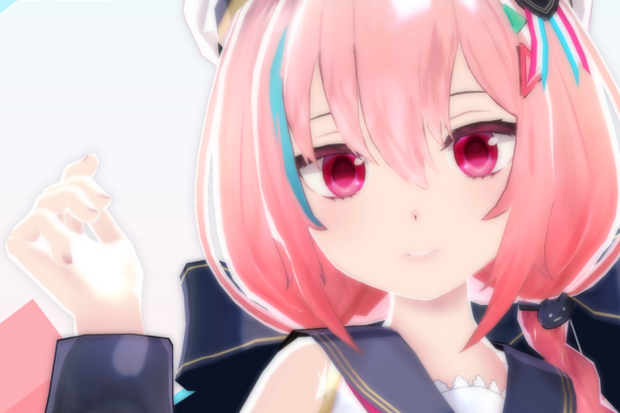
상품 설명
[アバターパフォーマンス]
全体的なパフォーマンス: 中
物理ボーンコンポーネント: 16
スキンメッシュレンダラー: 8
マテリアルスロット: 13
物理ボーントランスフォーム数: 46
物理ボーンコライダー数: 11
ポリゴン: 21898
[コンテンツの詳細]
Vketchan_v2.0.3.unitypackage
Vketchan_v2.0.3.fbx
Vketchan.psd
Vketchan2.psd
Vketchan_v1.6_MToon_blendshape.vrm
## アバターのインポート方法
1. インポートする前に、VRChat 公式サイトから VRChat Creator Companion をダウンロードし、手順に従って新しいアバタープロジェクトを作成します。
2. フォルダー内の Vketchan_v2.0.3.unitypackage をインポートします。
付属のシーンファイルを開くと、階層に完全にセットアップされたアバターが表示されます。
3. モデルを変更する場合は、Vketchan1 フォルダー内のモデル フォルダーとテクスチャ フォルダーを使用してください。
テクスチャは png および psd 形式で提供されます。
モデルは fbx 形式で提供されます。
## テクスチャについて
grass.png : Cloth1、髪、金属、体毛のマテリアルに使用するテクスチャ
Vketchan.png : Cloth1、髪、金属、肌のマテリアルに使用するテクスチャ
Vketchan_hair.png : 体毛のマテリアルに使用するテクスチャ
Vketchan_skin.png : 体毛のマテリアルに使用するテクスチャ
Vketchan_Cloth2.png : Cloth2 のマテリアルに使用するテクスチャ
VketchanMask Cloth2.png : Vketchan_Cloth2.png の白黒テクスチャ画像
VketchanMask.png : Vketchan.png の白黒テクスチャ画像
## メッシュについて
メッシュは 8 つの部分に分かれています。
Sotai_body
Sotai_face
Sotai_hair
Sotai_Underwear
Vketchan_beret
Vketchan_cloth
Vketchan_foot
Vketchan_ude
メッシュをさらに分割したい場合は、FBX ファイルを使用してください。
## Shapekeys について
face メッシュには、shapekeys のすべての設定があります。
リップシンクのシェイプキー
sil: sil のリップシンク シェイプキー
pp: pp のリップシンク シェイプキー
ff: ff のリップシンク シェイプキー
th: th のリップシンク シェイプキー
dd: dd のリップシンク シェイプキー
kk: kk のリップシンク シェイプキー
ch: ch のリップシンク シェイプキー
ss: ss のリップシンク シェイプキー
nn: nn のリップシンク シェイプキー
rr: rr のリップシンク シェイプキー
aa: aa のリップシンク シェイプキー
e: e のリップシンク シェイプキー
ih: ih のリップシンク シェイプキー
oh: oh のリップシンク シェイプキー
ou: ou のリップシンク シェイプキー
表情のシェイプキー
mouth_: 口を動かすシェイプキー
eye_: 目を動かすシェイプキー
eyeblow_: 目を動かすシェイプキー
ボディのシェイプキードレスアップ
shrink_bust : 胸のメッシュを細くするシェイプキー
shrink_torso : 背骨のメッシュを細くするシェイプキー
shrink_hips : 腰のメッシュを細くするシェイプキー
shrink_upperleg : 大腿部のメッシュを細くするシェイプキー
shrink_knee : 膝のメッシュを細くするシェイプキー
shrink_lowerleg : 下腿部のメッシュを細くするシェイプキー
shrink_foot : 足のメッシュを細くするシェイプキー
shrink_upperArm : 大腿部のメッシュを細くするシェイプキー
shrink_lowerArm : 大腿部のメッシュを細くするシェイプキー
-----
[Avatar Performance]
Overall Performance : Medium
Phys Bone Components : 16
Skinned Mesh Renderers : 8
Material Slots : 13
Phys Bone Transform Count : 46
Phys Bone Collider Count : 11
Polygons : 21898
[Details of Contents]
Vketchan_v2.0.3.unitypackage
Vketchan_v2.0.3.fbx
Vketchan.psd
Vketchan2.psd
Vketchan_v1.6_MToon_blendshape.vrm
## How to Import Avatar
1. Before importing, download the VRChat Creator Companion from the VRChat official website, and create a new avatar project by following the instructions.
2. Import the Vketchan_v2.0.3.unitypackage in the folder.
By opening the included scene file, an avatar fully setup will appear on the Hierarchy.
3. If you want to modify the model, please use Model and Texture folders inside the Vketchan1 folder.
The textures are provided in png and psd format.
The model is provided in fbx format.
## About Texture
grass.png : Texture used for Cloth1,hair,metal,sotai hair Material
Vketchan.png : Texture used for Cloth1,hair,Metal,skin Material
Vketchan_hair.png : Texture used for sotai hair Material
Vketchan_skin.png : Texture used for sotai skin Material
Vketchan_Cloth2.png : Texture used for Cloth2 Material
VketchanMask Cloth2.png : Black and white texture image of Vketchan_Cloth2.png
VketchanMask.png : Black and white texture image of Vketchan.png
## About Mesh
The meshes are separated into eight parts.
Sotai_body
Sotai_face
Sotai_hair
Sotai_Underwear
Vketchan_beret
Vketchan_cloth
Vketchan_foot
Vketchan_ude
If you want to split the mesh further, please use the FBX file.
## About Shapekeys
face mesh has all the settings for shapekeys.
Shapekeys for Lipsync
sil : Lipsync shapekey for sil
pp : Lipsync shapekey for pp
ff : Lipsync shapekey for ff
th : Lipsync shapekey for th
dd : Lipsync shapekey for dd
kk : Lipsync shapekey for kk
ch : Lipsync shapekey for ch
ss : Lipsync shapekey for ss
nn : Lipsync shapekey for nn
rr : Lipsync shapekey for rr
aa : Lipsync shapekey for aa
e : Lipsync shapekey for e
ih : Lipsync shapekey for ih
oh : Lipsync shapekey for oh
ou : Lipsync shapekey for ou
Expression shapekeys
mouth_ : Shapekey for moving the mouth
eye_ : Shapekey for moving the eyes
eyeblow_: Shapekey for moving the eyeblows
Body shapekeys for dress-up
shrink_bust : Shapekey for slenderizing chest mesh
shrink_torso : Shapekey for slenderizing spine mesh
shrink_hips : Shapekey for slenderizing waist mesh
shrink_upperleg : Shapekey for slenderizing upper-leg mesh
shrink_knee : Shapekey for slenderizing knee mesh
shrink_lowerleg : Shapekey for slenderizing lower-leg mesh
shrink_foot : Shapekey for slenderizing feet mesh
shrink_upperArm : Shapekey for slenderizing upper-arm mesh
shrink_lowerArm : Shapekey for slenderizing lower-arm mesh
-----
모든 리뷰
더보기리뷰 등록
리뷰를 작성하려면 로그인이 필요합니다.
로그인하고 리뷰 쓰기