'%3e%3cg%20clip-path='url(%23roundHexB)'%3e%3cpath%20fill='%236D5DFC'%20d='M256%2040%20443%20148%20443%20364%20256%20472%2069%20364%2069%20148Z'/%3e%3cpath%20fill='%239C93FB'%20d='M69%20148%20256%2040%20443%20148%20256%20256Z'/%3e%3cpath%20fill='%234A3FD1'%20d='M256%20256%20443%20148%20443%20364%20256%20472Z'/%3e%3c/g%3e%3c!--%20top%20face:%20filled%20round%20magnifier%20--%3e%3cg%20transform='matrix(0.8660254,-0.5,0.8660254,0.5,69,148)'%3e%3cg%20transform='matrix(0.935,0,0,0.935,7.02,7.02)'%3e%3ccircle%20cx='88'%20cy='88'%20r='52'%20fill='%23FFFFFF'/%3e%3ccircle%20cx='88'%20cy='88'%20r='28'%20fill='%239C93FB'/%3e%3cpath%20d='M124%20124%20164%20164'%20stroke='%23FFFFFF'%20stroke-width='26'%20stroke-linecap='round'/%3e%3c/g%3e%3c/g%3e%3cg%20transform='matrix(0.8660254,0.5,0,1,69,148)'%3e%3cpath%20d='M96.1,61.08%20L45.9,128.92%20Q34,145%2054,145%20L162,145%20Q182,145%20170.1,128.92%20L119.9,61.08%20Q108,45%2096.1,61.08%20Z'%20fill='%23FFFFFF'/%3e%3c/g%3e%3c!--%20right%20face:%20filled%20bubble%20--%3e%3cg%20transform='matrix(0.8660254,-0.5,0,1,256,256)'%3e%3cg%20transform='matrix(0.855,0,0,0.855,15.66,15.66)'%3e%3cpath%20d='M60%2042H156a28%2028%200%200%201%2028%2028V158Q184%20168%20174.47%20164.96L124.53%20149.04Q115%20146%20105%20146H60a28%2028%200%200%201-28-28V70a28%2028%200%200%201%2028-28Z'%20fill='%23FFFFFF'/%3e%3c/g%3e%3c/g%3e%3c/g%3e%3c/svg%3e)
 shadsterwolf
상품 설명
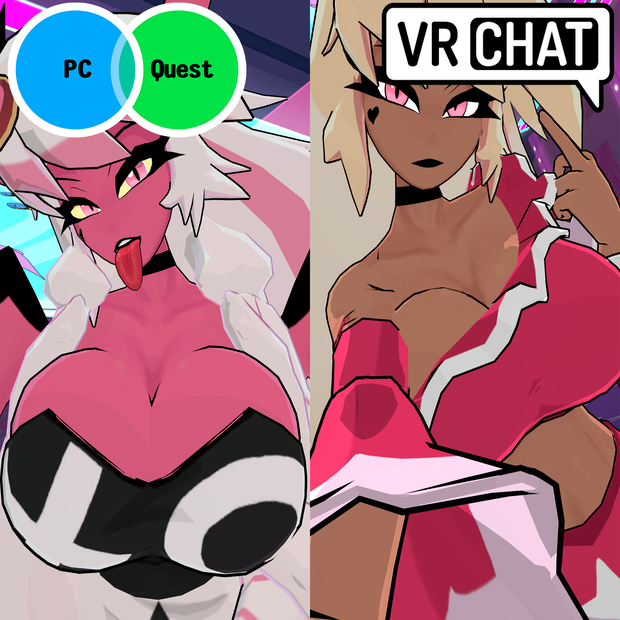
Helluva Boss inspired Verosika Mayday model designed for VRChat!
SFW and NSFW Model!
--Model Specs & Features--
PC & Quest Support
67k tris
3 Materials
Full Body Tracking
Physbone Support
Human and Demon Form
2 Outfits
Coat, Flask, Mic, Shades, Leggings, Underwear Toggles
8 Custom Facial Gestures
Viseme Support
Chest Slider
Thicc Slider
Gogo Loco (1.8.1) w/Fly by Franada
SDK3 (+ Unity 2022)
Poiyomi Toon Shader 8
SPS Support (VRCFury, which is DPS & TPS support)
--Change Log--
1.0.1 - Blender Project shapekeys reset with a few helpful notes about the model
1.0.2 - Fixed rigging issue causing the bust to distort at certain angles
1.0.3 - Fixed SPS scene that had outfit disabled, to keep initial PC/Quest in sync when not revealed
2.0.0 - Added new Casual Outfit, Added Ponytail, Added new Icons, Many shapekey changes, Handful of rig and weight adjustments, few texture changes
2.0.1 - Included second blink emote for those using Combo Gesture tool
2.0.2 - Fixed wings clipping while in human form
2.1.0 - Updated Gogoloco to v1.8.6, fixed Wholesome setup with SFX
3.0.0 - Added Pride Outfit, Updated Quest shader to Toon Standard, Various small changes done to meshes, shapekeys, rig, and textures, Optimized textures from 40MB to 20MB vram and reducing uncompressed size from 71MB to 44MB
3.0.1 - Fix for Quest vram usage at upload
3.1.0 - Added new Ozzie Outfit
3.1.1 - Fixed various clipping issues for the Casual Outfit
3.1.2 - Fixed missing Blitzo tattoo, Fixed outline shapekey glitch, Fixed human form eye emissions, slight mesh adjustment to human outfit
--Files Included--
Blender Raw File (4.5 LTS)
Textures (PNG only)
Unity Package (2022.3.6f1) with Scene, FBX, animations, and effects. All setup and ready for upload!
--Instructions for VRChat PC--
1. Download Unity Hub:
2. Make a new Avatar project with VRChat Creator Companion (VCC)
https://vrchat.com/home/download
3. (Optional) Import VRCFury for SPS
4. (Optional) Import Poiyomi Toon Shader (8.1):
https://github.com/poiyomi/PoiyomiToonShader/releases
5. Import my provided .unitypackage file
6. Open Avatar_PC scene, login using the VRChat SDK, build & upload!
--Instructions for VRChat Quest (Cont.)--
1. Copy the Avatar ID that generated after uploading to PC
(In the VRChat SDK, click on the Content Manager tab, you'll see "Copy ID")
2. Click on the _Quest avatar and attach/paste the Avatar ID
(In the Inspector, on the Pipeline Manager component, you'll see "Blueprint ID", then click Attach)
3. Click on File > Build Settings... > Android > Switch Platform
(Delete _PoiyomiShaders folder if you imported to help speed up the process)
4. Open the VRChat SDK and build & upload again!
**Please do not make public.**
**Please do not redistribute.**
Asset is NOT affiliated with Spindlehorse Toons
--Contact--
Twitter: https://twitter.com/Shadsterwolf
すみません、にほんご はなせません。(╯°□°)╯︵ ┻━┻
모든 리뷰
더보기리뷰 등록
리뷰를 작성하려면 로그인이 필요합니다.
로그인하고 리뷰 쓰기