'%3e%3cg%20clip-path='url(%23roundHexB)'%3e%3cpath%20fill='%236D5DFC'%20d='M256%2040%20443%20148%20443%20364%20256%20472%2069%20364%2069%20148Z'/%3e%3cpath%20fill='%239C93FB'%20d='M69%20148%20256%2040%20443%20148%20256%20256Z'/%3e%3cpath%20fill='%234A3FD1'%20d='M256%20256%20443%20148%20443%20364%20256%20472Z'/%3e%3c/g%3e%3c!--%20top%20face:%20filled%20round%20magnifier%20--%3e%3cg%20transform='matrix(0.8660254,-0.5,0.8660254,0.5,69,148)'%3e%3cg%20transform='matrix(0.935,0,0,0.935,7.02,7.02)'%3e%3ccircle%20cx='88'%20cy='88'%20r='52'%20fill='%23FFFFFF'/%3e%3ccircle%20cx='88'%20cy='88'%20r='28'%20fill='%239C93FB'/%3e%3cpath%20d='M124%20124%20164%20164'%20stroke='%23FFFFFF'%20stroke-width='26'%20stroke-linecap='round'/%3e%3c/g%3e%3c/g%3e%3cg%20transform='matrix(0.8660254,0.5,0,1,69,148)'%3e%3cpath%20d='M96.1,61.08%20L45.9,128.92%20Q34,145%2054,145%20L162,145%20Q182,145%20170.1,128.92%20L119.9,61.08%20Q108,45%2096.1,61.08%20Z'%20fill='%23FFFFFF'/%3e%3c/g%3e%3c!--%20right%20face:%20filled%20bubble%20--%3e%3cg%20transform='matrix(0.8660254,-0.5,0,1,256,256)'%3e%3cg%20transform='matrix(0.855,0,0,0.855,15.66,15.66)'%3e%3cpath%20d='M60%2042H156a28%2028%200%200%201%2028%2028V158Q184%20168%20174.47%20164.96L124.53%20149.04Q115%20146%20105%20146H60a28%2028%200%200%201-28-28V70a28%2028%200%200%201%2028-28Z'%20fill='%23FFFFFF'/%3e%3c/g%3e%3c/g%3e%3c/g%3e%3c/svg%3e)
 BonShop
상품 설명
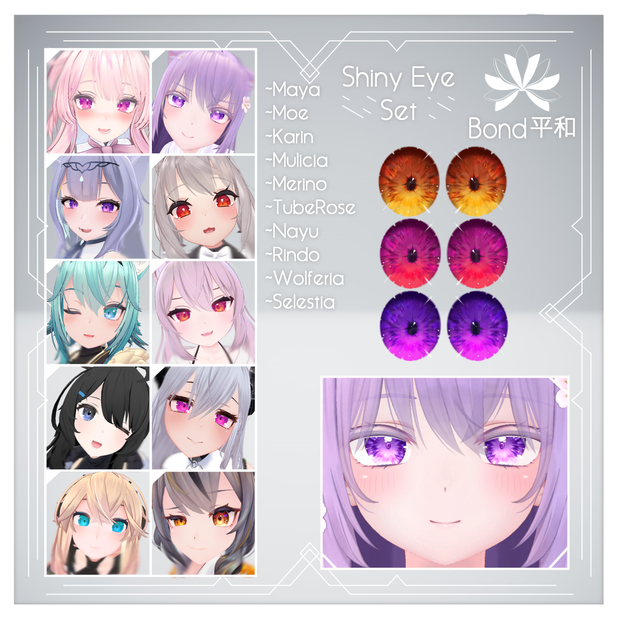
Shiny Eye Texture Set
◈ Package Contents | パッケージ内容 ◈
►13 Eye colours fitted to the corresponding avatar including: Orange, Red, Redpink, Pink, Purple, Blue, Lightblue, Teal, Green, Lime, Yellow, Black and White
►対応するアバターにフィットする13のアイカラー: オレンジ、レッド、レッドピンク、ピンク、パープル、ブルー、ライトブルー、ティール、グリーン、ライム、イエロー、ブラック、ホワイト
►Matcap Mask
►Matcap マスク
►Instructions on setting up
►セットアップ方法
◈This texture is fitted for 10 Avatars | このテクスチャは10アバターに対応しています◈
►Maya https://booth.pm/en/items/3390957
►Moe https://booth.pm/en/items/4667400
►Karin https://booth.pm/en/items/3470989
►Mulicia https://booth.pm/en/items/3302156
►Merino https://booth.pm/ja/items/2351859
►Tuberose https://booth.pm/ja/items/4193460
►Nayu https://booth.pm/ja/items/4023598
►Rindou https://booth.pm/en/items/3443188
►Wolferia https://booth.pm/ja/items/2709610
►Celestia https://booth.pm/ja/items/4035411
The eye texture can be applied to ANY avatar using the raw texture file, but you will have to fit this yourself.
目のテクスチャは生のテクスチャファイルを使ってどのアバターにも適用できますが、自分でフィットさせる必要があります。
◈How to install | インストール方法◈
►To install onto an avatar, please overlay the texture ontop of the avatar's face texture. The textures provided should already be fitted to your avatar unless you are buying the general eye texture.
►After you've overlayed the eye texture ontop of the face texture and dragged it back into unity, add a matcap in the material's settings and drag the mask provided to the matcap mask slot.
►Then select any matcap of your choice. I suggest the matcaps that come with the poiyomi shader which can be found here: https://github.com/poiyomi/PoiyomiToonShader
►Please remember to add the matcap mask
►アバターにインストールするには、アバターの顔テクスチャの上にテクスチャを重ねてください。一般的な目のテクスチャを購入しない限り、提供されるテクスチャは既にアバターにフィットしているはずです。
►目のテクスチャを顔のテクスチャの上にオーバーレイし、unityにドラッグバックした後、マテリアルの設定でmatcapを追加し、提供されているマスクをmatcap maskスロットにドラッグします。
►それからお好みのmatcapを選択してください。poiyomiシェーダーに付属しているmatcapを使うことをお勧めします https://github.com/poiyomi/PoiyomiToonShader
►マットキャップマスクを追加することを忘れないでください。
◈ Terms of use | 使用条件◈
Do not use for any commercial applications such as reselling, this texture is to only be used for yourself. Do not redistribute or pass off as your own. Modifications are allowed only for personal use.
このテクスチャは自分用にのみ使用して下さい。再配布したり、自分のものとして見せかけたりしないでください。改変は個人的な使用に限り許可されます。
◈ Q&A ◈
Q: How do I put the eyes on my avatar?
A: Use any photo editing software, the texture should already be fitted to your avatar. Copy and paste it ontop of your avatar's face texture.
Q: How do I make the eyes 2 different colours?
A: Do as above but with both colours you choose and erase the opposite eye for each texture.
Q: I can't get the matcap to work
A: Make sure you've dragged the Matcap mask into the matcap mask slot in your avatar's face material and selected a suitable matcap. I recommend the ones that come with poiyomi: https://github.com/poiyomi/PoiyomiToonShader
Q: アバターに目をつけるにはどうすればいいですか?
A: 写真編集ソフトを使ってください。テクスチャはすでにアバターにフィットしているはずです。それをコピーして、アバターの顔のテクスチャの上に貼り付けてください。
Q: どうすれば目の色を2色にできますか?
A: 上記と同じですが、選択した両方の色を使って、それぞれのテクスチャの反対側の目を消してください。
Q: マットキャップがうまく動きません。
A: マットキャップマスクをアバターの顔素材のマットキャップマスクスロットにドラッグし、適切なマットキャップを選択してください。poiyomiに付属しているものをお勧めします: https://github.com/poiyomi/PoiyomiToonShader
◈ Contact | 連絡先◈
If you have any other questions or issues, feel free to contact me through booth.
その他、ご質問や問題がありましたら、お気軽にブースまでご連絡ください。
모든 리뷰
더보기리뷰 등록
리뷰를 작성하려면 로그인이 필요합니다.
로그인하고 리뷰 쓰기