'%3e%3cg%20clip-path='url(%23roundHexB)'%3e%3cpath%20fill='%236D5DFC'%20d='M256%2040%20443%20148%20443%20364%20256%20472%2069%20364%2069%20148Z'/%3e%3cpath%20fill='%239C93FB'%20d='M69%20148%20256%2040%20443%20148%20256%20256Z'/%3e%3cpath%20fill='%234A3FD1'%20d='M256%20256%20443%20148%20443%20364%20256%20472Z'/%3e%3c/g%3e%3c!--%20top%20face:%20filled%20round%20magnifier%20--%3e%3cg%20transform='matrix(0.8660254,-0.5,0.8660254,0.5,69,148)'%3e%3cg%20transform='matrix(0.935,0,0,0.935,7.02,7.02)'%3e%3ccircle%20cx='88'%20cy='88'%20r='52'%20fill='%23FFFFFF'/%3e%3ccircle%20cx='88'%20cy='88'%20r='28'%20fill='%239C93FB'/%3e%3cpath%20d='M124%20124%20164%20164'%20stroke='%23FFFFFF'%20stroke-width='26'%20stroke-linecap='round'/%3e%3c/g%3e%3c/g%3e%3cg%20transform='matrix(0.8660254,0.5,0,1,69,148)'%3e%3cpath%20d='M96.1,61.08%20L45.9,128.92%20Q34,145%2054,145%20L162,145%20Q182,145%20170.1,128.92%20L119.9,61.08%20Q108,45%2096.1,61.08%20Z'%20fill='%23FFFFFF'/%3e%3c/g%3e%3c!--%20right%20face:%20filled%20bubble%20--%3e%3cg%20transform='matrix(0.8660254,-0.5,0,1,256,256)'%3e%3cg%20transform='matrix(0.855,0,0,0.855,15.66,15.66)'%3e%3cpath%20d='M60%2042H156a28%2028%200%200%201%2028%2028V158Q184%20168%20174.47%20164.96L124.53%20149.04Q115%20146%20105%20146H60a28%2028%200%200%201-28-28V70a28%2028%200%200%201%2028-28Z'%20fill='%23FFFFFF'/%3e%3c/g%3e%3c/g%3e%3c/g%3e%3c/svg%3e)
 Sisters!
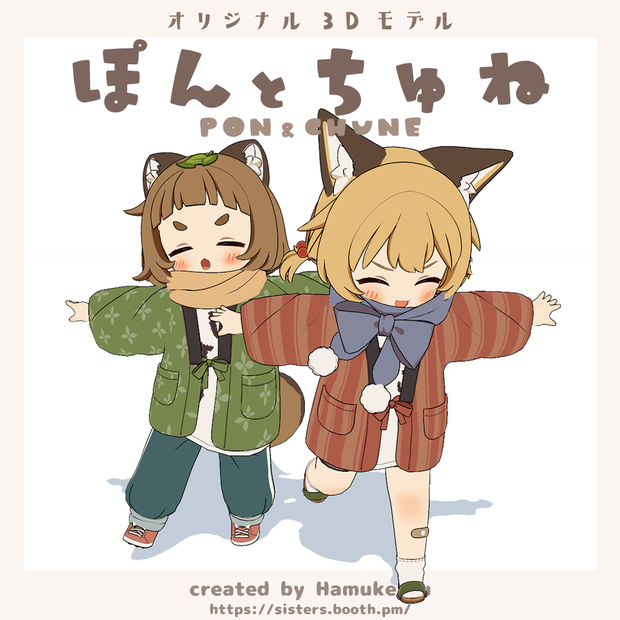
 オリジナル3Dモデル「ぽんとちゅね pon&chune」 #chibi_kemo
상품 설명
オリジナル3Dモデル「ぽんとちゅね pon&chune」
作者 -Creator- Hamuketsu/はむけつ
!試着アバターについて!
FujiyamaやSuRroomなどに設置されているPolygon Loadingギミックから試着出来ます。詳細はこちら [ https://polylo.power-of-tech.com/worlds ]
*Special Thanks!*
今回Ani-kunさんにunityのセットアップをしていただきました!
ありがとうございます!!
This time around, Ani-kun helped me set the model up in unity! Thank you so much!!
Ani-kunさんTwitter(X)@Anikun_VRC
https://twitter.com/anikun_vrc?s=21
---------------
✦共通素体 -Same base Body-
+当モデルは共通の「ちびケモ素体」を使用して作成されております。
These models use the same base body that is called chibi kemo body.
+対応アイテム -Compatible products-
【 https://booth.pm/ja/items?tags%5B%5D=chibi_kemo 】
※こちらはBOOTHでの「chibi_kemo」と検索した時の結果になります。対応アイテム作者様は商品タグに「chibi_kemo」のタグ追加を是非お願いします。
※This is the search results of "chibi_kemo" on BOOTH. If you create products for chibi kemo, please add the tag "chibi_kemo" on your product page.
+推奨ハッシュタグ -Recommended hashtag-
「 #chibi_kemo 」
+chibi_kemo Manual
改編の方法や改変時の注意事項が説明されたマニュアルです。
This is the manual about tips for the custom avatars.
---------------
✦注意事項 -Caution-
※キャンセル・返金 Cancel/Repayment
BOOTHではダウンロード商品の購入後の返品、返金は対応していません。
On BOOTH, it is not possible to cancel and repay downloaded data.
※お支払方法・購入方法等について -Payment-
お支払方法等BOOTHのシステムに関する質問は、本ショップではなくBOOTH事務局にお問い合わせください。
また、本ショップ以外での商品の取引(個別に金銭を受け取り、データを渡す等)には一切応じません。
Do NOT ask me about how to pay/purchase on BOOTH, please ask BOOTH directly.
Also it is not possible to pay directly to the creator to purchase model data.
※日本国外向けの代理購入サービスについて -Other shops-
代理販売は許可していません。
My models are only available from booth, reselling on other sites or shops is not allowed.
---------------
✦モデル概要 -Model Profile-
+ポリゴン数-Polygon- chune△68,834/pon△67,502
+リップシンク-Lip-sync- 15種対応
+表情用シェイプキー-ShapeKeys- 100種以上
+フルボディトラッキング-FullBodyTracking- 〇
+アイトラッキング-Eye-tracking- 〇
+設定済み表情アニメーション-FacialExpressions- 12
+マテリアル数-Material- 5
+PhysicsBone 〇
+使用シェーダー-Shader- lilToon
---------------
✦内容物 -Contents-
-unitypackage
-fbx
-texture.png
-clip_psd
-利用規約/License Agreement
---------------
✦導入法 -How to Upload-
1.VRChat公式にアクセスし、ログイン。「Download」より「Creator Companion(VCC)」をダウンロードし、インストール。
2.VCCを起動し、新規プロジェクトを作成。
3.まず初めにlilToon Shaderをプロジェクトにインポート。
【 https://booth.pm/ja/items/3087170 】
4.さらに本データモデルのunitypackageをプロジェクトにインポートする。
5.HierarchyにPrefabをD&D。
6.VRChat SDK->Show Control Panel からVRChat SDKパネルを開き、BuildタブのBuild&Publishボタンを押す。
7.情報を入力し、Uploadボタンを押す。
※Sharingの項目は必ずPrivateにすること。
1.Access and log in to the Official VRChat website. Download "Creator Companion(VCC)" from "Download" and install it to your PC.
2.Turn on VCC, and create a new project.
3.First of all, import lil toon shader to the project.
【 https://booth.pm/ja/items/3087170 】
4.Second of all, import this model's unitypackage to the project.
5.Drag and Drop the prefab to Hierarchy.
6.Open the VRChat SDK panel from VRChat SDK->Show Control Panel, and press Build & Publish.
7.Fill the information of the avatar and press Upload.
※The category of Sharing has to be Private.
---------------
✦利用規約 -License Agreement-
+利用規約(jp)
https://drive.google.com/file/d/1Kf3SgsqVPEn-35OqaGHAL-Ygd9rtimKa/view?usp=sharing
+License Agreement(en)
https://drive.google.com/file/d/1ANKFAbHnFZv29PKPqFpLy2OAbaJ97gJl/view?usp=sharing
+이용규약(ko)
https://drive.google.com/file/d/1j8OeQIlekfbXOfghjE7HvSdPPsP5fx4r/view?usp=sharing
+3D虚拟形象用户协议(zh-CN)
https://drive.google.com/file/d/1n15czKYbU0kXeD6GKmecDVm8mcgjCSSQ/view?usp=sharing
---------------
✦連絡先 -Contact-
Hamuketsu/はむけつ
Twitter(X)@hamuketsu_vrc
https://twitter.com/hamuketsu_vrc
---------------
✦アップデート情報 -Update info-
2023/12/22 ver.0.0.0
公開 released
2023/12/22
ちゅねのunitypackageがver.0.0.1になりました。
左耳PhysBoneの設定の修正です。
chune's unitypackage has been updated to ver.0.0.1.
The left ear's Phys bone setting was changed.
before) PBEarLeft > Spring > 1
after) PBEarLeft > Spring > 0.76
2025/06/08
利用規約を改定しました。 (Ver.0.1.0)
※モデル本体のアップデートはございません。
※ダウンロードファイル内に古いバージョンの利用規約が同梱されている場合は、最新の利用規約が適用されます。
모든 리뷰
더보기리뷰 등록
리뷰를 작성하려면 로그인이 필요합니다.
로그인하고 리뷰 쓰기