'%3e%3cg%20clip-path='url(%23roundHexB)'%3e%3cpath%20fill='%236D5DFC'%20d='M256%2040%20443%20148%20443%20364%20256%20472%2069%20364%2069%20148Z'/%3e%3cpath%20fill='%239C93FB'%20d='M69%20148%20256%2040%20443%20148%20256%20256Z'/%3e%3cpath%20fill='%234A3FD1'%20d='M256%20256%20443%20148%20443%20364%20256%20472Z'/%3e%3c/g%3e%3c!--%20top%20face:%20filled%20round%20magnifier%20--%3e%3cg%20transform='matrix(0.8660254,-0.5,0.8660254,0.5,69,148)'%3e%3cg%20transform='matrix(0.935,0,0,0.935,7.02,7.02)'%3e%3ccircle%20cx='88'%20cy='88'%20r='52'%20fill='%23FFFFFF'/%3e%3ccircle%20cx='88'%20cy='88'%20r='28'%20fill='%239C93FB'/%3e%3cpath%20d='M124%20124%20164%20164'%20stroke='%23FFFFFF'%20stroke-width='26'%20stroke-linecap='round'/%3e%3c/g%3e%3c/g%3e%3cg%20transform='matrix(0.8660254,0.5,0,1,69,148)'%3e%3cpath%20d='M96.1,61.08%20L45.9,128.92%20Q34,145%2054,145%20L162,145%20Q182,145%20170.1,128.92%20L119.9,61.08%20Q108,45%2096.1,61.08%20Z'%20fill='%23FFFFFF'/%3e%3c/g%3e%3c!--%20right%20face:%20filled%20bubble%20--%3e%3cg%20transform='matrix(0.8660254,-0.5,0,1,256,256)'%3e%3cg%20transform='matrix(0.855,0,0,0.855,15.66,15.66)'%3e%3cpath%20d='M60%2042H156a28%2028%200%200%201%2028%2028V158Q184%20168%20174.47%20164.96L124.53%20149.04Q115%20146%20105%20146H60a28%2028%200%200%201-28-28V70a28%2028%200%200%201%2028-28Z'%20fill='%23FFFFFF'/%3e%3c/g%3e%3c/g%3e%3c/g%3e%3c/svg%3e)
 Aetherius Forge
상품 설명
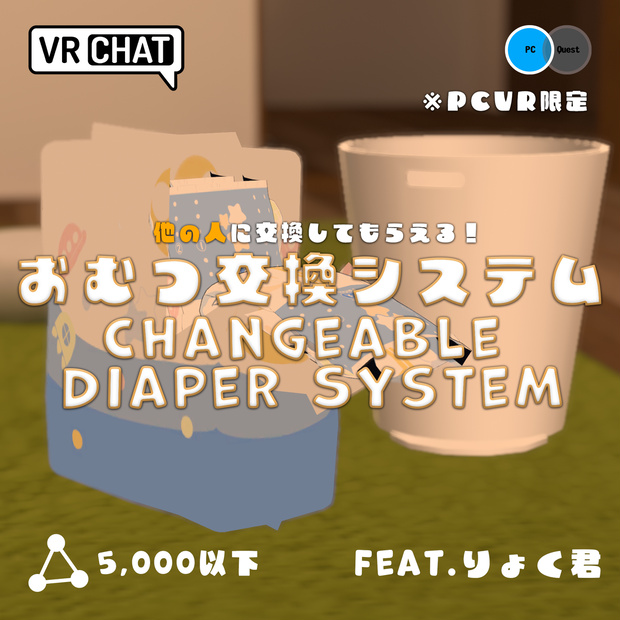
いつでもお漏らし、オムツ交換できちゃいます
他の人に交換してもらえます!
りょく君さんの許可を得てアセットをさらにシステムを入れて魔改造したアセットです
リアリティを追求しているので全て手動で交換しないといけません
普段VRで遊ぶひとに向けたアセットです
りょく君Asset:
https://ryokutea.booth.pm/items/4814579
※PCVR専用アセットです。PC上、Quest単体には非対応です
※バグる可能性があります。
(Expressionメニューでリセットボタンを押せば現状治ってます)
*This asset is for PCVR only, not for Quest only and PC desktop
*It may be buggy
(The reset button in the Expression menu currently fix the problem)
-遊び方-
①約5分待つ or Expressionボタンを押す
②4つのテープを直接掴んではがす(はがせたら固定する)
③開いたオムツの両端を両手でつかんで中心に持ってくる
(両手で常に掴みながら隅っこが中央に来るように)
④出現したゴミ箱に持ってい入れる
⑤オムツの袋が開いて新しいオムツをつかむ
⑥開くのを少し待ってから腰に持ってくる
交換完了!
-How to play-
1, Wait about 5 minutes or press the Expression button(Wet_Quick button)
2, Grab four pieces of tape and peel them off
(These are physbone so need pose it after grab it)
3, Grasp both ends of the opened diaper with both your hands and bring it to the center
(Always grasp with both hands so that the ends come to the center)
4, Hold it and put it in the trash can that has appeared
5, The diaper pack opened and grabs a new diaper
6, Wait a little while the diaper to opened and then bringing it to the waist
*These are can be changed by others!
Done!
必ず事前にダウンロードが必要です!
・りょく君アセット(事前に購入が必要です)
・liltoon(無料)
・poiyomi8.0以降(無料)
・Avatars3.0 Manager(必須ではありませんが全く分からない人は手順通りに行ってください。行いやすい方法でAnimation Controllerをマージしてください。アバター内のFXレイヤーに何も入れていない場合は必要ありません)
You need download these assets
・りょく君 asset (must be purchased)
・liltoon(for free)
・poiyomi8.0 or later (for free)
・Avatars3.0 Manager (Not required, Merge the Animation Controller in your way that is easy to do. but if you don't know how to use it, please follow my instructions
If you don't have anything in the FX layer in your avatar, you don't need it)
-条件 / Requirements-
Unity 2019.4.31f1
VRChat avatar SDK 3.0
アバターの基本的なアップロード方法を理解している
Basic knowledge of unity and uploading VRC avatars
-同梱データ/Includes-
UnityPackage
-導入方法-
①Poiyomi、Avatars 3.0 Managerをインポート
②購入したりょく君のアセットをインポート後、本アセットをインポート
③「DiaperChangeSystem」フォルダー内のprefab「DiaperChangeSystem」をHierarchyにドラックアンドドロップ
④「DiaperChangeSystem」のprefabを選択し、位置だけ調整
⑤調整後、prefabを右クリック、Unpack prefab completelyを選択し、DiaperChangeSystem内の2つのデータ「DiaperSystem, DiaperTrackHips」をアバター直下に入れる。DiaperChangeSystemのGameObjectは消す
⑥シーンビュー上で矢印を選択し、移動、回転、拡大縮小を使ってアバターにサイズを合わせる。サイズ調整が終わったら「Adjustment Diaper shape controller」の表示を非表示にする
(導入完了後でもサイズは調整できます。)
⑦DiaperTrackingHips/HipsのParet Constraint,の値の中にアバターのArmatureのHipsを割り当てる。割り当てたらActiveを押す
⑧ProjectウインドウのDiaperChangeSystemフォルダー内のTheDiaperSystemのアニメーションコントローラーをアバターのFXレイヤーに上書きするorFXレイヤーに入れる(どんな方法でも構いませんが全く分からない人は動画をご覧ください。)
⑨VRCParametersもアバターに上書きする(アバターにVRCParametersを使用していない場合SDKにドラックアンドドロップ)その後Expressionメニューを一つ作成し、Sub menuにした後に「DiaperSystem_Expressionをドラックアンドドロップ」する
完成!
-エクストラ(インサイドチソチソ)-
実はチソチソを設定できます
設定することでオムツの隙間から見えるようになります(めっちゃエロいです)
オムツを履いている状態のチソチソ&取り替える時にぼろんするちそちそ両方必要です。自分で用意する必要があります
大きすぎると貫通しちゃうのでいろいろ調整してね
手順
用意したチソチソ二つのオブジェクトをDiaperTrackingHips/Hips/DiaperSystem_Hipsの中の「dick02」,
「dick01」にそれぞれ入れます。(02は履いているとき、01はぼろんする時)
-利用規約について-
・著作権は放棄していません。
・VR、配信、動画での商用利用は個人、法人に限らず可能。
・改変、改造は可能。
・未改変、未改造、さらに改変後、改造後での再配布、転売は禁止。
・宗教的、政治的に使用禁止。
-免責事項-
本データの利用において、何らかのトラブル、
損失が生じたとしても当方は一切の責任を負いません。
-How to install-
1, Import Poiyomi and Avatars 3.0 Manager
2, Import this asset before りょく君 asset
3, Drag and drop prefab "DiaperChangeSystem" in "DiaperChangeSystem" folder to Hierarchy
4, Select the prefab "DiaperChangeSystem" and adjust "position" only
5, After adjusting, right click on the prefab, select "Unpack prefab completely" and put the two data "DiaperSystem, DiaperTrackHips" in DiaperChangeSystem directly under the avatar. Delete the GameObjects in DiaperChangeSystem
6, Select the arrows on the scene view and adjust the size to the avatar using Move, Rotate, and Scale. When you are done adjusting the size, hide the "Adjustment Diaper shape controller" display
(The size can adjust even after installation is done)
7, Assign the avatar's Armature/Hips to the DiaperTrackingHips/Hips Paret Constraint value. and then assign to press Active
8, Overwrite the animation controller of TheDiaperSystem in the DiaperChangeSystem folder of the Project window to the avatar's FX layer. or put it in the FX layer (your way is fine, but if you don't know how to do it at all, please watch my video)
9, Overwrite your VRCParameters on your avatar. Add new control in the Expression parameter, choose a Sub menu and Drag and Drop to "DiaperSystem_Expression" (if you are not using VRCParameters on your avatar, just drag and drop on it)
All done!
-Extras (chinchin of inside)-
Actually, you can set up a penis
By setting it up, you can see through the gap in the side of the diaper(thats horny!)
You need to have both inside penis with diaper on & inside penis when you change the diaper. You need to prepare them yourself
You need adjust the size of your asset penis
How to:
Place the two objects you prepared into "dick02" and "dick01" in DiaperTrackingHips/Hips/DiaperSystem_Hips respectively
Tick02" and "dick01" in (02 is when you wear them, and 01 is when you open the diaper)
Tarms of Use:
What you CAN do:
Upload and use for personal use
Modifiy and alteration
Commercial use in VR, distribution, and videos is allowed for both individuals and corporations
Ask for commissions to customize the given assets, as long as both parties have purchased the assets
What you CAN NOT do:
Redistribution and resale of unaltered, unmodified, altered, or modified
Use inapropriate edits on public worlds
Use anything in purpose of hate, political engagement, or to cause harm to anyone
Share any assets, unless every parties have purchased the original assets. This includes uploading custom versions to someone else's account
Rules:
Copyrights are not waived
The digital nature of this product, I do not issue refunds
No responsibility whatsoever for any problems or losses that may arise from the use of this data
Enjoy!
모든 리뷰
더보기리뷰 등록
리뷰를 작성하려면 로그인이 필요합니다.
로그인하고 리뷰 쓰기