'%3e%3cg%20clip-path='url(%23roundHexB)'%3e%3cpath%20fill='%236D5DFC'%20d='M256%2040%20443%20148%20443%20364%20256%20472%2069%20364%2069%20148Z'/%3e%3cpath%20fill='%239C93FB'%20d='M69%20148%20256%2040%20443%20148%20256%20256Z'/%3e%3cpath%20fill='%234A3FD1'%20d='M256%20256%20443%20148%20443%20364%20256%20472Z'/%3e%3c/g%3e%3c!--%20top%20face:%20filled%20round%20magnifier%20--%3e%3cg%20transform='matrix(0.8660254,-0.5,0.8660254,0.5,69,148)'%3e%3cg%20transform='matrix(0.935,0,0,0.935,7.02,7.02)'%3e%3ccircle%20cx='88'%20cy='88'%20r='52'%20fill='%23FFFFFF'/%3e%3ccircle%20cx='88'%20cy='88'%20r='28'%20fill='%239C93FB'/%3e%3cpath%20d='M124%20124%20164%20164'%20stroke='%23FFFFFF'%20stroke-width='26'%20stroke-linecap='round'/%3e%3c/g%3e%3c/g%3e%3cg%20transform='matrix(0.8660254,0.5,0,1,69,148)'%3e%3cpath%20d='M96.1,61.08%20L45.9,128.92%20Q34,145%2054,145%20L162,145%20Q182,145%20170.1,128.92%20L119.9,61.08%20Q108,45%2096.1,61.08%20Z'%20fill='%23FFFFFF'/%3e%3c/g%3e%3c!--%20right%20face:%20filled%20bubble%20--%3e%3cg%20transform='matrix(0.8660254,-0.5,0,1,256,256)'%3e%3cg%20transform='matrix(0.855,0,0,0.855,15.66,15.66)'%3e%3cpath%20d='M60%2042H156a28%2028%200%200%201%2028%2028V158Q184%20168%20174.47%20164.96L124.53%20149.04Q115%20146%20105%20146H60a28%2028%200%200%201-28-28V70a28%2028%200%200%201%2028-28Z'%20fill='%23FFFFFF'/%3e%3c/g%3e%3c/g%3e%3c/g%3e%3c/svg%3e)
 霧雨工房Booth支店
 位置ズレをタイマーでリセットするアプリ MultiTrackOSCSender 【VMCprotocol用】
상품 설명
※mocopi用はこちら↓
MocapAssistant
https://kirisamenanoha.booth.pm/items/5458434
IMU方式のモキャプデバイスでおうちフルトラ配信した時にモニターの前から動き回ったりすると段々位置がズレてしまう…なんてことはありませんか?
今回はそんなお悩みをVtuber目線で解決したいと思い、VMCprotocol受信に対応した位置をタイマーリセットできるアプリを作ってみました。
コンセプトは最低限の機能で簡単操作、分かりやすいUIになります。
可能であれば概要欄にクレジット表記お願いいたします。
霧雨なのは @kirisamenanoha
Multi Track OSC Sender
https://kirisamenanoha.booth.pm/items/5167553
SpoutのOBSプラグインインストール設定方法は各自お調べください。
SpoutプラグインダウンロードURL
https://github.com/Off-World-Live/obs-spout2-plugin/releases
--------------------------------------------------------
個人Vtuberの方については配信、動画投稿特に制限はありません。
法人所属Vtuberの方も配信、動画投稿特に制限はありません。
--------------------------------------------------------
お知らせ
--------------------------------------------------------
※本アプリを無断でコピー、配布、販売する行為はお止めください。
※ライセンスは同梱のテキストに添付。
※フル版ご購入の前に必ずお読みください。
体験版には30分の使用制限時間を設けております。
全ての機能を十分に確認しお使いの環境で動作に問題がなければ、フル版の購入を行ってください。Boothの仕様上ダウンロード製品の返金対応不可となります。予めご了承ください。
また、体験版ご利用時の時点で致命的なバグや改善提案があればXまたはBoothのDMにてお申し付けください。
*Please be sure to read before purchasing the full version.
The trial version has a usage time limit of 30 minutes.
Please check all functions thoroughly and purchase the full version if there are no problems with operation in your environment. Due to the specifications of Booth, refunds are not available for downloaded products. Please note.
Also, if you have any critical bugs or suggestions for improvement when using the trial version, please let us know via DM on X or Booth.
Also, if you have any critical bugs or suggestions for improvement when using the trial version, please let us know via DM on X or Booth.
特長
・リップシンク、ハンドトラッキング受信、フェイストラッキング受信、各アプリへの送信ができます。
・ifacialmocapやMeowFaceと直接連携できます。
・WebCamMotionCaptureやVseeFaceからハンドとフェイス両方受信可能。
・横ズレに対するポジション位置のタイマーリセット機能
・リングフィットアドベンチャーの配信などで使えるHipボーン位置固定機能。
・体が回転してほしくない時に使用するHipボーン回転固定機能。
・首(頭)の回転を固定するNecKボーン回転固定機能
・OBSのアウトラインフィルタ不要で白枠が付けられます。(別途Spoutプラグインが必要)
使い方
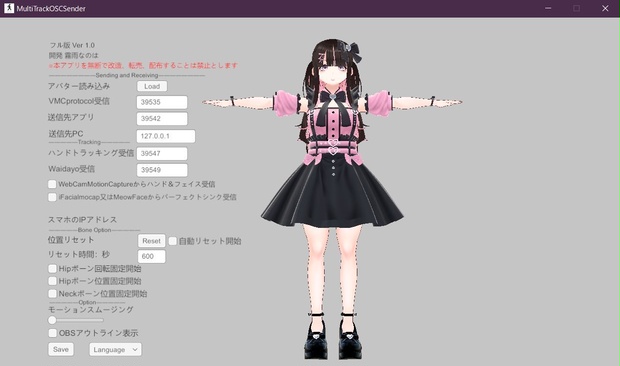
①起動後、セキュリティの重要な警告が出たら、アクセス許可を押す。
②VRMファイルを読み込む。
③VMCprotocol受信にポート番号を入力する。
(この時点でアバターが動かない場合はセキュリティソフトでブロックされていないか確認、再度ダウンロードし直して①のアクセス許可を押すを試してみてください。また送信側のIP設定やポート設定を確認してください。)
④配信アプリへモーション送信のポートを設定する。(Vroom、Warudo、3teneなど)
⑤ハンドトラッキングを受信する。(WebCamMotionCaputureやContactGloveなどVMCprotocolに限る)
WebCamMotionCaputureやVseeFaceからフェイストラッキングとハンドトラッキング両方受信したい方はWebCamMotionCaputureからハンド&フェイストラッキングを受信にチェックを入れる。
—————————————————————
webcammotioncaptureの使い方
①VRMを読み込む。
②webcammotioncaptureの外部の送信にチェックを入れて、IPアドレスは127.0.0.1を入れる。ポート番号を任意の番号にして設定してください。例39547
送信開始を押してください。
③ WebCamMotionCaputureからパーフェクトシンクも受信する方は表情の設定からパーフェクトシンクを選択してください。
④MultiTrackOSCSenderのハンド&フェイストラッキング受信にwebcammotioncaptureで設定したポート番号を入力
—————————————————————
上手く受信できない場合はポートを変えてみてください。
⑥Waidayoからパーフェクトシンクを受信する
上手く受信できない場合はポートを変えてみてください。
⑦ifacialmocap、MeowFaceからパーフェクトシンクを受信する方は、スマホのifacialmocap、MeowFaceをそれぞれ起動しifacialmocap又はMeowFaceからパーフェクトシンクを受信にチェックを入れる。スマホに表示されたIPアドレスを入力しSendボタンを押す。
⑧モーションスムージングを使用すると受信したモーションのカクツキを抑えることが出来ます。
⑨リセットボタンを押すとVroomやWarudoの初期ポジションにスライドしながらリセットされます。
⑩⑨を自動でリセットしたい場合はカウント時間を設定し(例:5分=300)自動リセット開始にチェックを入れる。カウントが開始されカウント後リセットされる。
ストップする場合はチェックを外す。
⑪リングフィットなどズレて欲しくない配信ではHipボーン位置固定を使用する。チェックすると左右前後へ移動が制限されます。上下は固定されません。また、手動リセットや自動リセットと併用は出来ません。
⑫Hipボーン回転固定。チェックを入れるとHipボーンが固定され回転しなくなります。Vroomなどの歌枠で腰が回転してしまう時やリングフィットアドベンチャー配信でHipボーン位置固定だけでは体が徐々に回転してしまう時にお勧め。胸や足の向きが若干おかしくなる場合があります。今後改善予定。
⑬NecKボーン回転固定機能頭だけ回転してほしくない時に使用。
⑭Spout出力を利用する場合はOBSにSpoutプラグインをインストールしソースにSpout2captureを追加して、SpoutSendersをMocapAssistantにする。Composite modeはdefaultを選択。白枠のアウトラインを付ける場合はアウトライン表示にチェックを入れる。
⑮マウス右クリック押しながら動かすとでカメラの移動が出来ます。ズームは右クリック押しながらホイール操作
⑯リップシンクはMキーを押すとマイクを選択できます。
⑰ポートやIP、セットタイムを入力しLanguage脇のセーブを押すと次回起動時から入力しなくて済みます。変更の度にセーブしてください。
How to use
① After startup, if an important security warning appears, press Permit access.
② Load the VRM file.
③Enter the port number for VMCprotocol reception.
(If the avatar does not work at this point, please check if it is blocked by security software, download it again, and try pressing ① to allow access. Also, check the IP settings and port settings of the sending side. please.)
④Set the port for motion transmission to the distribution app. (Vroom, Warudo, 3tene, etc.)
⑤Receive hand tracking. (Limited to VMCprotocol such as WebCamMotionCaputure and ContactGlove)
If you want to receive both face tracking and hand tracking from WebCamMotionCaputure or VseeFace, check Receive hand and face tracking from WebCamMotionCaputure.
—————————————————————
How to use webcammotioncapture
① Load VRM.
② Check the external transmission of webcammotioncapture and enter 127.0.0.1 as the IP address. Set the port number to an arbitrary number. Example 39547
Please press start sending.
③ If you also receive Perfect Sync from WebCamMotionCaputure, please select Perfect Sync from the facial expression settings.
④Enter the port number set in webcammotioncapture for MultiTrackOSCSender's hand & face tracking reception
—————————————————————
If you are having trouble receiving it, try changing the port.
⑥Receive Perfect Sync from Waidayo
If you are having trouble receiving it, try changing the port.
⑦If you want to receive Perfect Sync from ifacialmocap or MeowFace, check Receive Perfect Sync from ifacialmocap or MeowFace. Enter the IP address displayed on your smartphone and press the Send button.
⑧Use motion smoothing to reduce jitter in the received motion.
⑨Press the reset button and it will be reset while sliding to the initial position of Vroom or Warudo.
⑩ If you want to reset ⑨ automatically, set the count time (example: 5 minutes = 300) and check the automatic reset start box. Counting starts and is reset after counting.
Uncheck to stop.
⑪ Use fixed hip bone position for broadcasts where you don't want it to shift, such as ring fit. If checked, movement to the left, right, front and back will be restricted. The top and bottom are not fixed. Also, it cannot be used in conjunction with manual reset or automatic reset.
⑫Hip bone rotation fixed. If checked, the Hip bone will be fixed and will not rotate. Recommended when your hips rotate during a song frame such as Vroom, or when your body gradually rotates when you only fix the hip bone position during Ring Fit Adventure broadcasts. The orientation of your chest and legs may be slightly incorrect. Plans for improvement in the future.
⑬NecK bone rotation fixing function Used when you do not want only the head to rotate.
⑭If you want to use Spout output, install the Spout plugin on OBS, add Spout2capture to the source, and make SpoutSenders MocapAssistant. Select default for Composite mode. If you want to add a white frame outline, check Outline Display.
⑮You can move the camera by right-clicking and moving the mouse. To zoom, use the wheel while right-clicking
⑯For lip sync, press the M key to select the microphone.
⑰Enter the port, IP, and set time and press Save next to Language to avoid having to enter them the next time you start up. Please save after each change.
アップデート履歴
[2024/02/16: v1.0] 体験版リリース
[2024/02/16: v1.0] フル版リリース
모든 리뷰
더보기리뷰 등록
리뷰를 작성하려면 로그인이 필요합니다.
로그인하고 리뷰 쓰기