'%3e%3cg%20clip-path='url(%23roundHexB)'%3e%3cpath%20fill='%236D5DFC'%20d='M256%2040%20443%20148%20443%20364%20256%20472%2069%20364%2069%20148Z'/%3e%3cpath%20fill='%239C93FB'%20d='M69%20148%20256%2040%20443%20148%20256%20256Z'/%3e%3cpath%20fill='%234A3FD1'%20d='M256%20256%20443%20148%20443%20364%20256%20472Z'/%3e%3c/g%3e%3c!--%20top%20face:%20filled%20round%20magnifier%20--%3e%3cg%20transform='matrix(0.8660254,-0.5,0.8660254,0.5,69,148)'%3e%3cg%20transform='matrix(0.935,0,0,0.935,7.02,7.02)'%3e%3ccircle%20cx='88'%20cy='88'%20r='52'%20fill='%23FFFFFF'/%3e%3ccircle%20cx='88'%20cy='88'%20r='28'%20fill='%239C93FB'/%3e%3cpath%20d='M124%20124%20164%20164'%20stroke='%23FFFFFF'%20stroke-width='26'%20stroke-linecap='round'/%3e%3c/g%3e%3c/g%3e%3cg%20transform='matrix(0.8660254,0.5,0,1,69,148)'%3e%3cpath%20d='M96.1,61.08%20L45.9,128.92%20Q34,145%2054,145%20L162,145%20Q182,145%20170.1,128.92%20L119.9,61.08%20Q108,45%2096.1,61.08%20Z'%20fill='%23FFFFFF'/%3e%3c/g%3e%3c!--%20right%20face:%20filled%20bubble%20--%3e%3cg%20transform='matrix(0.8660254,-0.5,0,1,256,256)'%3e%3cg%20transform='matrix(0.855,0,0,0.855,15.66,15.66)'%3e%3cpath%20d='M60%2042H156a28%2028%200%200%201%2028%2028V158Q184%20168%20174.47%20164.96L124.53%20149.04Q115%20146%20105%20146H60a28%2028%200%200%201-28-28V70a28%2028%200%200%201%2028-28Z'%20fill='%23FFFFFF'/%3e%3c/g%3e%3c/g%3e%3c/g%3e%3c/svg%3e)
 yasuke0u0
상품 설명
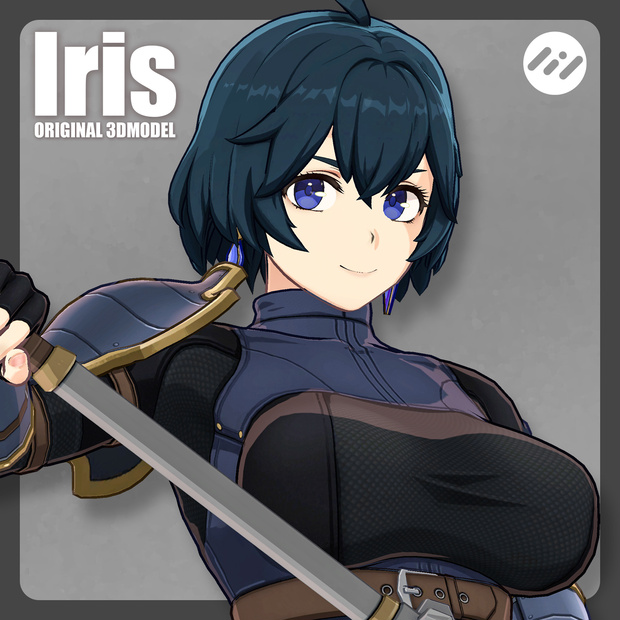
【オリジナル3Dモデル】Iris について
製作者:yasuke0u0
-------------------------------------------------------------------------------------
【基本仕様】
Iris本体
・ポリゴン数:Δ42,425
・ボーン:Unity Humaroid対応
・シェーダー:liltoon
lilLab様
https://booth.pm/ja/items/3087170
・マテリアル数:5
・テクスチャ枚数:23
・DynamicBone対応
・ブレンドシェイプ:リップシンク用15種+aiueo
:表情用21種
:その他7種
・Avatar3.0対応
・VRC SDK3対応
・OculusQuest、Mobile非対応
武器(Mace)
本体に同梱されていますので下記以外は共用になります。
・ポリゴン数:Δ42,425
・マテリアル数:1
・テクスチャ枚数:2
本モデル、テクスチャは以下DCCツールで製作されました。
・AutodeskMaya2022
・Substance3DPainter2021
・AdobePhotoshop2023
-------------------------------------------------------------------------------------
【商品同梱物】
■iris_00_v1.0.unitypackage
・Animation
ハンドサインに合わせた表情アニメーションです。
・iris_00(VertexColorBaked)
lilOutlineUtilによって作成されたメッシュデータです。ハードエッジによるアウトラインが調整されているため、基本的にはこちらを使用してください。
lilxyzw様
https://github.com/lilxyzw/lilOutlineUtil/blob/main/README_JP.md
・BakedMeshes
lilOutlineUtilによって生成されたメッシュデータです。
・Materials
・Texture
■モデルデータ
iris_00.fbx
iris_00.mb
mace_00.fbx
mace_00.mb
■テクスチャデータ
・_base
ベースカラーです。
・_gra
影の入りやすさを指定するマップです。
・_mat
matcapを使用する範囲を指定するマップです。
チーズ酵母様の【ラバー風matcap素材】を使用させていただいております。
・_pos
常に影色が表示される範囲を指定するマップです。
・_rim
リムライトが表示される範囲を指定するマップです。
・_shad
影色です。
・line
アウトラインが表示される範囲を指定するマップです。
-------------------------------------------------------------------------------------
■導入方法
1.Unity 2019.4.1f1で新規プロジェクトを作成してください。
2.最新のVRChatSDKをダウンロード、Unityプロジェクトを開きドラッグ&ドロップ、全てインポートしてください。
3.liltoonをダウンロード、ドラッグ&ドロップ、全てインポートしてください。
lilLab様
https://booth.pm/ja/items/3087170
3.iris_00_v1.0.unitypackageドラッグ&ドロップ、全てインポートしてください。
4.Asset内のiris_00(VertexColorBaked).prefabをHierarchyにドラッグアンドドロップ
5.VRChatSDKからアバターをアップロード※アップロード方法に関してはVRChatSDKアップロード関連の最新の説明をweb検索等でご確認ください。
-------------------------------------------------------------------------------------
【利用規約】
(1)「【オリジナル3Dモデル】Iris」の著作権は製作者yasuke0u0に帰属します。
(2)モデルデータの再配布・販売を禁止します。
(3) 営利目的での本モデルの利用、改変、使用を許可します。
【免責事項】
(1)本モデルに関するトラブルや損害について、制作者は一切の責任を負いません。
その他利用方法について不明点、質問等はyasuke0u0(https://twitter.com/yasuke0u0)のDMまでご連絡ください。
-------------------------------------------------------------------------------------
Original 3D Model] About Iris
Creator:yasuke0u0
-------------------------------------------------------------------------------------
Basic specifications
Iris main unit
Polygon count: Δ42,425
Bones: Unity Humaroid compatible
Shader: liltoon
By lilLab
https://booth.pm/ja/items/3087170
Number of materials: 5
Number of textures: 23
DynamicBone support
Blendshapes: 15 for lip-sync + aiueo
21 for facial expressions
21 blendshapes for facial expressions: 21 for lip-sync + aiueo: 7 others
Avatar 3.0 compatible
Compatible with VRC SDK3
OculusQuest and Mobile are not supported.
Weapons (Mace)
Weapons (Mace)
Weapons (Mace) are bundled with the main unit, so they are shared except for the following.
Polygon count : Δ42,425
Number of materials : 1
Number of textures: 2
This model and textures were created using the following DCC tools
AutodeskMaya2022
Substance3DPainter2021
AdobePhotoshop2023
-------------------------------------------------------------------------------------
Included in the package
iris_00_v1.0.unitypackage
Animation
This is an animation of the facial expressions that match the hand signs.
iris_00(VertexColorBaked)
Mesh data created by lilOutlineUtil. Basically, use this mesh data because the outline by hard edges has been adjusted.
Dear lilxyzw
https://github.com/lilxyzw/lilOutlineUtil/blob/main/README_JP.md
BakedMeshes
Mesh data generated by lilOutlineUtil.
Materials
Texture
Model data
iris_00.fbx
iris_00.mb
mace_00.fbx
mace_00.mb
Texture data
Base color.
Base color.
_gra
A map that specifies how easily shadows are cast.
_mat
A map that specifies the area where matcap is used.
We are using [Rubber-like matcap material] by Cheese Yeast.
_pos
This map specifies the area where the shadow color is always displayed.
rim
This map specifies the area where rim lights are displayed.
_shad
Shadow color.
_line
Map specifying the area where the outline is displayed.
-------------------------------------------------------------------------------------
How to install
1.Create a new project with Unity 2019.4.1f1.
2.Download the latest VRChatSDK, open a Unity project and drag & drop, import everything.
3. Download liltoon, drag & drop, import everything.
Dear lilLab
https://booth.pm/ja/items/3087170
3. Open iris_00_v1.0.unitypackage and drag & drop, import everything.
4. Drag and drop iris_00(VertexColorBaked).prefab in Asset to Hierarchy
5. Upload avatar from VRChatSDK *Please check the latest explanation related to VRChatSDK upload by searching the web, etc. for the uploading method.
-------------------------------------------------------------------------------------
Terms of Use
(1) The copyright of "[Original 3D model] Iris" belongs to the creator, yasuke0u0.
(2) Redistribution and sale of the body and parts are prohibited.
(3) Modification and use of this model for non-commercial purposes are permitted.
Disclaimer
(1) The creator is not responsible for any trouble or damage related to this model.
If you have any other questions or concerns about the use of this model, please contact yasuke0u0(https://twitter.com/yasuke0u0) by DM.
모든 리뷰
더보기리뷰 등록
리뷰를 작성하려면 로그인이 필요합니다.
로그인하고 리뷰 쓰기