'%3e%3cg%20clip-path='url(%23roundHexB)'%3e%3cpath%20fill='%236D5DFC'%20d='M256%2040%20443%20148%20443%20364%20256%20472%2069%20364%2069%20148Z'/%3e%3cpath%20fill='%239C93FB'%20d='M69%20148%20256%2040%20443%20148%20256%20256Z'/%3e%3cpath%20fill='%234A3FD1'%20d='M256%20256%20443%20148%20443%20364%20256%20472Z'/%3e%3c/g%3e%3c!--%20top%20face:%20filled%20round%20magnifier%20--%3e%3cg%20transform='matrix(0.8660254,-0.5,0.8660254,0.5,69,148)'%3e%3cg%20transform='matrix(0.935,0,0,0.935,7.02,7.02)'%3e%3ccircle%20cx='88'%20cy='88'%20r='52'%20fill='%23FFFFFF'/%3e%3ccircle%20cx='88'%20cy='88'%20r='28'%20fill='%239C93FB'/%3e%3cpath%20d='M124%20124%20164%20164'%20stroke='%23FFFFFF'%20stroke-width='26'%20stroke-linecap='round'/%3e%3c/g%3e%3c/g%3e%3cg%20transform='matrix(0.8660254,0.5,0,1,69,148)'%3e%3cpath%20d='M96.1,61.08%20L45.9,128.92%20Q34,145%2054,145%20L162,145%20Q182,145%20170.1,128.92%20L119.9,61.08%20Q108,45%2096.1,61.08%20Z'%20fill='%23FFFFFF'/%3e%3c/g%3e%3c!--%20right%20face:%20filled%20bubble%20--%3e%3cg%20transform='matrix(0.8660254,-0.5,0,1,256,256)'%3e%3cg%20transform='matrix(0.855,0,0,0.855,15.66,15.66)'%3e%3cpath%20d='M60%2042H156a28%2028%200%200%201%2028%2028V158Q184%20168%20174.47%20164.96L124.53%20149.04Q115%20146%20105%20146H60a28%2028%200%200%201-28-28V70a28%2028%200%200%201%2028-28Z'%20fill='%23FFFFFF'/%3e%3c/g%3e%3c/g%3e%3c/g%3e%3c/svg%3e)
 Okaeri Game Studio
 「ツール」Easy Icon Tool! Free thumbnail tool for .unitypackage files!
상품 설명
Easy Icon Tool!
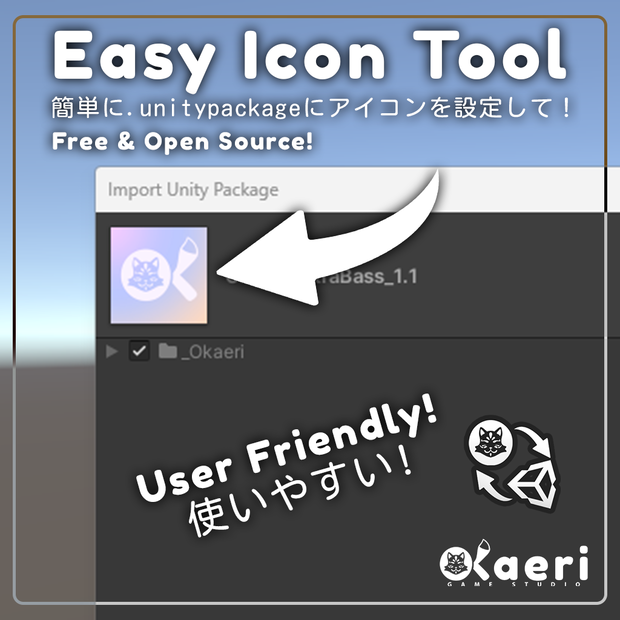
これはEasy Icon Toolです。
このツールを使用すると、.unitypackageファイルを.exeにドラッグ&ドロップするだけで、お好みのアイコンを割り当てることができます。
非常に使いやすく、デフォルトのアイコンが付属しており、任意の画像で置き換えることができます!
カスタムアイコンでパッケージの品質を向上させましょう!ブランディングは非常に重要です〜
手順:
1. .icon.pngファイルをお好みの画像に変更してください(解像度とファイル名は同じである必要があります)。
2. .unitypackageファイルをEasyIconTool.exeにドラッグ&ドロップしてください。
3. 完了です!
このソフトウェアは無料かつオープンソースです。(MITライセンス)
ダウンロードには事前にコンパイルされた実行ファイルとソースコード(Python)が含まれています。
Easy Icon Tool!
This is the Easy Icon Tool.
It allows you to drag-and-drop a .unitypackage file on the .exe, and it will assign the icon of your choice to it.
It is very simple to use, and comes with a default icon that you can replace with anything!
Step up the quality of your packages with a custom icon today! Branding is super important~
INSTRUCTIONS:
1. Change the .icon.png file to an image of your choice. (the resolution and filename must be the same)
2. Drag and drop a .unitypackage file on EasyIconTool.exe
3. Done!
This software is free and open source. (MIT)
The download contains a pre-compiled executable as well as the source code. (Python)
Changelog
08-03-23
- Day 1 Patch!
- Fixed an issue where it was not possible to drag-and-drop from a different folder.
모든 리뷰
더보기리뷰 등록
리뷰를 작성하려면 로그인이 필요합니다.
로그인하고 리뷰 쓰기