'%3e%3cg%20clip-path='url(%23roundHexB)'%3e%3cpath%20fill='%236D5DFC'%20d='M256%2040%20443%20148%20443%20364%20256%20472%2069%20364%2069%20148Z'/%3e%3cpath%20fill='%239C93FB'%20d='M69%20148%20256%2040%20443%20148%20256%20256Z'/%3e%3cpath%20fill='%234A3FD1'%20d='M256%20256%20443%20148%20443%20364%20256%20472Z'/%3e%3c/g%3e%3c!--%20top%20face:%20filled%20round%20magnifier%20--%3e%3cg%20transform='matrix(0.8660254,-0.5,0.8660254,0.5,69,148)'%3e%3cg%20transform='matrix(0.935,0,0,0.935,7.02,7.02)'%3e%3ccircle%20cx='88'%20cy='88'%20r='52'%20fill='%23FFFFFF'/%3e%3ccircle%20cx='88'%20cy='88'%20r='28'%20fill='%239C93FB'/%3e%3cpath%20d='M124%20124%20164%20164'%20stroke='%23FFFFFF'%20stroke-width='26'%20stroke-linecap='round'/%3e%3c/g%3e%3c/g%3e%3cg%20transform='matrix(0.8660254,0.5,0,1,69,148)'%3e%3cpath%20d='M96.1,61.08%20L45.9,128.92%20Q34,145%2054,145%20L162,145%20Q182,145%20170.1,128.92%20L119.9,61.08%20Q108,45%2096.1,61.08%20Z'%20fill='%23FFFFFF'/%3e%3c/g%3e%3c!--%20right%20face:%20filled%20bubble%20--%3e%3cg%20transform='matrix(0.8660254,-0.5,0,1,256,256)'%3e%3cg%20transform='matrix(0.855,0,0,0.855,15.66,15.66)'%3e%3cpath%20d='M60%2042H156a28%2028%200%200%201%2028%2028V158Q184%20168%20174.47%20164.96L124.53%20149.04Q115%20146%20105%20146H60a28%2028%200%200%201-28-28V70a28%2028%200%200%201%2028-28Z'%20fill='%23FFFFFF'/%3e%3c/g%3e%3c/g%3e%3c/g%3e%3c/svg%3e)
 Minty Labs
상품 설명
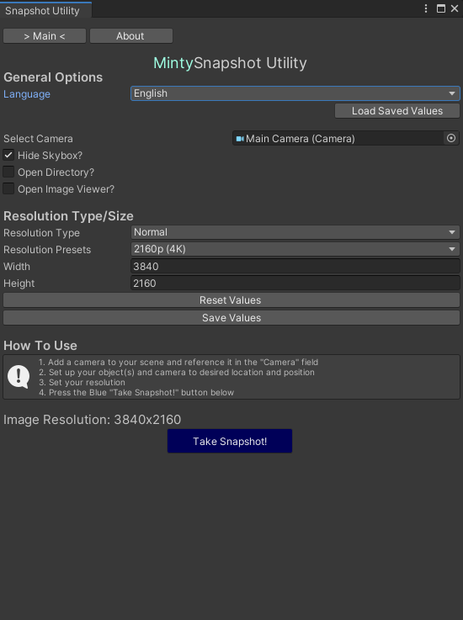
Created back in late 2018, this is an updated version for using a unity camera to save it's view as an image. From there, you can do whatever you want.
Open source on GitHub: https://github.com/Minty-Labs/Unity-Tools
Features
● There are four image resolution size options. [Custom, Normal, VRChat, ChilloutVR]
ᅠᅠ○ Custom is self-explanatory
ᅠᅠ○ Normal is screen resolutions [240p, 360p, 480p, 720p, 1080p, 1440p, 4K, 8K]
ᅠᅠ○ VRChat has the image size that VRChat uses, but with larger scale options [1200x900]
ᅠᅠ○ ChilloutVR has the image size that CVR uses, but with larger scale options [512x512]
ᅠᅠ○ A multiplier is set in place to quickly enlarge the resolution size.
● Use Scene View as camera
● Capture image without skybox. (Subject cutout)
● Save & Load custom settings
Languages
English: Lily
日本: sudo (須藤), Kati (カティ)
한국인: SweetDogButter
Русский: FulmurX
Updates
[2024-11-30: v1.4.0]
- Fixed background being transparent when the "Hide Skybox" toggle is unchecked
[2024-09-24: v1.3.0]
- Added an option to use your Scene View as a camera
- Added resolution presets: 240p & 360p
- Small code/logic edits
- Updated About page layout & links
[2024-03-02: v1.2.0]
- Updated About Menu UI
- Made it not error on VRChat world/avatar upload | YOU WILL NEED TO DELETE THE "Minty Labs/Snapshot Utility" FOLDER IN ORDER FOR THIS TO FULLY WORK
- Added simple refresh button for reloading language contributors
[2023-07-29: v1.1.0]
- Finished Multi-Language support
- Removed Play Mode requirement; Now you can just take the snapshot
[2023-07-23: v1.0.0]
Initial Release
모든 리뷰
더보기리뷰 등록
리뷰를 작성하려면 로그인이 필요합니다.
로그인하고 리뷰 쓰기