'%3e%3cg%20clip-path='url(%23roundHexB)'%3e%3cpath%20fill='%236D5DFC'%20d='M256%2040%20443%20148%20443%20364%20256%20472%2069%20364%2069%20148Z'/%3e%3cpath%20fill='%239C93FB'%20d='M69%20148%20256%2040%20443%20148%20256%20256Z'/%3e%3cpath%20fill='%234A3FD1'%20d='M256%20256%20443%20148%20443%20364%20256%20472Z'/%3e%3c/g%3e%3c!--%20top%20face:%20filled%20round%20magnifier%20--%3e%3cg%20transform='matrix(0.8660254,-0.5,0.8660254,0.5,69,148)'%3e%3cg%20transform='matrix(0.935,0,0,0.935,7.02,7.02)'%3e%3ccircle%20cx='88'%20cy='88'%20r='52'%20fill='%23FFFFFF'/%3e%3ccircle%20cx='88'%20cy='88'%20r='28'%20fill='%239C93FB'/%3e%3cpath%20d='M124%20124%20164%20164'%20stroke='%23FFFFFF'%20stroke-width='26'%20stroke-linecap='round'/%3e%3c/g%3e%3c/g%3e%3cg%20transform='matrix(0.8660254,0.5,0,1,69,148)'%3e%3cpath%20d='M96.1,61.08%20L45.9,128.92%20Q34,145%2054,145%20L162,145%20Q182,145%20170.1,128.92%20L119.9,61.08%20Q108,45%2096.1,61.08%20Z'%20fill='%23FFFFFF'/%3e%3c/g%3e%3c!--%20right%20face:%20filled%20bubble%20--%3e%3cg%20transform='matrix(0.8660254,-0.5,0,1,256,256)'%3e%3cg%20transform='matrix(0.855,0,0,0.855,15.66,15.66)'%3e%3cpath%20d='M60%2042H156a28%2028%200%200%201%2028%2028V158Q184%20168%20174.47%20164.96L124.53%20149.04Q115%20146%20105%20146H60a28%2028%200%200%201-28-28V70a28%2028%200%200%201%2028-28Z'%20fill='%23FFFFFF'/%3e%3c/g%3e%3c/g%3e%3c/g%3e%3c/svg%3e)
 shadsterwolf
상품 설명
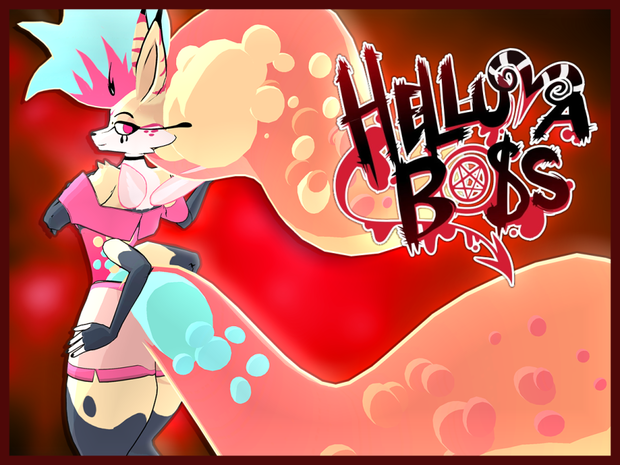
Helluvaboss Queen Bee Model designed for VRChat!
SFW and NSFW Model!
--Model Specs & Features--
PC & Quest Support
103k tris
7 Body Materials
Full Body Tracking
Physbone Support
6 Custom Facial Gestures
Viseme Support
3 Outfits
Toggle Lower Arms
Lower Arm Control Posing or Tracking
Size Slider
Gogo Loco
SDK3 (+ Unity 2022)
Poiyomi Toon Shader
VRCFury
--Change Log--
1.4.0 - Added reskin textures made by CozyLaila & Robhearts
1.4.1 - Fixed Quest texture memory issue after new sdk update
1.4.2 - Blender Project now also contains the reskins as separate objects
1.5.0 - Quest now supports new vrc constraints! Updated poiyomi to 9.0
1.5.1 - Fixed issue with SFW version lower arm constraints
1.6.0 - Added Jury Outfit (Mastermind), Added SPS support
1.6.1 - Fixed Quest material issue, fixed missing wholesome prefab issue, fixed issue between outfit toggles
1.6.2 - Fixed missing compiled poi shader, fixed shoulder strap weights for first outfit
1.6.3 - Fixed Quest issue swapping material skins when returning to original hair
1.7.0 - Updated GogoLoco to 1.8.6
1.8.0 - Updated Quest to use new Toon Standard shader with emissions
1.8.1 - Fixed Quest upload uncompressed memory limit (again)
1.9.0 - Doubled body size sliders, Tail is now togglable, changed few topology to body mesh, updated Blender project to 5.0.1, updated few physbones, removed arm poses until I figure out how to fix them
1.9.1 - Fixed rear rigging issues
1.9.2 - Fixed Tail material swap after making it a separate object
2.0.0 - Added Funeral outfit, Added Funeral body skin, Added Sad emote, Readded handposes and added a new one, Various small changes to body mesh and rig, Optimized textures and structure (38% file size reduction), Updated Blender file to 5.1.2
2.0.1 - Fixed some clipping for Funeral outfit, added new image icon
2.0.2 - Fixed an issue where the Face outline would shrink during emotes
2.0.3 - Fixed missing undergarment for Funeral outfit
2.0.4 - Fixed additional outline issues
--Files Included--
Blender Raw File (5.1.2)
Textures (JPG/PNG only)
Unity Package (2022.3.6f1) with Scene, FBX, animations, and effects. All setup and ready for upload!
--Instructions for VRChat PC--
1. Download Unity Hub:
2. Make a new Avatar project with VRChat Creator Companion (VCC)
https://vrchat.com/home/download
3. (Optional) Import Poiyomi Toon Shader:
https://github.com/poiyomi/PoiyomiToonShader/releases
4. Import my provided .unitypackage file
Open Avatar.scene, login using the VRchat SDK, build & upload!
--Instructions for VRChat Quest (Cont.)--
1. Copy the Avatar ID that generated after uploading to PC
(In the VRChat SDK, click on the Content Manager tab, you'll see "Copy ID")
2. Click on the _Quest avatar and attach/paste the Avatar ID
(In the Inspector, on the Pipeline Manager component, you'll see "Blueprint ID", then click Attach)
3. Click on File > Build Settings... > Android > Switch Platform
(Delete _PoiyomiShaders folder if you imported to help speed up the process)
4. Open the VRChat SDK and build & upload again!
(If "Build & Publish for Android" is gray, delete/inactive the PC avatar)
**Please do not make public.**
**Please do not redistribute.**
Banner image made by SilentDreams (@SilentDreamsMax)
Asset is NOT affiliated with Spindlehorse Toons
--Contact--
Twitter: https://twitter.com/Shadsterwolf
すみません、にほんご はなせません。(╯°□°)╯︵ ┻━┻
모든 리뷰
더보기리뷰 등록
리뷰를 작성하려면 로그인이 필요합니다.
로그인하고 리뷰 쓰기