'%3e%3cg%20clip-path='url(%23roundHexB)'%3e%3cpath%20fill='%236D5DFC'%20d='M256%2040%20443%20148%20443%20364%20256%20472%2069%20364%2069%20148Z'/%3e%3cpath%20fill='%239C93FB'%20d='M69%20148%20256%2040%20443%20148%20256%20256Z'/%3e%3cpath%20fill='%234A3FD1'%20d='M256%20256%20443%20148%20443%20364%20256%20472Z'/%3e%3c/g%3e%3c!--%20top%20face:%20filled%20round%20magnifier%20--%3e%3cg%20transform='matrix(0.8660254,-0.5,0.8660254,0.5,69,148)'%3e%3cg%20transform='matrix(0.935,0,0,0.935,7.02,7.02)'%3e%3ccircle%20cx='88'%20cy='88'%20r='52'%20fill='%23FFFFFF'/%3e%3ccircle%20cx='88'%20cy='88'%20r='28'%20fill='%239C93FB'/%3e%3cpath%20d='M124%20124%20164%20164'%20stroke='%23FFFFFF'%20stroke-width='26'%20stroke-linecap='round'/%3e%3c/g%3e%3c/g%3e%3cg%20transform='matrix(0.8660254,0.5,0,1,69,148)'%3e%3cpath%20d='M96.1,61.08%20L45.9,128.92%20Q34,145%2054,145%20L162,145%20Q182,145%20170.1,128.92%20L119.9,61.08%20Q108,45%2096.1,61.08%20Z'%20fill='%23FFFFFF'/%3e%3c/g%3e%3c!--%20right%20face:%20filled%20bubble%20--%3e%3cg%20transform='matrix(0.8660254,-0.5,0,1,256,256)'%3e%3cg%20transform='matrix(0.855,0,0,0.855,15.66,15.66)'%3e%3cpath%20d='M60%2042H156a28%2028%200%200%201%2028%2028V158Q184%20168%20174.47%20164.96L124.53%20149.04Q115%20146%20105%20146H60a28%2028%200%200%201-28-28V70a28%2028%200%200%201%2028-28Z'%20fill='%23FFFFFF'/%3e%3c/g%3e%3c/g%3e%3c/g%3e%3c/svg%3e)
 gagavr
상품 설명
ページにお越しいただきありがとうございます!
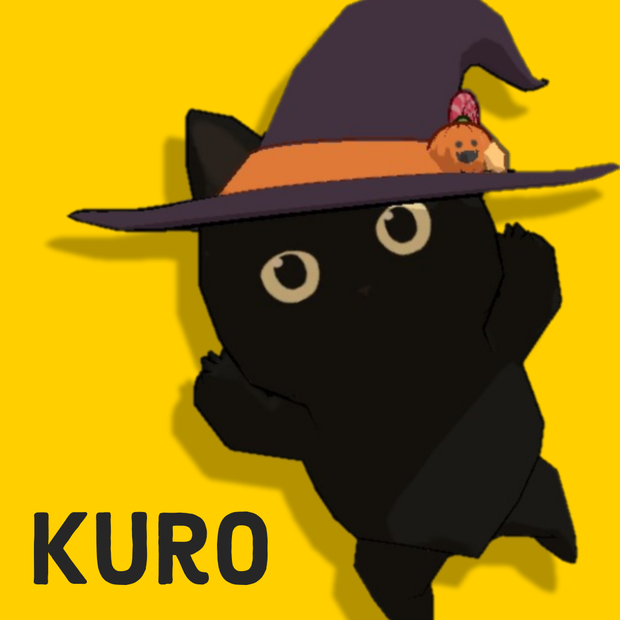
【3Dモデル】 Kuro
制作者 Gagavr
耳、しっぽ、羽が揺れます。Dynamic Boneで設定をしております。Dynamic Boneをお持ちでない場合は、コンポーネントの削除をお願いいたします。
VRChat想定のUnityデータで、FBXが同梱されています。ご購入の前に下記の利用規約(TERMS OF SERVICE)をお読みいただき、ご了承された上でのご購入をお願いいたします。
▽ 導入方法
1.Unity 2019.4.31f1でプロジェクト作成
2.VRCSDKを公式よりダウンロードし、 Assets > Import Package > Custom Packageからインポート
3. ユニティちゃんトゥーンシェーダー Ver.2.0.8を同様にインポート
4. UnityアセットのDynamic Boneをお持ちであれば、UnityのMy Assetsからインポート
5.Kuro.zipを解凍し、梱包されているKuro.unitypackageを同様にインポート
6.KuroプレハブをHierarchyに移動
7.VRChatにアップロード
◇◆◇◆◇◆◇◆◇◆◇◆
Thank you for checking out my page!
3D Model by Gagavr includes Kuro.unitypackage and FBX File.
▽ Contents
・ Unity : Kuro.unitypackage
▽ Instructions
1. Create a new Unity project (Unity 2019.4.31f1)
2. Assets > Import Package > Custom Package Select "VRCSDK" into your Unity project
3. Assets > Import Package > Custom Package Select "Kuro.unitypackage" to import.
4. Unity My Assets > Dynamic Bone > Open in Unity > Import (If you have)
5. In Unity, drag Kuro.prefab onto your Hierarchy.
6. Upload to VRChat!
◇ Dynamic Bone settings have been arranged, please remove the component if you do not have Dynamic Bone.
▽ TERMS OF SERVICE
3d model belongs to Gagavr by purchasing you are agreeing to these terms :
・ You cannot redistribute the model
・ You cannot sell this model
・ You may edit and upload the model for yourself only
・ Copyright of this model and the remodeled/edited model shall be attributed to Gagavr
・ Use of the model is restricted to the purchaser only
Kuro model : polygons 7806
_________________________________________
Unity 2019.4.31f1
VRCSDK3-AVATAR-2022.02.16.19.13_Public
Unity-Chan Toon Shader / UTS2 v.2.0.8
見てくれてありがとうございます!
모든 리뷰
더보기리뷰 등록
리뷰를 작성하려면 로그인이 필요합니다.
로그인하고 리뷰 쓰기