'%3e%3cg%20clip-path='url(%23roundHexB)'%3e%3cpath%20fill='%236D5DFC'%20d='M256%2040%20443%20148%20443%20364%20256%20472%2069%20364%2069%20148Z'/%3e%3cpath%20fill='%239C93FB'%20d='M69%20148%20256%2040%20443%20148%20256%20256Z'/%3e%3cpath%20fill='%234A3FD1'%20d='M256%20256%20443%20148%20443%20364%20256%20472Z'/%3e%3c/g%3e%3c!--%20top%20face:%20filled%20round%20magnifier%20--%3e%3cg%20transform='matrix(0.8660254,-0.5,0.8660254,0.5,69,148)'%3e%3cg%20transform='matrix(0.935,0,0,0.935,7.02,7.02)'%3e%3ccircle%20cx='88'%20cy='88'%20r='52'%20fill='%23FFFFFF'/%3e%3ccircle%20cx='88'%20cy='88'%20r='28'%20fill='%239C93FB'/%3e%3cpath%20d='M124%20124%20164%20164'%20stroke='%23FFFFFF'%20stroke-width='26'%20stroke-linecap='round'/%3e%3c/g%3e%3c/g%3e%3cg%20transform='matrix(0.8660254,0.5,0,1,69,148)'%3e%3cpath%20d='M96.1,61.08%20L45.9,128.92%20Q34,145%2054,145%20L162,145%20Q182,145%20170.1,128.92%20L119.9,61.08%20Q108,45%2096.1,61.08%20Z'%20fill='%23FFFFFF'/%3e%3c/g%3e%3c!--%20right%20face:%20filled%20bubble%20--%3e%3cg%20transform='matrix(0.8660254,-0.5,0,1,256,256)'%3e%3cg%20transform='matrix(0.855,0,0,0.855,15.66,15.66)'%3e%3cpath%20d='M60%2042H156a28%2028%200%200%201%2028%2028V158Q184%20168%20174.47%20164.96L124.53%20149.04Q115%20146%20105%20146H60a28%2028%200%200%201-28-28V70a28%2028%200%200%201%2028-28Z'%20fill='%23FFFFFF'/%3e%3c/g%3e%3c/g%3e%3c/g%3e%3c/svg%3e)
 artofomi
 【無料あり】ペンシルスケッチ風テクスチャ/Pencil Sketch Style Textures
상품 설명
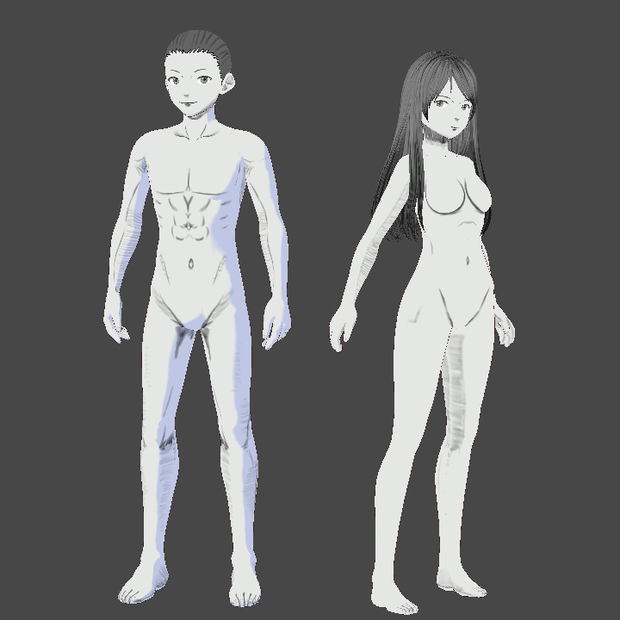
ペンシルスケッチ風テクスチャ
VRoid正式版の鉛筆風のスケッチっぽいテクスチャです、以下のカテゴリで使ってください
ベースヘアー
体型(全身)/衣装(上半身インナー・ボディースーツ)
まゆげ
まつげ
瞳
口
口内
鼻
肌
髪型(ベースヘアーとテクスチャ)
使い方
1.右側から使いたいファイルをダウンロードしてください。
2.VROID STUDIOで使いたいモデルを開いてください。
3.左上のタブから「カスタムアイテムをインポート」をクリック。
4.解凍した「x.vroidcustomitem」をクリック。
5.すぐに着用するをクリックすると現在のモデルに反映されます。
髪のテクスチャは髪型のタブの右側のマテリアルタブから「テクスチャを編集」の画面でPNGをインポートしてください
全ファイル入りZipファイルは上記の全ファイルが含まれています。
デラックスVer.はサンプル画像のモデル2体が.vroidファイルとして含まれています。
UNITYのゲームで使用、VRChat、VTuber、何に使ってもOKです。
必須ではありませんが、他の人がここで見つけられるように使用している場合は、クレジットを付けてください。
Pencil Sketch Style Textures
Textures to look like a "pencil sketch" for:
Base Hair
Body (Skin or Bodysuit)
Eyebrows
Eyeliner
Iris
Mouth
Mouth Inside
Nose
Skin (Face)
Hair (Base Hair and Texture)
How to use
1. Download file on the right side.
2. Open up VRoid Studio and go to any model you would like to use it on.
3. Go to "Import Custom Items" on the top left bar.
4. Navigate to unzipped file, open x.vroidcustomitem
5. Click on wear it now to apply to model, click on wear later to save.
For the Hair Texture, you can import PNG from "Edit Hairstyle" screen.
Zip File with all the files includes all above files.
Deluxe Ver. includes models shown in the sample image.
You can use it for your Unity games, VRchat, Vtubing, etc.
It's not required but please credit if you're using just so that others can find it here.
모든 리뷰
더보기리뷰 등록
리뷰를 작성하려면 로그인이 필요합니다.
로그인하고 리뷰 쓰기