'%3e%3cg%20clip-path='url(%23roundHexB)'%3e%3cpath%20fill='%236D5DFC'%20d='M256%2040%20443%20148%20443%20364%20256%20472%2069%20364%2069%20148Z'/%3e%3cpath%20fill='%239C93FB'%20d='M69%20148%20256%2040%20443%20148%20256%20256Z'/%3e%3cpath%20fill='%234A3FD1'%20d='M256%20256%20443%20148%20443%20364%20256%20472Z'/%3e%3c/g%3e%3c!--%20top%20face:%20filled%20round%20magnifier%20--%3e%3cg%20transform='matrix(0.8660254,-0.5,0.8660254,0.5,69,148)'%3e%3cg%20transform='matrix(0.935,0,0,0.935,7.02,7.02)'%3e%3ccircle%20cx='88'%20cy='88'%20r='52'%20fill='%23FFFFFF'/%3e%3ccircle%20cx='88'%20cy='88'%20r='28'%20fill='%239C93FB'/%3e%3cpath%20d='M124%20124%20164%20164'%20stroke='%23FFFFFF'%20stroke-width='26'%20stroke-linecap='round'/%3e%3c/g%3e%3c/g%3e%3cg%20transform='matrix(0.8660254,0.5,0,1,69,148)'%3e%3cpath%20d='M96.1,61.08%20L45.9,128.92%20Q34,145%2054,145%20L162,145%20Q182,145%20170.1,128.92%20L119.9,61.08%20Q108,45%2096.1,61.08%20Z'%20fill='%23FFFFFF'/%3e%3c/g%3e%3c!--%20right%20face:%20filled%20bubble%20--%3e%3cg%20transform='matrix(0.8660254,-0.5,0,1,256,256)'%3e%3cg%20transform='matrix(0.855,0,0,0.855,15.66,15.66)'%3e%3cpath%20d='M60%2042H156a28%2028%200%200%201%2028%2028V158Q184%20168%20174.47%20164.96L124.53%20149.04Q115%20146%20105%20146H60a28%2028%200%200%201-28-28V70a28%2028%200%200%201%2028-28Z'%20fill='%23FFFFFF'/%3e%3c/g%3e%3c/g%3e%3c/g%3e%3c/svg%3e)
 NEKO MANMA
상품 설명
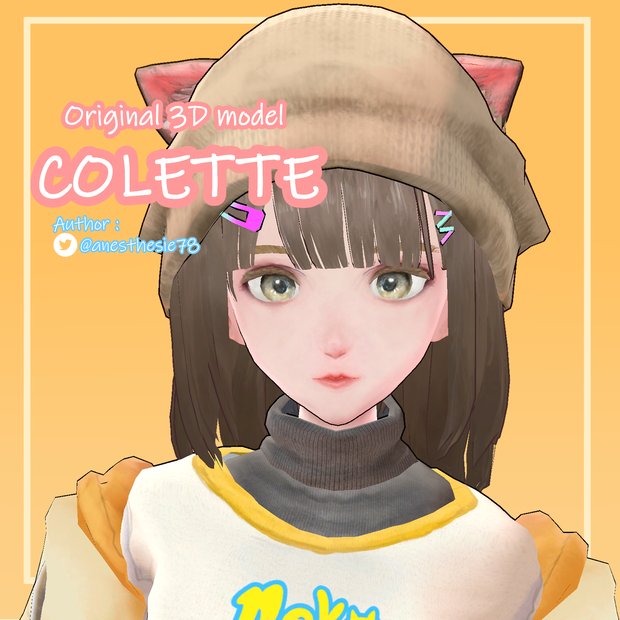
VRChat想定の3Dアバターです。
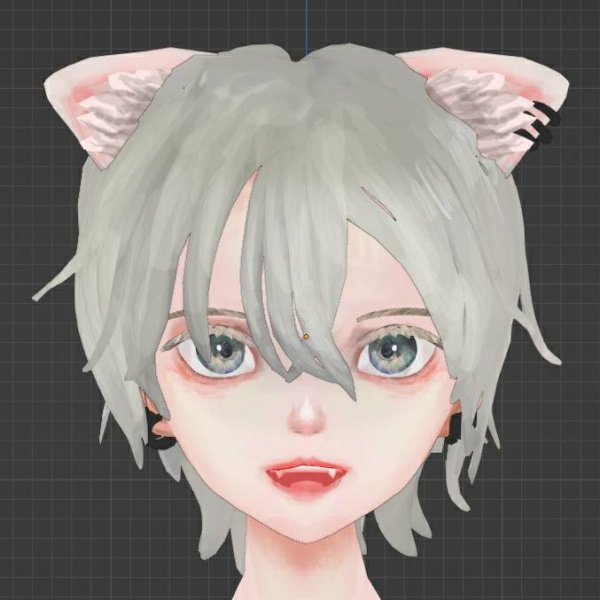
名前はコレットです。猫耳の人見知りな女の子です。
デフォルト衣装とルームウェア版2つ分のUnityPackageが入ってます。
モデル情報
・Unity2019.4.31f1
・VRCHAT SDK 3.1.10
・VRChat Package Resolver Tool 0.1.17
・ポリゴン数:△64869(通常衣装)
△57794(ルームウェア版)
・VRChat Performance Rank;Poor(通常衣装・ルームウェア版ともに)
・Avatar3.0対応
・Humanoid対応
・Physbone対応
・アイトラッキング対応
・リップシンク対応
・フルトラッキング未確認
・シェーダー:liltoon (1.3.6)
・身長140cmくらい
・AFKポーズ設定済
通常衣装:Expression Menuで帽子、パーカー、インナー、短パン、レギンスの着脱が可能です。腕とキャミソールに貫通防止のシェイプキーを適用しています。ハンドサインとは別にExpression Menuより表情と髪の長さが変更できます
・ルームウェア版:Expression Menuでパーカーとドルフィンパンツの着脱が可能です。ハンドサインとは別にExpression Menuより表情と髪の長さが変更できます
商品内容
・Unitypackage(通常衣装)
・Unitypackage(ルームウェア版)
・テクスチャ
・FBX
・改変用PSD(Clip Studio Paintでエクスポートしています)
必要なもの
・VCC(VRChat Creators Companion)
・liltoonシェーダーをUnitypackageをインポートする前にダウンロードしてください
(https://booth.pm/ja/items/3087170)
導入方法
1.VCCをインストールし、Avatarsで新規プロジェクトの作成を行ってください
2.LiltoonのUnitypackageをプロジェクト内にインポートしてください
3.本商品のUnitypackageをインポートし、フォルダ「Collette_default_costumeV01」の中にあるPrefabをHierarchyにドラッグアンドドロップし、VRChat SDKよりアップロードしてください
更新履歴
2022/12/04
販売開始 V1.1
利用規約
ご購入前にお読みください
VN3ライセンス( https://www.vn3.org )を使用しています。
日本語:https://drive.google.com/file/d/1LGCU444mGe1K9voDev4BR02sN3vGwygY/view?usp=sharing
英語:
https://docs.google.com/document/d/1gU9VAmgGvpOrGUgTZdfsuyJxqKfed1SKaI0HNyqddKg/edit?usp=sharing
その他
・AFKポーズにねここや様の「ポーズ詰め合わせ」をお借りしています:https://booth.pm/ja/items/1634088
・ダウンロード商品の性質上、返金・返品には対応しかねますことをご了承ください
・ご感想やご報告、ご質問などござましたらBOOTHのメッセージにてお願いいたします
・使用ツール
Zbrush
Blender
Substance Painter
Clip Studio Paint
About Colette
This is a VRChat ready 3D model avatar.
Her name is Colette, a shy girl with cat ears.
This article includes 2 Unitypackages, the one is the avatar in defaut costume, the another one is the avatar in lounge costume.
Model information
・Unity2019.4.31f1
・VRCHAT SDK 3.1.10
・VRChat Package Resolver Tool 0.1.17
・Polygon count:△64869(defaut outfit)
△57794(loungewear)
・VRChat Performance Rank;Poor(the both of the defaut outfit and the loungewear)
・Avatar3.0 : done
・Humanoid : done
・Physbone : done
・Eyetracking : done
・Lipsync : done
・Full tracking : unknown
・Shader : liltoon (1.3.6)
・height : about 140cm
・AFK pose : customized
Default outfit : You can turn on and turn off the hoodie, the inner, the short pants and the leggings in Expression Menu. The blendshape to prevent collision is applied on the arms and the camisole. In addition to hand gestures, you can change hair length and facial expressions in Expression Menu.
Loungewear version : You can turn on and turn off the hoodie and the pants. In addition to hand gestures, you can change hair length and facial expressions in Expression Menu.
Contents
・Unitypackage(default outfit)
・Unitypackage (loungewear version)
・textures
・FBX
・PSD for customization(these files are exported from Clip Studio Paint)
What you need
・VCC(VRChat Creators Companion)
・Please import Liltoon Shader before importing the Unitypackage in the project
(https://booth.pm/ja/items/3087170)
How to upload the avatar in VRChat
1. Download VCC, then make a new project with "Avatars" option
2. Import Liltoon unitypackage in your project
3. Import the unitypackage of Colette in your project, then drag and drop the prefab which is in the folder "Collette_default_costumeV01" on the Hierarchy. Now you are ready to upload the avatar from the VRChat SDK tab.
History
2022/12/04
Sales start V1.1
Terms of Use
Please read and acknowledge the terms carefully before purchasing
These documents are made with ( https://www.vn3.org)
Japanese:https://drive.google.com/file/d/1LGCU444mGe1K9voDev4BR02sN3vGwygY/view?usp=sharing
English:
https://docs.google.com/document/d/1gU9VAmgGvpOrGUgTZdfsuyJxqKfed1SKaI0HNyqddKg/edit?usp=sharing
Others
- For the AFK pose, I used "posing pack" of Nekokoya :
https://booth.pm/ja/items/1634088
- Please note that due to the nature of downloadable products, refunds and returns are not available.
- If you would like to tell me something, please let me know on Booth
- The tools used :
Zbrush
Blender
Substance Painter
Clip Studio Paint
A propos de Colette
Il s'agit d'un avatar 3D conçu pour VRChat.
Il s'appelle Colette : c'est une fille timide aux oreilles de chat.
Cet article comprend deux projets Unity, celui du costume de défaut et celui du costume de vêtement de détente.
Informations sur le modèle
・Unity2019.4.31f1
・VRCHAT SDK 3.1.10
・VRChat Package Resolver Tool 0.1.17
・Le nombre de polygons:△64869(vêtement de défaut)
△57794(tenue de détente)
・VRChat Performance Rank;Poor(Costume de défaut et la tenue de détente)
- Avatar3.0
- Humanoid rig paramétré
- Physbone paramétré
- LipSync : paramétré
- Shader : Liltoon (1.3.6)
- Taille : environ 140cm
- AFK : personnalisé
- Le costume de défaut : On peut enlever et remettre le pull, le t-shirt, le bonet, le shorts et le leggings. Le blendshape pour prévenir la collision de mesh est appliqué au bras et à la camisole dans Expression Menu. De surcroît, on peut changer l'expression faciale et la longueur des cheveux dans Expression Menu en plus des expressions paramétrés dans les gestuelles des mains.
- Le vêtement de détente : On peut enlever et remettre le pull et le shorts dans Expression Menu. De surcroît, on peut changer l'expression faciale et la longueur des cheveux dans Expression Menu en plus des expressions paramétrés dans les gestuelles des mains.
Contenu
- Unitypackage(Costume de défaut)
- Unitypackage (Tenue de détente)
- Textures
- FBX
- PSD pour personnaliser les textures(Ces fichiers PSD sont exporté depuis Clip Studio Paint)
Ce dont vous avez besoin
- VCC(VRChat Creators Companion)
- liltoon Shader. Téléchargez le shader Liltoon avant d'improter l'Unitypackage dans le projet Unity, s'il vous plaît
(https://booth.pm/ja/items/3087170)
Comment uploader l'avatar dans VRChat
1. Téléchargez VCC, puis créez un nouveau project avec option "avatars"
2. Importez l'Unitypackage de Liltoon dans votre projet
3. Importz l'Unitypackage de Colette, puis glissez sur Hierarchy le prefab que vous trouverez dans le dossier "Collette_default_costumeV01". Maintenant tout est prêt. Uploadez l'avatar à partir de la tab VRChat SDK.
Historique
2022/12/04
En vente V1.1
Autres
- Pour la pose d'AFK, j'ai utilisé l'article suivant de Nekokoya : https://booth.pm/ja/items/1634088
- Du fait qu'il s'agit d'un article numérique, le remboursement et le retour de l'article ne sont pas réalisables
- Si vous avez une demande ou une question, veuillez m'envoyer un message sur Booth
- Les outils utilisés :
Zbrush
Blender
Substance Painter
Clip Studio Paint
Conditions d'utilisation
Veuillez accepter les conditions d'utilisation avant d'acheter cet article
Les conditions d'utilisation ont été crées avec VN3 license ( https://www.vn3.org)
(En japonais):https://drive.google.com/file/d/1LGCU444mGe1K9voDev4BR02sN3vGwygY/view?usp=sharing
(En anglais):
https://docs.google.com/document/d/1gU9VAmgGvpOrGUgTZdfsuyJxqKfed1SKaI0HNyqddKg/edit?usp=sharing
모든 리뷰
더보기리뷰 등록
리뷰를 작성하려면 로그인이 필요합니다.
로그인하고 리뷰 쓰기