'%3e%3cg%20clip-path='url(%23roundHexB)'%3e%3cpath%20fill='%236D5DFC'%20d='M256%2040%20443%20148%20443%20364%20256%20472%2069%20364%2069%20148Z'/%3e%3cpath%20fill='%239C93FB'%20d='M69%20148%20256%2040%20443%20148%20256%20256Z'/%3e%3cpath%20fill='%234A3FD1'%20d='M256%20256%20443%20148%20443%20364%20256%20472Z'/%3e%3c/g%3e%3c!--%20top%20face:%20filled%20round%20magnifier%20--%3e%3cg%20transform='matrix(0.8660254,-0.5,0.8660254,0.5,69,148)'%3e%3cg%20transform='matrix(0.935,0,0,0.935,7.02,7.02)'%3e%3ccircle%20cx='88'%20cy='88'%20r='52'%20fill='%23FFFFFF'/%3e%3ccircle%20cx='88'%20cy='88'%20r='28'%20fill='%239C93FB'/%3e%3cpath%20d='M124%20124%20164%20164'%20stroke='%23FFFFFF'%20stroke-width='26'%20stroke-linecap='round'/%3e%3c/g%3e%3c/g%3e%3cg%20transform='matrix(0.8660254,0.5,0,1,69,148)'%3e%3cpath%20d='M96.1,61.08%20L45.9,128.92%20Q34,145%2054,145%20L162,145%20Q182,145%20170.1,128.92%20L119.9,61.08%20Q108,45%2096.1,61.08%20Z'%20fill='%23FFFFFF'/%3e%3c/g%3e%3c!--%20right%20face:%20filled%20bubble%20--%3e%3cg%20transform='matrix(0.8660254,-0.5,0,1,256,256)'%3e%3cg%20transform='matrix(0.855,0,0,0.855,15.66,15.66)'%3e%3cpath%20d='M60%2042H156a28%2028%200%200%201%2028%2028V158Q184%20168%20174.47%20164.96L124.53%20149.04Q115%20146%20105%20146H60a28%2028%200%200%201-28-28V70a28%2028%200%200%201%2028-28Z'%20fill='%23FFFFFF'/%3e%3c/g%3e%3c/g%3e%3c/g%3e%3c/svg%3e)
 CodeAldnoah
상품 설명
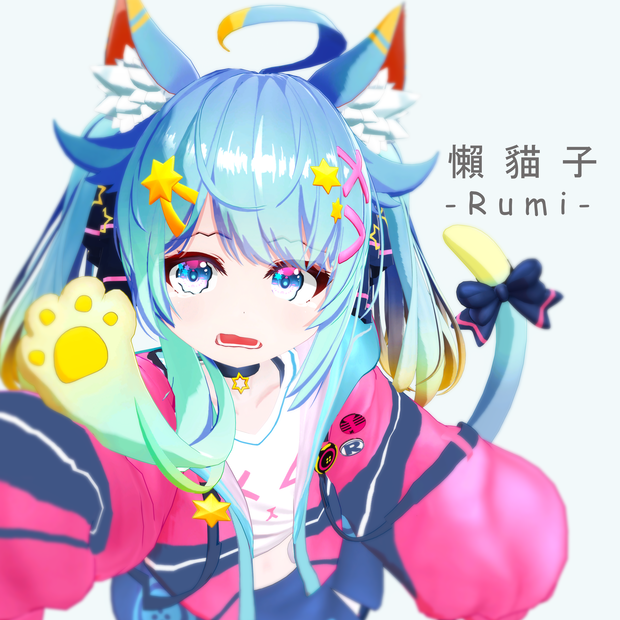
【 懶貓子の公式モデル 】
【 Official model of Lazy Cat Rumi】
【Discord : https://discord.gg/ptcKAQB】
■ このモデルは、UnityのHumanoidフォーマットに対応しています。
■ Vtuber : 瑠美(懶貓子)の子供バージョンです。
■ ソースファイルの再配布を禁止します
■ 個人的な使用のみ可能(規約を参照)。
■ This model supports Unity's Humanoid format
■ This is the child version of Vtuber : Rumi (懶貓子)
■ This model is mainly intended for use in VRChat
■ Available for personal use only (see terms).
■ モデル情報 / Package Contents ■
● Avatar3.0 VRChat UnityPackage v1.0
● project.blend
● PSD / PNG
● FBX
● VRM
◆ モデル情報 ◆ / Model Information
■ VRCSDK 3.0 :対応
■ 物理ボーン :対応
■ ユニティヒューマノイド :対応
■ フルボディトラッキング :対応
■ リップシンク :対応
■ アイトラッキング :対応
■ 表情メニュー :対応
■ 顔の表情メニュー :対応
■ シェーダー(付属):liltoon+標準シェーダー
https://lilxyzw.booth.pm/items/3087170
ポリカウント: △175303
シェイプキー : 表情パーツ 254
ボディ - 20
その他 - 10
プリセット顔 - 32
MMD対応 - 43
■ VRCSDK 3.0 : Yes
■ Phys Bone : Yes
■ Unity Humanoid : Yes
■ Full-body Tracking : Yes
■ Lip Sync : Yes
■ Eye-Tracking : Yes
■ Expression Menu : Yes
■ Face Expression Menu : Yes
Polycount : △175303
Shape key : Facial Expressions 254
Body - 20
Others - 10
Preset Face - 32
MMD Compatible 43
■ Shader (included) : liltoon + standard shader
https://lilxyzw.booth.pm/items/3087170
◆【利用規約】◆ / Terms of Use
■ ソースファイルの再配布を禁止します
Redistribution of source files is prohibited
■ モデルをPrivateに設定する。
Set model as Private only.
本規約は、あしやまひろこ(@hiorko_TB)氏が作成したVN3ライセンス
This agreement uses the VN3 license (https://www.vn3.org/)
Terms of use(EN)
https://drive.google.com/file/d/1Y262xoeq3FbGL_i7wR-jxDikO-cIXlyN/view?usp=share_link
利用規約(JP)
https://drive.google.com/file/d/1P2Cd3s-xdj5bgggN-XJgw3Ey9kYU2C2P/view?usp=share_link
이용규약(KO)
https://drive.google.com/file/d/1F3zHFVou7PGLFkwnVeR643IaFZvu_UVd/view?usp=share_link
使用条款(CH)
https://drive.google.com/file/d/1mwDcrHumfweBZlUhvFo1Ic65S4-92vBc/view?usp=share_link
◆ 本モデルを使用された時点で本利用規約に同意したものとみなします。
購入前に必ずご確認いただきますようお願いいたします。
Upon purchase, you agree to these terms of use. Please be sure to check before purchasing.
◆ 【連絡先 】◆ / Contact
● Discord : UMR#9861 | https://discord.gg/ptcKAQB
● Twitter:
@codealdnoah
https://twitter.com/codealdnoah
● Email : [email protected]
◆【使用説明書】 ◆
Rumi unitypackageをインポートする前に、これらを用意してください。
■ Unity (バージョン要件は vrchat でご確認ください)
■ VRCSDK 3.0
1. VRCSDK のインポート
2. Rumi_Unitypackage をインポートします。
3. UnityScene [ Rumi_VRChat_v1.0a ]を開く。
4. VRCSDKコントロールパネルでBUILDをクリックすると、アップロードに時間がかかります。
◆ 【Instructions 】◆
Please have these ready before importing Rumi unitypackage.
■ Unity 2019.4.31f1
■ VRCSDK 3.0
1. Import VRCSDK
2. Import Rumi_Unitypackage
3. Open the UnityScene [ Rumi_VRChat_v1.0a ]
4. Go to VRCSDK control panel, click BUILD, it will take some time to upload.
모든 리뷰
더보기리뷰 등록
리뷰를 작성하려면 로그인이 필요합니다.
로그인하고 리뷰 쓰기