'%3e%3cg%20clip-path='url(%23roundHexB)'%3e%3cpath%20fill='%236D5DFC'%20d='M256%2040%20443%20148%20443%20364%20256%20472%2069%20364%2069%20148Z'/%3e%3cpath%20fill='%239C93FB'%20d='M69%20148%20256%2040%20443%20148%20256%20256Z'/%3e%3cpath%20fill='%234A3FD1'%20d='M256%20256%20443%20148%20443%20364%20256%20472Z'/%3e%3c/g%3e%3c!--%20top%20face:%20filled%20round%20magnifier%20--%3e%3cg%20transform='matrix(0.8660254,-0.5,0.8660254,0.5,69,148)'%3e%3cg%20transform='matrix(0.935,0,0,0.935,7.02,7.02)'%3e%3ccircle%20cx='88'%20cy='88'%20r='52'%20fill='%23FFFFFF'/%3e%3ccircle%20cx='88'%20cy='88'%20r='28'%20fill='%239C93FB'/%3e%3cpath%20d='M124%20124%20164%20164'%20stroke='%23FFFFFF'%20stroke-width='26'%20stroke-linecap='round'/%3e%3c/g%3e%3c/g%3e%3cg%20transform='matrix(0.8660254,0.5,0,1,69,148)'%3e%3cpath%20d='M96.1,61.08%20L45.9,128.92%20Q34,145%2054,145%20L162,145%20Q182,145%20170.1,128.92%20L119.9,61.08%20Q108,45%2096.1,61.08%20Z'%20fill='%23FFFFFF'/%3e%3c/g%3e%3c!--%20right%20face:%20filled%20bubble%20--%3e%3cg%20transform='matrix(0.8660254,-0.5,0,1,256,256)'%3e%3cg%20transform='matrix(0.855,0,0,0.855,15.66,15.66)'%3e%3cpath%20d='M60%2042H156a28%2028%200%200%201%2028%2028V158Q184%20168%20174.47%20164.96L124.53%20149.04Q115%20146%20105%20146H60a28%2028%200%200%201-28-28V70a28%2028%200%200%201%2028-28Z'%20fill='%23FFFFFF'/%3e%3c/g%3e%3c/g%3e%3c/g%3e%3c/svg%3e)
 Aetherius Forge
상품 설명
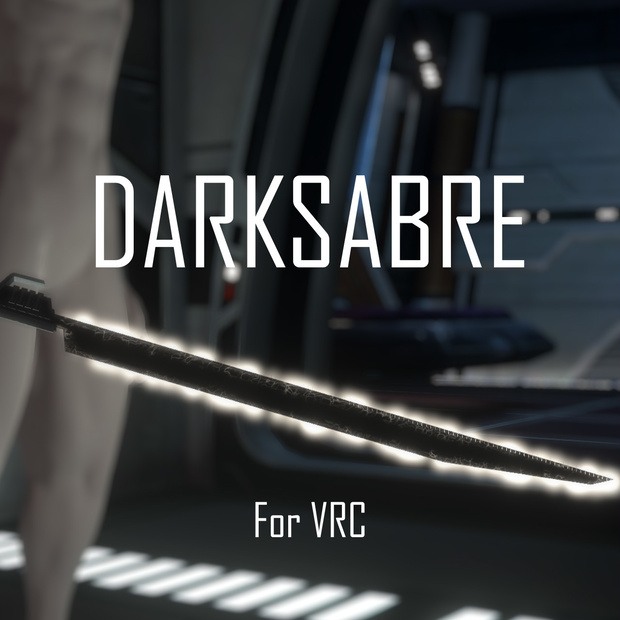
刀身内側が黒い光の剣です
内側はメッシュ、外側はパーティクルを使用しています
Quest版には対応していません
事前にPoiyomi、Avatars 3.0 Managerのダウンロードが必要です
You need download here
Poiyomi
https://github.com/poiyomi/PoiyomiToonShader
Avatars 3.0 Manager
https://github.com/VRLabs/Avatars-3.0-Manager
機能
・刀身が出たり消えるアニメーション
・プレイヤーに刀身が当たると出る火花
・刀身色変更
・刀身から出るトレイルエフェクト
・SEが余分に同梱されていて主に刀身が出たり消えるアニメーションに付いている音です
映画マンダロリアン仕様
クローンウォーズ仕様
Features
Animation of the blade ignition and retraction
Sparks when the blade hits the players
Sword blade color change
Trail effects from the blade
Extra sound effects are included in the package, mainly for the animation of the sword blade ignition and retraction.
The Mandalorian version
The Clone Wars version
条件 / Requirements
Unity 2019.4.31f1
VRChat avatar SDK 3.0
アバターの基本的なアップロード方法を理解している
Basic knowledge of unity and uploading VRC avatars
情報
ポリゴン数:△2,141
メッシュ:2
マテリアル数:5
テクスチャー数:10
パーティクル数:2
サウンドエフェクト数:3
リアルタイムライト:1
コンタクトリシーバー:1
Stats
Triangles : 2,141
Meshes : 2
Materials : 5
Textures : 10
Particles : 2
Sound effects: 3
Real-time lights: 1
Contact receivers: 1
同梱データ
UnityPackage
FBXモデル
Packaged
UnityPackage
FBX Model
導入方法
①Poiyomi、Avatars 3.0 Managerをインポート
②Darksabre.unitypackageをインポートする
③Dark Sabreフォルダー内のプレファブ「Package」を任意のアバターのプロジェクト内のHierarchyにドラックアンドドロップ
④「Package」を右クリックでUnpack prefab completelyをクリック
⑤「Package」フォルダー内の「Dark Sabre」をアバター内にドラックアンドドロップ。さらに「Target pos」を持たせたい任意のアーマチュアーにドラックアンドドロップ(手など)
⑥「Package」フォルダーはもういらないのでDeleteします
⑦設定した「Target pos」の位置を調整する
⑧AV3 Managerウインドウを開き、アバターのFXレイヤーのAnimatorContorollerにDark SabreのAnimatorContorollerをマージする
⑨VRCExpressionParametersに「Ignition」(Bool),「Blade hue」(Float 0),「HiltToggle」(Bool)を書き込む
⑩VRCExpressionsMenuにAdd ControlでTypeをSub Menuにし、SubMenu項目に「Dark Sabre」フォルダー内のDS_Expressionsを入れる
完成!
Setup
①Import Poiyomi and Avatars 3.0 Manager
②Import Darksabre.unitypackage
③Drag and drop the prefab "Package" in the Dark Sabre folder into the Hierarchy in any avatar's project
④Right-click "Package" and click Unpack prefab completely.
⑤Drag and drop "Dark Sabre" in the "Package" folder into the avatar, and then drag and drop "Target pos" onto the desired armature (ex.right hand,left hand)
⑥Delete the "Paclage"folder
⑦Adjust the position of the set "Target pos"
⑧Open the AV3 Manager window and merge the AnimatorController of Dark Sabre into the AnimatorController of the FX layer of the avatar
⑨Write"Ignition"(Bool),"Blade hue"(Float 0),"HiltToggle"(Bool)in VRCExpressionParameters
⑩Add Control to VRCExpressionsMenu, set Type to Sub Menu, and put DS_Expressions in the "Dark Sabre" folder in the SubMenu
サーベルのサイズ変更方法
How to adjustment Sabre size
https://twitter.com/Dragunov_807QB/status/1588482915377086464
※v1.1以下のデータを使用している方へ
v1.2からサウンドを修正しました。修正方法は下記のリンクから
*For those using data under v1.1
I modified the sound from v1.2. Please click the link below to learn how to fix it.
https://twitter.com/Dragunov_807QB/status/1588453383836667906
利用規約について
・著作権は放棄していません。
・VR、配信、動画での商用利用は個人、法人に限らず可能。
・改変、改造は可能。
・未改変、未改造、さらに改変後、改造後での再配布、転売は禁止。
・宗教的、政治的に使用禁止。
Terms
Copyrights are not waived.
Commercial use in VR, distribution, and videos is allowed for both individuals and corporations.
Modification and alteration are allowed.
Redistribution and resale of unaltered, unmodified, altered, or modified versions are prohibited.
Religious or political use is prohibited.
免責事項
本データの利用において、何らかのトラブル、
損失が生じたとしても当方は一切の責任を負いません。
Disclaimer
Im not responsible for any trouble or loss that may occur in the use of this data.
I assume no responsibility whatsoever for any problems or losses that may arise from the use of this data.
アップデート
2022.10.19 (v1.1)
-同梱し忘れてたトレイルエフェクトのマテリアルを追加
2022.11.4 (v1.2)
-サウンドの修正
Update
2022.10.19 (v1.1)
-Added trail effects material that I forgot to include
2022.11.4 (v1.2)
-Fixed the sounds
2024.07.15 (v1.3)
-パラメーター名を変更(ds_〇〇〇)
-Changed the parameter name
Have fun!!
모든 리뷰
더보기리뷰 등록
리뷰를 작성하려면 로그인이 필요합니다.
로그인하고 리뷰 쓰기