'%3e%3cg%20clip-path='url(%23roundHexB)'%3e%3cpath%20fill='%236D5DFC'%20d='M256%2040%20443%20148%20443%20364%20256%20472%2069%20364%2069%20148Z'/%3e%3cpath%20fill='%239C93FB'%20d='M69%20148%20256%2040%20443%20148%20256%20256Z'/%3e%3cpath%20fill='%234A3FD1'%20d='M256%20256%20443%20148%20443%20364%20256%20472Z'/%3e%3c/g%3e%3c!--%20top%20face:%20filled%20round%20magnifier%20--%3e%3cg%20transform='matrix(0.8660254,-0.5,0.8660254,0.5,69,148)'%3e%3cg%20transform='matrix(0.935,0,0,0.935,7.02,7.02)'%3e%3ccircle%20cx='88'%20cy='88'%20r='52'%20fill='%23FFFFFF'/%3e%3ccircle%20cx='88'%20cy='88'%20r='28'%20fill='%239C93FB'/%3e%3cpath%20d='M124%20124%20164%20164'%20stroke='%23FFFFFF'%20stroke-width='26'%20stroke-linecap='round'/%3e%3c/g%3e%3c/g%3e%3cg%20transform='matrix(0.8660254,0.5,0,1,69,148)'%3e%3cpath%20d='M96.1,61.08%20L45.9,128.92%20Q34,145%2054,145%20L162,145%20Q182,145%20170.1,128.92%20L119.9,61.08%20Q108,45%2096.1,61.08%20Z'%20fill='%23FFFFFF'/%3e%3c/g%3e%3c!--%20right%20face:%20filled%20bubble%20--%3e%3cg%20transform='matrix(0.8660254,-0.5,0,1,256,256)'%3e%3cg%20transform='matrix(0.855,0,0,0.855,15.66,15.66)'%3e%3cpath%20d='M60%2042H156a28%2028%200%200%201%2028%2028V158Q184%20168%20174.47%20164.96L124.53%20149.04Q115%20146%20105%20146H60a28%2028%200%200%201-28-28V70a28%2028%200%200%201%2028-28Z'%20fill='%23FFFFFF'/%3e%3c/g%3e%3c/g%3e%3c/g%3e%3c/svg%3e)
 Arizen
상품 설명
[ KR ]
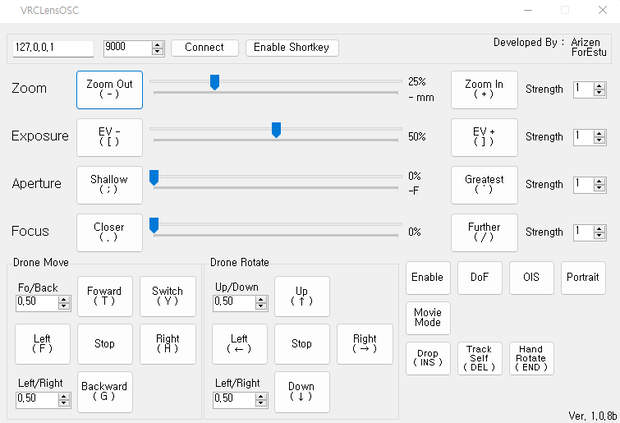
VRCLensOSC는 VRCLens( https://booth.pm/ko/items/2283183 )를 보다 쉽게 조작할 수 있게 해주는 OSC 확장입니다.
본 프로그램은 왁타버스 촬영/영상 제작 스터디 1기의 결과물으로 Booth에서는 개발자 후원 목적으로 판매되고 있습니다.
무료 배포 버전은 왁물원( https://cafe.naver.com/steamindiegame/7077159 )을 통해서 받으실 수 있습니다.
[ EN ]
VRCLensOSC is a OSC Extenstion that makes it easier for you to operate VRCLens( https://booth.pm/en/items/2283183 )
This software is the output of the Waktaverse Video shooting/editing study 1st. And being sold in Booth for supporting developer purposes.
You can get a free version from Wakmulwon(Korean,
https://cafe.naver.com/steamindiegame/7077159 ).
Or get the code and compile it yourself!
Github : https://github.com/wolfkr/VRCLensOSC
기능/Features
[ KR ]
- 직관적인 인터페이스
- 편리한 드론 조작
- 단축키를 통한 VRCLens 조작
- 드론 이동/회전 속도 조절
- 줌인/아웃 속도 조절
[ EN ]
- Intuitive interfaces
- Comfortable Drone control
- Control VRCLens with Shortkey
- Speed control of Drone Move/Rotation
- Control Zoom in/out speed
사용법/How to Use
[ KR ]
0. !!중요!! VRCLensOSC는 VRCLens에서 조작 설정이 전부 "다이얼"로 되어있어야 정상적으로 동작을 합니다.
1. VRChat PC에서 R키를 눌러 액션메뉴를 엽니다.
2. Options -> OSC에 가서 OSC를 활성화 합니다.
3. 받으신 프로그램을 켜시고, Connect 버튼을 눌러 OSC를 연결합니다.
4. 단축키 기능을 사용하고 싶으시면 Enable ShortKey 버튼을 눌러 활성화 하시면 됩니다.
[ EN ]
0. !!IMPORTANT!! VRCLensOSC only works normally when the VRCLens control option is set to "Dialed".
1. Press R key to opens Action Menu in VRChat PC
2. Goto Options -> OSC and Enable OSC
3. Start VRCLensOSC.exe and press "Connect" button to connect OSC.
4. If you want to use shortcut key, press "Enable Shortkey" button.
Versions
[2022/12/16 1.1.0b]
- Hotkey for Droneswitch, Focus are changed
[2022/08/03 1.0.9b]
- Slider moving speed can be more slower
[2022/08/01 1.0.8b]
Initial release
모든 리뷰
더보기리뷰 등록
리뷰를 작성하려면 로그인이 필요합니다.
로그인하고 리뷰 쓰기