'%3e%3cg%20clip-path='url(%23roundHexB)'%3e%3cpath%20fill='%236D5DFC'%20d='M256%2040%20443%20148%20443%20364%20256%20472%2069%20364%2069%20148Z'/%3e%3cpath%20fill='%239C93FB'%20d='M69%20148%20256%2040%20443%20148%20256%20256Z'/%3e%3cpath%20fill='%234A3FD1'%20d='M256%20256%20443%20148%20443%20364%20256%20472Z'/%3e%3c/g%3e%3c!--%20top%20face:%20filled%20round%20magnifier%20--%3e%3cg%20transform='matrix(0.8660254,-0.5,0.8660254,0.5,69,148)'%3e%3cg%20transform='matrix(0.935,0,0,0.935,7.02,7.02)'%3e%3ccircle%20cx='88'%20cy='88'%20r='52'%20fill='%23FFFFFF'/%3e%3ccircle%20cx='88'%20cy='88'%20r='28'%20fill='%239C93FB'/%3e%3cpath%20d='M124%20124%20164%20164'%20stroke='%23FFFFFF'%20stroke-width='26'%20stroke-linecap='round'/%3e%3c/g%3e%3c/g%3e%3cg%20transform='matrix(0.8660254,0.5,0,1,69,148)'%3e%3cpath%20d='M96.1,61.08%20L45.9,128.92%20Q34,145%2054,145%20L162,145%20Q182,145%20170.1,128.92%20L119.9,61.08%20Q108,45%2096.1,61.08%20Z'%20fill='%23FFFFFF'/%3e%3c/g%3e%3c!--%20right%20face:%20filled%20bubble%20--%3e%3cg%20transform='matrix(0.8660254,-0.5,0,1,256,256)'%3e%3cg%20transform='matrix(0.855,0,0,0.855,15.66,15.66)'%3e%3cpath%20d='M60%2042H156a28%2028%200%200%201%2028%2028V158Q184%20168%20174.47%20164.96L124.53%20149.04Q115%20146%20105%20146H60a28%2028%200%200%201-28-28V70a28%2028%200%200%201%2028-28Z'%20fill='%23FFFFFF'/%3e%3c/g%3e%3c/g%3e%3c/g%3e%3c/svg%3e)
 Portalgraph
 Portalgraph VR180 Player Personal / PortalgraphムービープレイヤーPersonal
상품 설명
VR空間プロジェクターPortalgraphを使用したVR180動画プレイヤーです。
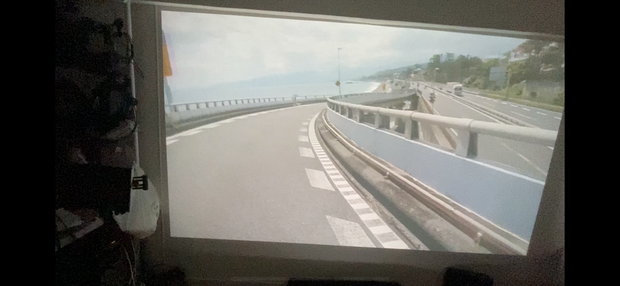
スクリーンの中に等身大3Dの実写空間が広がる、かつてない体験を楽しめます。
マニュアルに従ってキャリブレーション後、実行ファイルにVR180動画をドラッグアンドドロップして起動してください。
VRR180動画サンプル
https://drive.google.com/file/d/1ZKKYPQP6mc3t-Z0uvgAQ9ZxZpItvyqse/view?usp=sharing
本アプリケーションは個人利用のみに限定します。
商用用途でのご利用は、[email protected]までご連絡ください。
This is a VR180 video player using the VR spacial projector Portalgraph.
You can enjoy an unprecedented experience of a life-size 3D live-action space on the screen.
After calibration according to the manual, drag and drop the VR180 movie into the executable file to launch it.
VR180 movie sample
https://drive.google.com/file/d/1ZKKYPQP6mc3t-Z0uvgAQ9ZxZpItvyqse/view?usp=sharing
This application is for personal use only.
For commercial use, please contact [email protected]
Translated with www.DeepL.com/Translator (free version)
動作環境
ゲーミングPC
3Dプロジェクターまたは3Dテレビと対応3Dメガネ
VIVEトラッカー
ベースステーション(DLP-Link式の3Dプロジェクターの場合はベースステーション2.0)
(Portalgraph SDKは不要です)
HEVCビデオ拡張機能(120円) https://www.microsoft.com/store/productId/9NMZLZ57R3T7
Requirement
Gaming PC
3D projector or 3D TV and compatible 3D glasses
VIVE Tracker
Base Station (Base Station 2.0 for DLP-Link 3D projectors)
HEVC Video Extension ($1) https://www.microsoft.com/store/productId/9NMZLZ57R3T7
更新履歴
2022/05/21 キャリブレーション機能に不具合があったため、ファイルを差し替えました。ダウンロードした方は差し替えをお願いします。
2022/05/24 VRヘッドセットなしの環境での再生に問題があったかもしれないのでバイナリを差し替えました。もしもうまく再生できなかった場合はお試しください。
2022/05/25 ファイルパスに日本語が入っている場合にファイルが再生できなかったので対処しました。
2023/07/30 アナグリフ表示が綺麗になりました。
모든 리뷰
더보기리뷰 등록
리뷰를 작성하려면 로그인이 필요합니다.
로그인하고 리뷰 쓰기