'%3e%3cg%20clip-path='url(%23roundHexB)'%3e%3cpath%20fill='%236D5DFC'%20d='M256%2040%20443%20148%20443%20364%20256%20472%2069%20364%2069%20148Z'/%3e%3cpath%20fill='%239C93FB'%20d='M69%20148%20256%2040%20443%20148%20256%20256Z'/%3e%3cpath%20fill='%234A3FD1'%20d='M256%20256%20443%20148%20443%20364%20256%20472Z'/%3e%3c/g%3e%3c!--%20top%20face:%20filled%20round%20magnifier%20--%3e%3cg%20transform='matrix(0.8660254,-0.5,0.8660254,0.5,69,148)'%3e%3cg%20transform='matrix(0.935,0,0,0.935,7.02,7.02)'%3e%3ccircle%20cx='88'%20cy='88'%20r='52'%20fill='%23FFFFFF'/%3e%3ccircle%20cx='88'%20cy='88'%20r='28'%20fill='%239C93FB'/%3e%3cpath%20d='M124%20124%20164%20164'%20stroke='%23FFFFFF'%20stroke-width='26'%20stroke-linecap='round'/%3e%3c/g%3e%3c/g%3e%3cg%20transform='matrix(0.8660254,0.5,0,1,69,148)'%3e%3cpath%20d='M96.1,61.08%20L45.9,128.92%20Q34,145%2054,145%20L162,145%20Q182,145%20170.1,128.92%20L119.9,61.08%20Q108,45%2096.1,61.08%20Z'%20fill='%23FFFFFF'/%3e%3c/g%3e%3c!--%20right%20face:%20filled%20bubble%20--%3e%3cg%20transform='matrix(0.8660254,-0.5,0,1,256,256)'%3e%3cg%20transform='matrix(0.855,0,0,0.855,15.66,15.66)'%3e%3cpath%20d='M60%2042H156a28%2028%200%200%201%2028%2028V158Q184%20168%20174.47%20164.96L124.53%20149.04Q115%20146%20105%20146H60a28%2028%200%200%201-28-28V70a28%2028%200%200%201%2028-28Z'%20fill='%23FFFFFF'/%3e%3c/g%3e%3c/g%3e%3c/g%3e%3c/svg%3e)
 蔦峰トモリ
蔦峰トモリ상품 설명
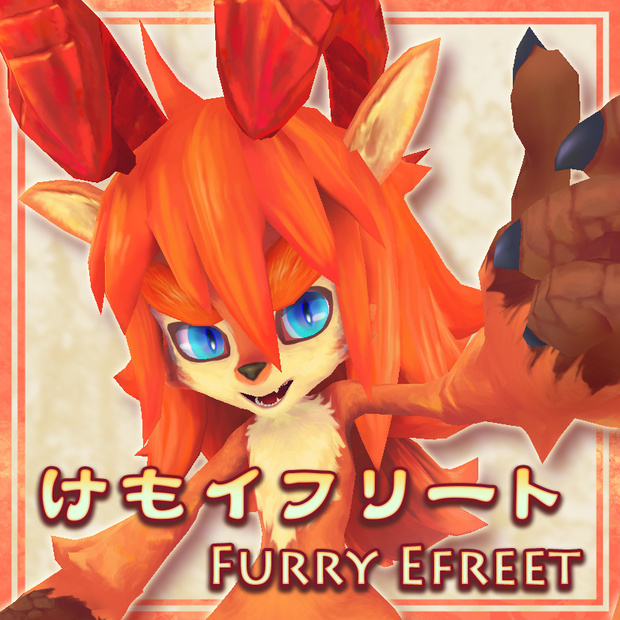
オリジナル3Dモデル【けもイフリート(FurryEfreet)】
制作:蔦峰トモリ
sketchfab:
https://sketchfab.com/3d-models/furry-efreet-0594e74ba4e247ce8eb6d29363d144aa
Pixiv:
https://www.pixiv.net/artworks/78371922
で制作していた『けもイフリート』がVR用モデルになりました🔥
■モデル仕様
【共通事項】
・Unity2019.4.31にて制作
・身長約135cm
・顔のブレンドシェイプ数 58種
・フルトラッキングの動作は確認できておりません
【VRC版モデル】
・SDK3.0対応
・アバターパフォーマンス(PC Build):Good
・ポリゴン数 △9320
・リップシンク対応
・アイトラッキング・自動まばたき対応
・エクスプレッション表情5種、アニメーション5種
・PhysBone設定済み
【VRC-Quest版モデル】
※VRC版モデルとの相違点は以下の通りです。
・アバターパフォーマンス(Android Build):Poor
・ポリゴン数△9128
・モデル階層内のメッシュ「m_eyeeff」を削除
・マテリアルとテクスチャをQuest用に変更
【VRM版モデル】
・ポリゴン数 △9320
・標準表情用14種+パーフェクトシンク用45種
・VRMSpringBone設定済み
■商品内容
【Unityパッケージ】
・FurryEfreetVRC.unitypackage
・FurryEfreetVRM.unitypackage
【VRMデータ】
・FurryEfreetVRM.vrm
【モデルデータ】
・FurryEfreet.fbx
・FurryEfreet_tex.png
・FurryEfreet_quest_tex.png
・FurryEfreet_eyeover_tex.png
その他ライセンス文章など。
■導入方法
【VRC】
①Unityを、バージョン2019.4.31でプロジェクトを立ち上げてください。
②VRCSDK3-Avatars(https://vrchat.com/home/download)をプロジェクトにインポートしてください。
③商品内容の「FurryEfreetVRC.unitypackage」をプロジェクトにインポートしてください。
④Assets > FurryEfreetVRC > Scenes にある、
FurryEfreetScene をダブルクリックしてください。
⑤Hierarchy上に
・FurryEfreetVRC (PC用)
・FurryEfreetVRC_Quest(Quest用)
が配置されますので、必要なものをアップロードしてください。
※アップロード時はPrivateでアップロードしてください。
また、アバターペデスタルなどによる再配布となる行為もご遠慮ください。
――――――――――――――――――――
【VRM】
FurryEfreetVRM.vrm をそのままご利用できます。
■利用規約・免責事項
VN3ライセンス(https://www.vn3.org/)を採用させていただいております。
以下のリンクをご確認ください。また、画像説明欄にも簡易一覧図を載せております。
https://drive.google.com/file/d/1YsFjDDxbVxWAates1v7rovV0K6NAXfjB/view?usp=sharing
本モデルを取得した時点で利用規約に同意したものといたします。
ご購入後の返金には対応できません。ご了承ください。
■お問い合わせ
不具合やバグ報告などのお問い合わせはBOOTHのダイレクトメッセージよりお願いいたします。
English
■Model Specifications
【Common specifications】
・Created with Unity version 2019.4.31
・Height about 135cm
・Blendshapes: 58
・Full Tracking operation has not been confirmed
【VRC version 】
・SDK3.0
・Avatar Performance (PC Build): Good
・Polygons △9320
・Lip-sync is supported
・Eye tracking and automatic blinking are supported
・Expression: 5 facial expressions, 5 animations
・PhysBone is already set up.
【VRC-Quest version】
The differences from the VRC model are as follows
・Avatar performance (Android Build): Poor
・Polygons △9128
・Mesh "m_eyeeff" in the model hierarchy was deleted.
・Material and texture were changed for VRC-Quest version.
【VRM version】
・Polygons △9320
・BlendShapeClip: 14 for standard expressions + 45 for perfect sync
・VRMSpringBone is already set up.
■Product Contents
【Unity Package】
・FurryEfreetVRC.unitypackage
・FurryEfreetVRM.unitypackage
【VRM data】
・FurryEfreetVRM.vrm
【Model data】
・FurryEfreet.fbx
・FurryEfreet_tex.png
・FurryEfreet_quest_tex.png
・FurryEfreet_eyeover_tex.png
Other license text, etc.
■How to install
(1) Start the project with Unity, version 2019.4.31.
(2) Import VRCSDK3-Avatars (https://vrchat.com/home/download) into your project.
(3) import the product content "FurryEfreetVRC.unitypackage" into your project.
(4) Double-click FurryEfreetScene in Assets > FurryEfreetVRC > Scenes.
(5) Add the following models to the Hierarchy.
・FurryEfreetVRC (for PC)
・FurryEfreetVRC_Quest (for Quest)
Upload the necessary models.
※When uploading avatars, please upload Private. Also, Please do not redistribute by avatar pedestal.
――――――――――――――――――――
【VRM】
"FurryEfreetVRM.vrm" can be used as is.
■Terms of Use and Disclaimer
I have adopted the VN3 license (https://www.vn3.org/).
Please check the following link.
https://drive.google.com/file/d/1s40mMpDpwkZMhICowfnrIw0QOUtkMbo6/view?usp=sharing
By acquiring this model, you agree to the Terms of Use.
No refunds will be made after purchase. Please understand that we will not be able to provide refunds.
■Contact
Please contact me for bug reports via direct message on BOOTH.
모든 리뷰
더보기리뷰 등록
리뷰를 작성하려면 로그인이 필요합니다.
로그인하고 리뷰 쓰기