'%3e%3cg%20clip-path='url(%23roundHexB)'%3e%3cpath%20fill='%236D5DFC'%20d='M256%2040%20443%20148%20443%20364%20256%20472%2069%20364%2069%20148Z'/%3e%3cpath%20fill='%239C93FB'%20d='M69%20148%20256%2040%20443%20148%20256%20256Z'/%3e%3cpath%20fill='%234A3FD1'%20d='M256%20256%20443%20148%20443%20364%20256%20472Z'/%3e%3c/g%3e%3c!--%20top%20face:%20filled%20round%20magnifier%20--%3e%3cg%20transform='matrix(0.8660254,-0.5,0.8660254,0.5,69,148)'%3e%3cg%20transform='matrix(0.935,0,0,0.935,7.02,7.02)'%3e%3ccircle%20cx='88'%20cy='88'%20r='52'%20fill='%23FFFFFF'/%3e%3ccircle%20cx='88'%20cy='88'%20r='28'%20fill='%239C93FB'/%3e%3cpath%20d='M124%20124%20164%20164'%20stroke='%23FFFFFF'%20stroke-width='26'%20stroke-linecap='round'/%3e%3c/g%3e%3c/g%3e%3cg%20transform='matrix(0.8660254,0.5,0,1,69,148)'%3e%3cpath%20d='M96.1,61.08%20L45.9,128.92%20Q34,145%2054,145%20L162,145%20Q182,145%20170.1,128.92%20L119.9,61.08%20Q108,45%2096.1,61.08%20Z'%20fill='%23FFFFFF'/%3e%3c/g%3e%3c!--%20right%20face:%20filled%20bubble%20--%3e%3cg%20transform='matrix(0.8660254,-0.5,0,1,256,256)'%3e%3cg%20transform='matrix(0.855,0,0,0.855,15.66,15.66)'%3e%3cpath%20d='M60%2042H156a28%2028%200%200%201%2028%2028V158Q184%20168%20174.47%20164.96L124.53%20149.04Q115%20146%20105%20146H60a28%2028%200%200%201-28-28V70a28%2028%200%200%201%2028-28Z'%20fill='%23FFFFFF'/%3e%3c/g%3e%3c/g%3e%3c/g%3e%3c/svg%3e)
 Nzerv
Nzerv상품 설명
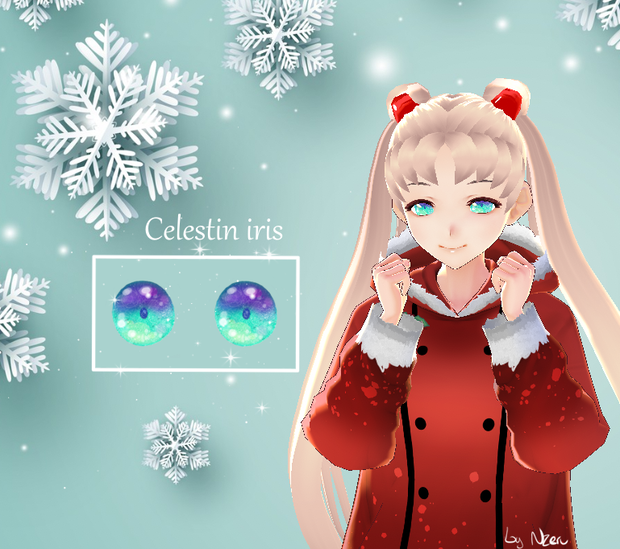
✿ File : celestin_eyes_by_nzerv
✿ For Vroid studio (stable version) and beta
✿ How to install on the stable version of Vroid :
1- Choose your avatar
2- Go to Face > Irises > Custom (create a new one)
3- Then go to 'Edit texture'
4- Right click on 'Default Design' and select
'Import', then find my file
5- Make sur to uncheck all 'Color calibration'
✿ How to install on Vroid beta :
1- Choose your avatar
2- Face editor > Texture > Irises
3- Right click on 'Default image' > Import > Find my
file
𝗬𝗼𝘂 𝗰𝗮𝗻 𝗳𝗶𝗻𝗱 𝗺𝘆 𝗼𝘁𝗵𝗲𝗿 𝗰𝗿𝗲𝗮𝘁𝗶𝗼𝗻𝘀 𝗵𝗲𝗿𝗲 :
𝗜𝗻𝘀𝘁𝗮𝗴𝗿𝗮𝗺 : https://www.instagram.com/nzerv_creations/
모든 리뷰
더보기리뷰 등록
리뷰를 작성하려면 로그인이 필요합니다.
로그인하고 리뷰 쓰기불러오는 중
관련 상품
불러오는 중