'%3e%3cg%20clip-path='url(%23roundHexB)'%3e%3cpath%20fill='%236D5DFC'%20d='M256%2040%20443%20148%20443%20364%20256%20472%2069%20364%2069%20148Z'/%3e%3cpath%20fill='%239C93FB'%20d='M69%20148%20256%2040%20443%20148%20256%20256Z'/%3e%3cpath%20fill='%234A3FD1'%20d='M256%20256%20443%20148%20443%20364%20256%20472Z'/%3e%3c/g%3e%3c!--%20top%20face:%20filled%20round%20magnifier%20--%3e%3cg%20transform='matrix(0.8660254,-0.5,0.8660254,0.5,69,148)'%3e%3cg%20transform='matrix(0.935,0,0,0.935,7.02,7.02)'%3e%3ccircle%20cx='88'%20cy='88'%20r='52'%20fill='%23FFFFFF'/%3e%3ccircle%20cx='88'%20cy='88'%20r='28'%20fill='%239C93FB'/%3e%3cpath%20d='M124%20124%20164%20164'%20stroke='%23FFFFFF'%20stroke-width='26'%20stroke-linecap='round'/%3e%3c/g%3e%3c/g%3e%3cg%20transform='matrix(0.8660254,0.5,0,1,69,148)'%3e%3cpath%20d='M96.1,61.08%20L45.9,128.92%20Q34,145%2054,145%20L162,145%20Q182,145%20170.1,128.92%20L119.9,61.08%20Q108,45%2096.1,61.08%20Z'%20fill='%23FFFFFF'/%3e%3c/g%3e%3c!--%20right%20face:%20filled%20bubble%20--%3e%3cg%20transform='matrix(0.8660254,-0.5,0,1,256,256)'%3e%3cg%20transform='matrix(0.855,0,0,0.855,15.66,15.66)'%3e%3cpath%20d='M60%2042H156a28%2028%200%200%201%2028%2028V158Q184%20168%20174.47%20164.96L124.53%20149.04Q115%20146%20105%20146H60a28%2028%200%200%201-28-28V70a28%2028%200%200%201%2028-28Z'%20fill='%23FFFFFF'/%3e%3c/g%3e%3c/g%3e%3c/g%3e%3c/svg%3e)
 Rori Shop
상품 설명
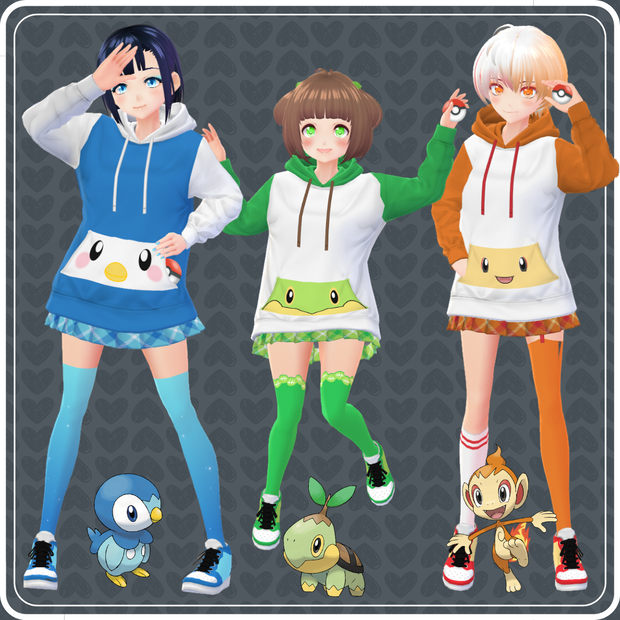
In honor of Pokémon Brilliant Diamond and Shining Pearl, I created hoodies with designs of Piplup, Turtwig and Chimchar. Choose your favorite starter! ヾ(๑╹ヮ╹๑)ノ”
Pokémon Diamond and Pearl Hoodies Set includes:
- 3 hoodies,
- 3 skirts,
- 3 socks,
- 3 shoes.
with and without texture.
** Not Included **
• Eyes: https://lolishop.booth.pm/items/2626977
https://lolishop.booth.pm/items/2594535
https://lolishop.booth.pm/items/2385380
• Makeup: https://lolishop.booth.pm/items/2716934
https://lolishop.booth.pm/items/2465299
https://lolishop.booth.pm/items/2626977
• Nails: https://lolishop.booth.pm/items/3219356
❖ Materials location
Hoodie: Hoodie
Skirt: Pleated Skirt
Socks: Body
Shoes: Basketball Sneakers
❖ 【VRoid 1.0】 INSTRUCTIONS:
• Hoodie: Outfit -> Top -> Custom -> Hoodie -> Edit Textures -> Delete the current layer -> Create a new layer -> Right click on the new layer -> Import -> Choose the file you want.
• Skirt: Outfit -> Bottoms -> Custom -> Pleated Skirt -> Edit Textures -> Delete the current layer -> Create a new layer -> Right click on the new layer -> Import -> Choose the file you want.
• Socks: Outfit -> Socks -> Custom -> Blank -> Edit Texture -> Delete the current layer -> Create a new layer -> Right click on the new layer -> Import -> Choose the file you want.
• Shoes: Outfit -> Shoes -> Custom -> Basketball Sneakers -> Edit Textures -> Delete the current layer -> Create a new layer -> Right click on the new layer -> Import -> Choose the file you want.
❖ 【VRoid Beta】 INSTRUCTIONS:
• Hoodie: Clothing Editor -> Clothing -> Tops -> Hodded Sweatsuit -> Texture -> Delete the current hoodie layer -> Create a new layer -> Right click on the new layer -> Import -> Choose the file you want.
• Skirt: Clothing Editor -> Clothing -> Bottoms -> Uniform Skirt -> Texture -> Delete the current skirt layer -> Create a new layer -> Right click on the new layer -> Import -> Choose the file you want.
• Socks: Body Editor -> Texture -> Create a new layer and put it above the skin layer -> Right click on the new layer -> Import -> Choose the file you want.
• Shoes: Clothing Editor -> Design -> Shoes -> Basketball Sneakers -> Texture -> Delete the current shoes layer -> Create a new layer -> right click on the new layer -> Import -> Choose the file you want.
--------------------- Terms of use ---------------------
OK:
• Personal use:
- whatever you don't post online (no credit required).
• Public use:
- photos, videos etc you post online (credit required);
- stream etc (give me credit in the easiest way for you, even vocally. Thanks!).
• Modification of these material according to your taste (credit the original item).
NOT Allowed:
• Redistribution/selling of this material.
• Modification of these material for resale.
• Including this material in models you sell/share publicly (example: VRchat or VRoid Hub).
• Claim this material as your own.
모든 리뷰
더보기리뷰 등록
리뷰를 작성하려면 로그인이 필요합니다.
로그인하고 리뷰 쓰기