'%3e%3cg%20clip-path='url(%23roundHexB)'%3e%3cpath%20fill='%236D5DFC'%20d='M256%2040%20443%20148%20443%20364%20256%20472%2069%20364%2069%20148Z'/%3e%3cpath%20fill='%239C93FB'%20d='M69%20148%20256%2040%20443%20148%20256%20256Z'/%3e%3cpath%20fill='%234A3FD1'%20d='M256%20256%20443%20148%20443%20364%20256%20472Z'/%3e%3c/g%3e%3c!--%20top%20face:%20filled%20round%20magnifier%20--%3e%3cg%20transform='matrix(0.8660254,-0.5,0.8660254,0.5,69,148)'%3e%3cg%20transform='matrix(0.935,0,0,0.935,7.02,7.02)'%3e%3ccircle%20cx='88'%20cy='88'%20r='52'%20fill='%23FFFFFF'/%3e%3ccircle%20cx='88'%20cy='88'%20r='28'%20fill='%239C93FB'/%3e%3cpath%20d='M124%20124%20164%20164'%20stroke='%23FFFFFF'%20stroke-width='26'%20stroke-linecap='round'/%3e%3c/g%3e%3c/g%3e%3cg%20transform='matrix(0.8660254,0.5,0,1,69,148)'%3e%3cpath%20d='M96.1,61.08%20L45.9,128.92%20Q34,145%2054,145%20L162,145%20Q182,145%20170.1,128.92%20L119.9,61.08%20Q108,45%2096.1,61.08%20Z'%20fill='%23FFFFFF'/%3e%3c/g%3e%3c!--%20right%20face:%20filled%20bubble%20--%3e%3cg%20transform='matrix(0.8660254,-0.5,0,1,256,256)'%3e%3cg%20transform='matrix(0.855,0,0,0.855,15.66,15.66)'%3e%3cpath%20d='M60%2042H156a28%2028%200%200%201%2028%2028V158Q184%20168%20174.47%20164.96L124.53%20149.04Q115%20146%20105%20146H60a28%2028%200%200%201-28-28V70a28%2028%200%200%201%2028-28Z'%20fill='%23FFFFFF'/%3e%3c/g%3e%3c/g%3e%3c/g%3e%3c/svg%3e)
 rabishop
상품 설명
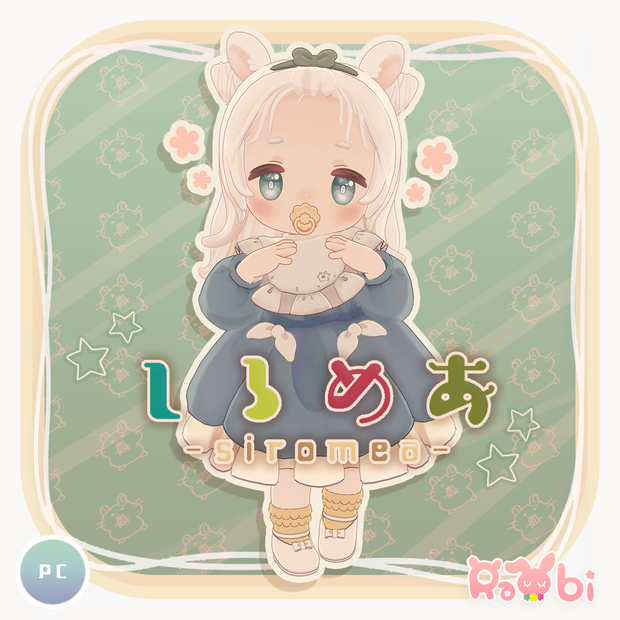
【オリジナル3Dモデル】しろめあ -SIROMEA-
制作者_Creator ひの(hino) twitter@hino_VRC ▶https://twitter.com/hino_VRC
小さいハムスターのもちもち赤ちゃんです。
ほっぺたがゆれたり、EXメニューで音が鳴るガラガラやおしゃぶりのON/OFFなどが可能です。
This is a small glutinous baby hamster.
The cheeks shake, and you can use the EX menu to turn on/off the sounding rattle and pacifier.
試着可能ワールド(Sample Avatars):Avatar Museum5
rabishopのハッシュタグ作りました。
撮った写真などはtwitterで #VRCしろめあ と、#rabi3D をつけてツイートしてもらえると作者がとても喜びます🐇♡
✦商品内容✦-Product Contents-
■siromea_ver.1.0.5(メインデータなので最初に必ずダウンロードしてください。)
・siromea_ver.1.0.5.unitypackage
・PSD,clip
・FBX
・textures.png
・blenderデータ
・rabi 3Dモデル利用規約 -rabi 3Dmodel_Terms of Service-
・改変メモ
■siromea_colorOptions(色改変用のデータです。)
・clip
・tex
・colorOptions.unitypackage
・readme
✦商品仕様✦-Product Specifications-
・ポリゴン数 △50425polygons
・シェーダー-Shader- lilToon
・Blend shape 104
・設定済み表情アニメーション -FacialExpressions- 19
・ダイナミックボーンとPhysBones設定済み Dynamic bones and PhysBones already set
・髪型の調整可能 Adjustable hair style.
・素体データ有 Body data is available.
・メニューから衣装の変更、着替え、ガラガラ遊び、クレヨンと耳とおしゃぶりのON/OFFができます。
From the menu, you can change outfits, change clothes,
play with rattles, and turn on/off the crayons, ears, and pacifier.
・人耳prefab付(改変用) With human ear prefab (for modification)
✦対応衣装の販売について✦
衣装の販売は大歓迎です!
販売データにアバター本体のデータを入れることは禁止します。
宣材画像にモデルとしてしろめあを使用して頂くことも、モデル名を記載することを条件に許可します。
You are welcome to sell your costumes!
It is prohibited to include the data of the avatar itself in the sales data.
You may also use Shiromeia as a model in your promotional images, provided that you include the model's name.
✦導入方法✦ -How to Upload-
①Unity 2022.3.22f1 で新規プロジェクトを作成
②モデルをインポートする前に、LilToonを、Asetts → Import Package → Custom Packageからインポート。
③siromea_ver.1.0.5.unitypackageを
Asetts → Import Package → Custom Packageからインポートします。
色改変がしたい人はsiromea_colorOptionsをダウンロードしてcolorOptions.unitypackageもAsetts → Import Package → Custom Packageからインポートしてください。
④projectタブのsiromeaフォルダ内のsiromeaプレハブと、必要であればsiromea_thumbnailプレハブをHierarchyに移動します。(プレハブのマテリアルが紫になっている場合は、プレハブを選択して右クリック→Reimportで直ります。)
⑤ ④でsiromea_thumbnailプレハブを移動した人は、アップロード時に、VRCCamをHierarchyから選択してInspectorのTransformのPositionのYを1にしていただくと、
サムネイルが変更されます。
Materials>thumbnailの中のマテリアルのテクスチャを変えれば好きなサムネイルにできます。
⑥アップロードして終了です。
①Create a new project with Unity 2022.3.22f1
②Import LilToon from Asets → Import Package → Custom Package before importing the model.
③ Import siromea_ver.1.0.0.unitypackage
Asetts → Import Package → Custom Package.
If you want to modify the colors, download siromea_colorOptions and import colorOptions.unitypackage from Asetts → Import Package → Custom Package.
④In the siromea folder in the project tab, move the siromea prefab and, if necessary, the siromea_thumbnail prefab to the Hierarchy. (If the prefab's material is purple, select the prefab and right click -> Reimport to fix it.)
⑤For those of you who have moved the siromea_thumbnail prefab in ④, when you upload, please select the VRCCam from the Hierarchy and set the Y in Transform's Position to 1 in Inspector.
This will change the thumbnail.
You can change the texture of the material in Materials>thumbnail to make any thumbnail you want.
⑥ Upload the file and you are done.
✦rabi 3Dモデル利用規約
https://drive.google.com/file/d/1tRuJ1FRg4ltLlWLySlTiqVOOhY_N-Pfq/view?usp=drive_link
✦rabi 3Dmodel_Terms of Service
https://drive.google.com/file/d/1kWDEZy55xPUfvnmK_-hpDIerworPTURa/view?usp=drive_link
✦rabi 3D 모델 이용 약관
https://drive.google.com/file/d/1QmCPqhzMuXjZrbfT1IKlA9EfgLhABshB/view?usp=drive_link
✦rabi 3D model 中文版
https://drive.google.com/file/d/1QpG1t_U15Z2CjtHEWKlkudBxsocrEkqX/view?usp=drive_link
🐰アバターをVtuberとして使用したい場合は購入する前にご相談ください。
✦更新履歴
2022/01/21 販売開始
2022/01/29 siromea_ver.1.0.1 とsiromea_colorOptionsを公開しました。
■追加要素 Additional elements
・別フォルダでsiromea_colorOptionsを追加して色改変がしやすくなりました。
・すやすやAFKモーションを追加しました。
・きらきらくれよんを追加しました。
■不具合の修正 Bug Fixes
・伏せジャンプをしたらコライダーダッシュが起きていたので修正しました。
・服のリボンのシェイプキー(hide_ribbon)が破綻していたので修正しました。
・FXを修正して瞬きやリップシンクなどで起こる表情の破綻を緩和しました。
2022/4/24 siromea_ver.1.0.2公開
・PhysBonesに対応しました。
・人耳prefabを追加しました。
2022/09/24 siromea_ver.1.0.3公開
・貫通対策シェイプキーの追加、新規表情追加、FXの修正、その他微調整をしました。
2022/01/03 siromea_ver.1.0.4公開
・髪、耳、ほっぺ、スカートのPB設定を修正をしました。
・AFKアニメーションとHipコライダーの微調整をしました。
2023/04/04 ver.1.0.5公開
・VRCSDKが更新されたことで、ガラガラの音が原因でアップロードできなくなる問題が発生したので修正いたしました。
(siromea>Audio_Particle Systemにあるガラガラの音ファイルのInspectorの『Load In Background』にチェックを入れてApplyを押せばアップロードできるようになります。)
✦動画で使用させて頂いた素敵なワールド
しろめあちゃんが可愛く撮れます。
とてもおすすめのワールドです。
https://vrchat.com/home/launch?worldId=wrld_c5f7a361-e3d9-4266-89b4-1024fc39328b&instanceId=33643
しろめあ対応衣装
■うさぎの赤ちゃんセット
https://booth.pm/ja/items/3600471
■園児服
https://booth.pm/ja/items/3622555
■きょうりゅうきぐるみ
https://rabishop.booth.pm/items/3601127
■少女パジャマ
https://rabishop.booth.pm/items/3691028
■にゃんこ探検隊
https://rabishop.booth.pm/items/3904080
■みつばちべいびぃ
https://rabishop.booth.pm/items/4140310
■彼ニット
모든 리뷰
더보기리뷰 등록
리뷰를 작성하려면 로그인이 필요합니다.
로그인하고 리뷰 쓰기