'%3e%3cg%20clip-path='url(%23roundHexB)'%3e%3cpath%20fill='%236D5DFC'%20d='M256%2040%20443%20148%20443%20364%20256%20472%2069%20364%2069%20148Z'/%3e%3cpath%20fill='%239C93FB'%20d='M69%20148%20256%2040%20443%20148%20256%20256Z'/%3e%3cpath%20fill='%234A3FD1'%20d='M256%20256%20443%20148%20443%20364%20256%20472Z'/%3e%3c/g%3e%3c!--%20top%20face:%20filled%20round%20magnifier%20--%3e%3cg%20transform='matrix(0.8660254,-0.5,0.8660254,0.5,69,148)'%3e%3cg%20transform='matrix(0.935,0,0,0.935,7.02,7.02)'%3e%3ccircle%20cx='88'%20cy='88'%20r='52'%20fill='%23FFFFFF'/%3e%3ccircle%20cx='88'%20cy='88'%20r='28'%20fill='%239C93FB'/%3e%3cpath%20d='M124%20124%20164%20164'%20stroke='%23FFFFFF'%20stroke-width='26'%20stroke-linecap='round'/%3e%3c/g%3e%3c/g%3e%3cg%20transform='matrix(0.8660254,0.5,0,1,69,148)'%3e%3cpath%20d='M96.1,61.08%20L45.9,128.92%20Q34,145%2054,145%20L162,145%20Q182,145%20170.1,128.92%20L119.9,61.08%20Q108,45%2096.1,61.08%20Z'%20fill='%23FFFFFF'/%3e%3c/g%3e%3c!--%20right%20face:%20filled%20bubble%20--%3e%3cg%20transform='matrix(0.8660254,-0.5,0,1,256,256)'%3e%3cg%20transform='matrix(0.855,0,0,0.855,15.66,15.66)'%3e%3cpath%20d='M60%2042H156a28%2028%200%200%201%2028%2028V158Q184%20168%20174.47%20164.96L124.53%20149.04Q115%20146%20105%20146H60a28%2028%200%200%201-28-28V70a28%2028%200%200%201%2028-28Z'%20fill='%23FFFFFF'/%3e%3c/g%3e%3c/g%3e%3c/g%3e%3c/svg%3e)
 SYS / SHOP_6
상품 설명
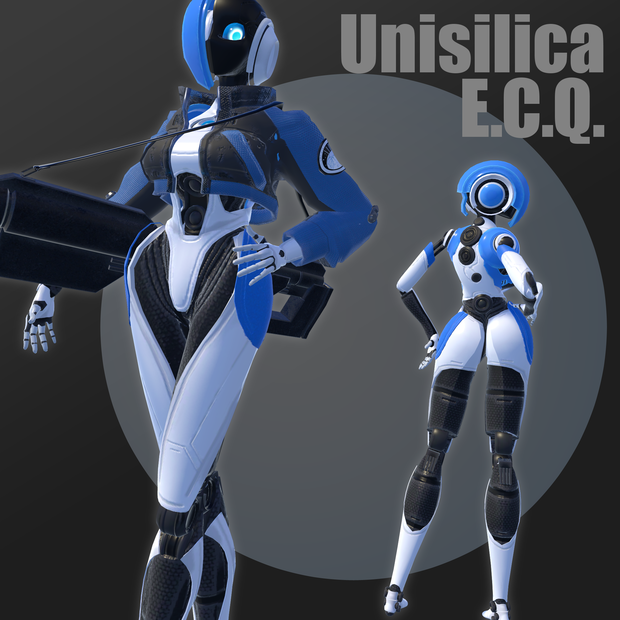
VRC想定のアバターモデル「Unisilica ユニシリカ」
のfbxモデル及びVRCセットアップ済みアバターのunitypackageです。
【注意事項】【Notes】
・モデル、テクスチャ、エフェクトの改造・加筆修正は自由です。
・データの再配布はおやめください。
・フルボディトラッキング適正:最低限の動作のみ対応
・VRChatで使用することを想定しています。が、その他動画コンテンツ、自作ゲーム等での使用も可能です。
-You are free to modify or modify the model, texture, and effects.
-Please do not redistribute the data.
-It is supposed to be used in VRChat. However, it can also be used in other video content, homebrew games, etc.
【内容】【Details】
・本製品unitypackage
∟・素体fbxファイル,prefab
∟・ジャケット付きfbxファイル,prefab
∟・アクセサリー(ジェネリックレーザー砲)fbxファイル
∟・AvaterDescriptor設定シーン
∟・マテリアル
∟・テクスチャ
・サムネイル
・readme
・ This product unity package
∟ ・ Element fbx file, prefab
∟ ・ Fbx file with jacket, prefab
∟ ・ Accessories (generic laser cannon) fbx file
∟ ・ Avater Descriptor setting scene
∟ ・ Material
∟ ・ Texture
・ thumbnail
・ readme
【導入】【Install】
VRCSDK 2021.11.08.14.28(以降)を導入します。(https://docs.vrchat.com/docs/setting-up-the-sdk)
Assets/unisilica/silica.sceneを開きます。
VRChatSDKウィンドウのBuilderタブ上部からunisilicaTjacket(ジャケット付き)もしくはunisilicaT(素体)を選択してアップロードしてください。
改変を行う際はAssets/unisilica/unisilicaTjacket.fbxもしくはAssets/unisilica/unisilicaT.fbxをご利用ください。
install VRCSDK 2021.11.08.14.28(or later) (https://docs.vrchat.com/docs/setting-up-the-sdk)
Open "Assets/unisilica/silica.scene" .
In the VRChatSDK window, select unisilicaTjacket or unisilicaT from the top of the Builder tab, and upload it.
To modify it, please use Assets/unisilica/unisilicaTjacket.fbx or Assets/unisilica/unisilicaT.fbx.
모든 리뷰
더보기리뷰 등록
리뷰를 작성하려면 로그인이 필요합니다.
로그인하고 리뷰 쓰기