'%3e%3cg%20clip-path='url(%23roundHexB)'%3e%3cpath%20fill='%236D5DFC'%20d='M256%2040%20443%20148%20443%20364%20256%20472%2069%20364%2069%20148Z'/%3e%3cpath%20fill='%239C93FB'%20d='M69%20148%20256%2040%20443%20148%20256%20256Z'/%3e%3cpath%20fill='%234A3FD1'%20d='M256%20256%20443%20148%20443%20364%20256%20472Z'/%3e%3c/g%3e%3c!--%20top%20face:%20filled%20round%20magnifier%20--%3e%3cg%20transform='matrix(0.8660254,-0.5,0.8660254,0.5,69,148)'%3e%3cg%20transform='matrix(0.935,0,0,0.935,7.02,7.02)'%3e%3ccircle%20cx='88'%20cy='88'%20r='52'%20fill='%23FFFFFF'/%3e%3ccircle%20cx='88'%20cy='88'%20r='28'%20fill='%239C93FB'/%3e%3cpath%20d='M124%20124%20164%20164'%20stroke='%23FFFFFF'%20stroke-width='26'%20stroke-linecap='round'/%3e%3c/g%3e%3c/g%3e%3cg%20transform='matrix(0.8660254,0.5,0,1,69,148)'%3e%3cpath%20d='M96.1,61.08%20L45.9,128.92%20Q34,145%2054,145%20L162,145%20Q182,145%20170.1,128.92%20L119.9,61.08%20Q108,45%2096.1,61.08%20Z'%20fill='%23FFFFFF'/%3e%3c/g%3e%3c!--%20right%20face:%20filled%20bubble%20--%3e%3cg%20transform='matrix(0.8660254,-0.5,0,1,256,256)'%3e%3cg%20transform='matrix(0.855,0,0,0.855,15.66,15.66)'%3e%3cpath%20d='M60%2042H156a28%2028%200%200%201%2028%2028V158Q184%20168%20174.47%20164.96L124.53%20149.04Q115%20146%20105%20146H60a28%2028%200%200%201-28-28V70a28%2028%200%200%201%2028-28Z'%20fill='%23FFFFFF'/%3e%3c/g%3e%3c/g%3e%3c/g%3e%3c/svg%3e)
 heroesnfools
상품 설명
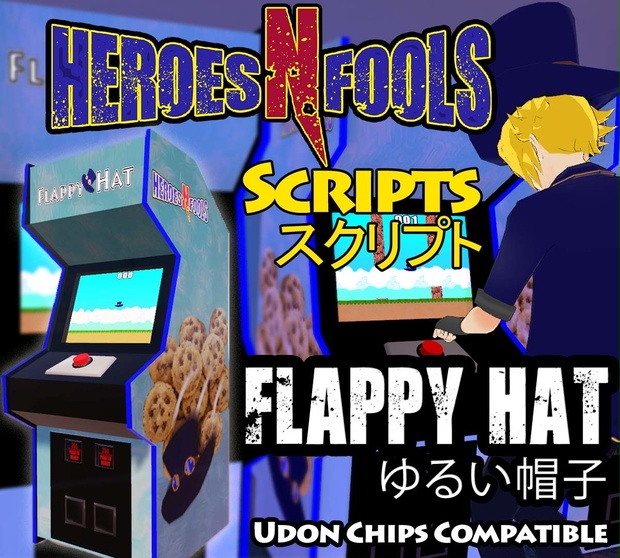
A fully functional arcade cabinet with the game Flappy Hat! Perfect to add to your arcade world to have a fully functional game. Also, this arcade game is compatible with Udon Chips
Install Instructions
-First be sure you're environment has the latest VRChat SDK3 package for worlds installed.
-Next make sure to install Merlins Udon Sharp package
-If you wish to use Udon Chips, install that related package based on their instructions next.
-Next install the package of Flappy Hat you purchased
-Drag the prefab desired from the HnFScripts\Other\FlappyHat\Prefabs folder into the scene.
-In the prefab, you can configure the game settings on HnF_FlappyHat behavior located on the Cabinet gameobject.
-That's it! prefab is ready for use, it's low impact so you should be able to have several in one world.
Try before you Buy?
Give the arcade cabinet a try in my Arcade world!
HnF Arcade: https://vrchat.com/home/world/wrld_a6c85639-6e19-4366-8f69-72b4ae657aaa
Details
-Each game works in sync, and doesn't contribute to network lag while not in use.
-In VR you can physically slap the button by moving your model's wrist close to the button.
-The screen is clickable to make for ease of use in desktop.
-To use Udon Chips, check the check box for Udon Chips on the Cabinet game object, then configure the cost and reward multiplier to you're liking.
Requirements
Udon Chips (Optional): https://lura.booth.pm/items/3060394
Udon: https://vrchat.com/home/download
UdonSharp: https://github.com/MerlinVR/UdonSharp/releases/
Update informations
[2021-10-20: v1.0] Release for booth.
[2021-10-29: v1.1] Fixed denied sound reference not being attached to cabinet
[2021-12-07: v1.2] Fixed export incompatibility with Virtual Tennis
Set max score to 9999 and added more cabinet settings
모든 리뷰
더보기리뷰 등록
리뷰를 작성하려면 로그인이 필요합니다.
로그인하고 리뷰 쓰기