'%3e%3cg%20clip-path='url(%23roundHexB)'%3e%3cpath%20fill='%236D5DFC'%20d='M256%2040%20443%20148%20443%20364%20256%20472%2069%20364%2069%20148Z'/%3e%3cpath%20fill='%239C93FB'%20d='M69%20148%20256%2040%20443%20148%20256%20256Z'/%3e%3cpath%20fill='%234A3FD1'%20d='M256%20256%20443%20148%20443%20364%20256%20472Z'/%3e%3c/g%3e%3c!--%20top%20face:%20filled%20round%20magnifier%20--%3e%3cg%20transform='matrix(0.8660254,-0.5,0.8660254,0.5,69,148)'%3e%3cg%20transform='matrix(0.935,0,0,0.935,7.02,7.02)'%3e%3ccircle%20cx='88'%20cy='88'%20r='52'%20fill='%23FFFFFF'/%3e%3ccircle%20cx='88'%20cy='88'%20r='28'%20fill='%239C93FB'/%3e%3cpath%20d='M124%20124%20164%20164'%20stroke='%23FFFFFF'%20stroke-width='26'%20stroke-linecap='round'/%3e%3c/g%3e%3c/g%3e%3cg%20transform='matrix(0.8660254,0.5,0,1,69,148)'%3e%3cpath%20d='M96.1,61.08%20L45.9,128.92%20Q34,145%2054,145%20L162,145%20Q182,145%20170.1,128.92%20L119.9,61.08%20Q108,45%2096.1,61.08%20Z'%20fill='%23FFFFFF'/%3e%3c/g%3e%3c!--%20right%20face:%20filled%20bubble%20--%3e%3cg%20transform='matrix(0.8660254,-0.5,0,1,256,256)'%3e%3cg%20transform='matrix(0.855,0,0,0.855,15.66,15.66)'%3e%3cpath%20d='M60%2042H156a28%2028%200%200%201%2028%2028V158Q184%20168%20174.47%20164.96L124.53%20149.04Q115%20146%20105%20146H60a28%2028%200%200%201-28-28V70a28%2028%200%200%201%2028-28Z'%20fill='%23FFFFFF'/%3e%3c/g%3e%3c/g%3e%3c/g%3e%3c/svg%3e)
 wasuwasu shop
상품 설명
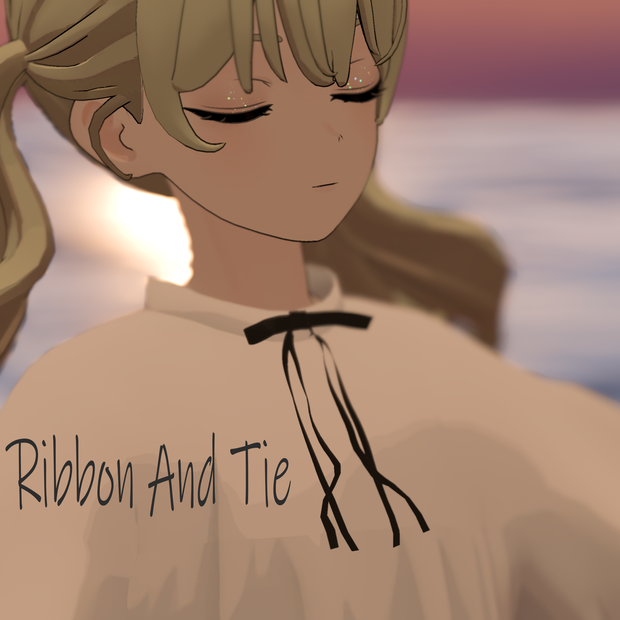
シンプルなリボンタイです。
DynamicBone設定済みで揺れます。
Grusちゃんのアバターの位置に合わせたprefabを同封しています。
ポリゴン数 △ 4,496
テクスチャ:4種類(black, red, emerald, white)
【内容物/Contents】
┗RibbonAndTie
┃Ribbon_AndTie.unitypackage
┃RibbonAndTie.fbx
┃RibbonAndTie.prefab
┃RibbonAndTie_for_grus.prefab
┃RibbonAndTieTexture.psd
┗texture
┃RibbonAndTieTexture_white.png
┃RibbonAndTieTexture_black.png
┃RibbonAndTieTexture_emerald.png
┃RibbonAndTieTexture_red.png
┗material
┃RibbonAndTie_Black.mat
┃RibbonAndTie_Emerald.mat
┃RibbonAndTie_Red.mat
┃RibbonAndTie_white.mat
【導入方法】
1. Poiyomi Toonシェーダーをインポート
2. DynamicBoneをインポート
3. Ribbon_AndTie.unitypackageをインポート
4. prefabをアバターのChestボーンの位置に入れてください。
【使用アセット】
・Poiyomi Toon V7.3.046
https://github.com/poiyomi/PoiyomiToonShader/releases
・DynamicBone
【更新履歴】
2021/10/17 公開
【サムネ内使用商品】
※アバター本体は付属してません
Grus
https://booth.pm/ja/items/3190100
問い合わせはこちらまで
booth https://wasuwasu.booth.pm/
twitter https://twitter.com/wasuwasus
【利用規約】
本データはVN3ライセンスに準拠しております。下の規約に則った利用をお願いします。
https://drive.google.com/drive/folders/1i7BxukOwR4nYTtP8tmd1N2dPS7uQBMo3?usp=sharing
<EN>
[How to use]
1. Import Poiyomi Toon shader
2. Import DynamicBone
3. Import Ribbon_AndTie.unitypackage.
4. Put prefab in the position of your avatar's Chest bone.
[Used Assets]
Poiyomi Toon V7.3.046
https://github.com/poiyomi/PoiyomiToonShader/releases
DynamicBone
[Update history]
Published on 2021/10/17
[Products used in the thumbnail]
The avatar itself is not included.
Grus
https://booth.pm/ja/items/3190100
For inquiries, please contact
booth https://wasuwasu.booth.pm/
twitter https://twitter.com/wasuwasus
[Terms of Use]
This data complies with the VN3 license. Please use the data in accordance with the following terms.
https://drive.google.com/drive/folders/1i7BxukOwR4nYTtP8tmd1N2dPS7uQBMo3?usp=sharing
모든 리뷰
더보기리뷰 등록
리뷰를 작성하려면 로그인이 필요합니다.
로그인하고 리뷰 쓰기