'%3e%3cg%20clip-path='url(%23roundHexB)'%3e%3cpath%20fill='%236D5DFC'%20d='M256%2040%20443%20148%20443%20364%20256%20472%2069%20364%2069%20148Z'/%3e%3cpath%20fill='%239C93FB'%20d='M69%20148%20256%2040%20443%20148%20256%20256Z'/%3e%3cpath%20fill='%234A3FD1'%20d='M256%20256%20443%20148%20443%20364%20256%20472Z'/%3e%3c/g%3e%3c!--%20top%20face:%20filled%20round%20magnifier%20--%3e%3cg%20transform='matrix(0.8660254,-0.5,0.8660254,0.5,69,148)'%3e%3cg%20transform='matrix(0.935,0,0,0.935,7.02,7.02)'%3e%3ccircle%20cx='88'%20cy='88'%20r='52'%20fill='%23FFFFFF'/%3e%3ccircle%20cx='88'%20cy='88'%20r='28'%20fill='%239C93FB'/%3e%3cpath%20d='M124%20124%20164%20164'%20stroke='%23FFFFFF'%20stroke-width='26'%20stroke-linecap='round'/%3e%3c/g%3e%3c/g%3e%3cg%20transform='matrix(0.8660254,0.5,0,1,69,148)'%3e%3cpath%20d='M96.1,61.08%20L45.9,128.92%20Q34,145%2054,145%20L162,145%20Q182,145%20170.1,128.92%20L119.9,61.08%20Q108,45%2096.1,61.08%20Z'%20fill='%23FFFFFF'/%3e%3c/g%3e%3c!--%20right%20face:%20filled%20bubble%20--%3e%3cg%20transform='matrix(0.8660254,-0.5,0,1,256,256)'%3e%3cg%20transform='matrix(0.855,0,0,0.855,15.66,15.66)'%3e%3cpath%20d='M60%2042H156a28%2028%200%200%201%2028%2028V158Q184%20168%20174.47%20164.96L124.53%20149.04Q115%20146%20105%20146H60a28%2028%200%200%201-28-28V70a28%2028%200%200%201%2028-28Z'%20fill='%23FFFFFF'/%3e%3c/g%3e%3c/g%3e%3c/g%3e%3c/svg%3e)
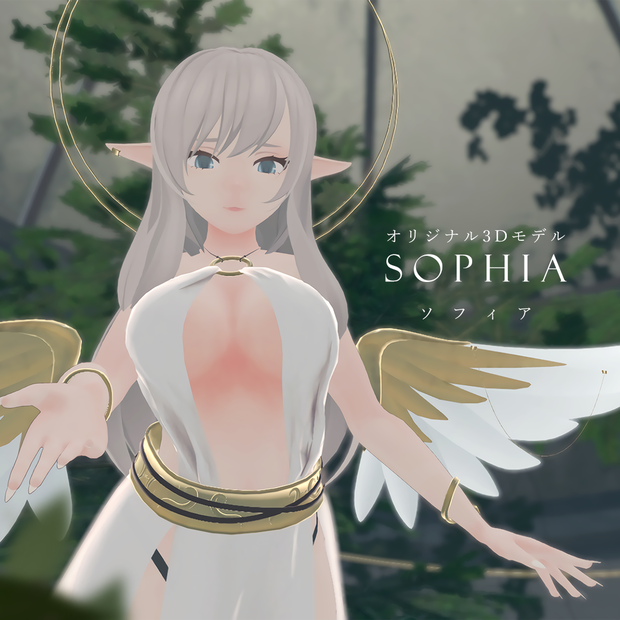
 flowersrite
상품 설명
■アバター試着ワルド / Find the avatar sample in this world:
https://vrchat.com/home/world/wrld_2cbf8ffb-e78b-4303-af30-6ecf14c47d04
内容 / CONTENT
■ Unityパッケージ / Unity package
- アバターモデル / avatar model
- 素体モデル / avatar base model
- アニメーション (表情, アバター3.0メニュー) / animations (facial expressions, avatar 3.0 menus)
- 調整用テクスチャ (psd) / modifiable textures (psd)
詳細 / DETAILS
■ モデリング環境 / modeling environment: Blender 2.90
■ ポリゴン数 △ / polygon count △
衣裝A: △81544 (体+衣裝+翼)
衣裝B: △71640 (体+衣裝+翼)
素体: △31654 (体) + △25734 (髪) + △1316 (衣裝)
■ Avatars3.0対応 (Humanoid)
■ アニメーション設定済み / animations are set up
■ 表情アニメーション (12種) / 12 default animation files for facial expressions
■ 表情調整用ブレンドシェイプ (71種) / 71 blendshapes to create facial expressions
■ リップシンク設定済み / lip-sync is set up
■ Dynamic Bone設定済み (アセットは含まれていません,あらかじめご導入してください) / Dynamic Bone is set up (the asset is not included, please import beforehand)
■ フルトラッキング対応 / full body tracking is supported
導入方法 / IMPORTING
【JP】
1. Unityの指定バージョンで新規プロジェクトを作成してください。
VRChat指定のUnityバージョン: https://docs.vrchat.com/docs/current-unity-version
2. VRCSDK (*Avatar SDK3) をインポートしてください。
https://vrchat.com/home/download
3. Dynamic Bone (有料) をインポートしてください。
(https://assetstore.unity.com/packages/tools/animation/dynamic-bone-16743)
4. Sunao Shader (無料) をインポートしてください。
(https://booth.pm/zh-cn/items/1723985)
5. 本データのunitypackageをインポートしてください。
6.オプションA: FlowersRite Sophiaフォルダの中でPREFABをHierarchyに追加してください。
OR
オプションB: FlowersRite Sophiaフォルダの中で”Sophia Scene”を開いてください。
7. VRCにアップロード√
【EN】
1. Create a new Unity project, please use the correct Unity version VRChat announced.
Currently Supported Unity Version: https://docs.vrchat.com/docs/current-unity-version
2. Import VRCSDK (*Avatar SDK3).
https://vrchat.com/home/download
3. Import Dynamic Bone (paid asset).
(https://assetstore.unity.com/packages/tools/animation/dynamic-bone-16743)
4. Import Sunao Shader (free asset).
(https://booth.pm/zh-cn/items/1723985)
5. Import unitypackage of the avatar you purchased.
6.Option A: Drag the prefab from "FlowersRite Sophia" folder into Hierarchy.
OR
Option B: Open “Sophia Scene” from "FlowersRite Sophia" folder.
7. Ready to upload to VRChat√
利用規約 / RULES
本モデルではVN3ライセンス(https://www.vn3.org/)を使用しています。
規約を以下のリンクでご確認ください。
【JP】
https://drive.google.com/file/d/1euniV4XWld3ASnoyTnnnc2ZdY_h3sibt/view?usp=sharing
【EN】
https://drive.google.com/file/d/1IAfwZO2xpXBxeY-bIw_8fpCvmX0Bu-qz/view?usp=sharing
改版履歴 / UPDATES
■ 2021.9.17 v1.005
リリース
■ 2021.9.17 v1.006
PREFABを追加しました。
■ 2021.9.17 v1.007
Re-organized the folder
모든 리뷰
더보기리뷰 등록
리뷰를 작성하려면 로그인이 필요합니다.
로그인하고 리뷰 쓰기