'%3e%3cg%20clip-path='url(%23roundHexB)'%3e%3cpath%20fill='%236D5DFC'%20d='M256%2040%20443%20148%20443%20364%20256%20472%2069%20364%2069%20148Z'/%3e%3cpath%20fill='%239C93FB'%20d='M69%20148%20256%2040%20443%20148%20256%20256Z'/%3e%3cpath%20fill='%234A3FD1'%20d='M256%20256%20443%20148%20443%20364%20256%20472Z'/%3e%3c/g%3e%3c!--%20top%20face:%20filled%20round%20magnifier%20--%3e%3cg%20transform='matrix(0.8660254,-0.5,0.8660254,0.5,69,148)'%3e%3cg%20transform='matrix(0.935,0,0,0.935,7.02,7.02)'%3e%3ccircle%20cx='88'%20cy='88'%20r='52'%20fill='%23FFFFFF'/%3e%3ccircle%20cx='88'%20cy='88'%20r='28'%20fill='%239C93FB'/%3e%3cpath%20d='M124%20124%20164%20164'%20stroke='%23FFFFFF'%20stroke-width='26'%20stroke-linecap='round'/%3e%3c/g%3e%3c/g%3e%3cg%20transform='matrix(0.8660254,0.5,0,1,69,148)'%3e%3cpath%20d='M96.1,61.08%20L45.9,128.92%20Q34,145%2054,145%20L162,145%20Q182,145%20170.1,128.92%20L119.9,61.08%20Q108,45%2096.1,61.08%20Z'%20fill='%23FFFFFF'/%3e%3c/g%3e%3c!--%20right%20face:%20filled%20bubble%20--%3e%3cg%20transform='matrix(0.8660254,-0.5,0,1,256,256)'%3e%3cg%20transform='matrix(0.855,0,0,0.855,15.66,15.66)'%3e%3cpath%20d='M60%2042H156a28%2028%200%200%201%2028%2028V158Q184%20168%20174.47%20164.96L124.53%20149.04Q115%20146%20105%20146H60a28%2028%200%200%201-28-28V70a28%2028%200%200%201%2028-28Z'%20fill='%23FFFFFF'/%3e%3c/g%3e%3c/g%3e%3c/g%3e%3c/svg%3e)
 jetdog
상품 설명
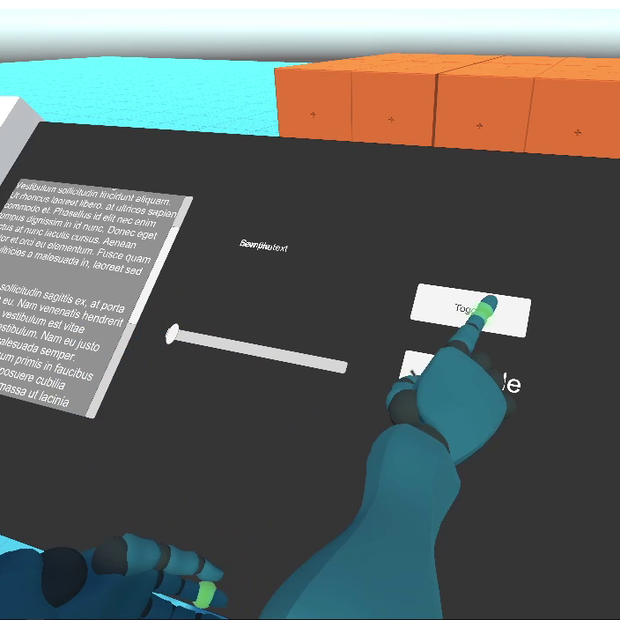
A simple script to Upgrade UI panels in VRChat. Will allow you to use your finger to physically touch the buttons.
See a Preview: https://twitter.com/jetdog8808_dev/status/1435347755958931462
Try your self: https://vrchat.com/home/world/wrld_fa354ba2-cb66-4f8c-b857-d42ea3d76e21
Requirements:
* VRChat sdk
* UdonSharp
Setup:
drag "finger trackers" into the scene. This is the colliders used to let you interact with the ui. then add the "UI_interaction" udon script to buttons, toggles, sliders, or scrollbars. you can also just add it to one of those gameobjects and then click the "Apply to all UI" to add the script to the rest of the gameobjects automatically.
IMPORTANT:
This script does not support layered ui. if you have two buttons on top of each other it will press both. This does not support masks as well. you will still be able to press it even if you cant see it.
Notes:
This script supports buttons, toggles, sliders, and scrollbars. Will handle interactable state and transitions. You can also specify with buttons and toggles to send events on Press or Release.
There is also a button on the script that will apply it to all supported components in the scene.
모든 리뷰
더보기리뷰 등록
리뷰를 작성하려면 로그인이 필요합니다.
로그인하고 리뷰 쓰기