'%3e%3cg%20clip-path='url(%23roundHexB)'%3e%3cpath%20fill='%236D5DFC'%20d='M256%2040%20443%20148%20443%20364%20256%20472%2069%20364%2069%20148Z'/%3e%3cpath%20fill='%239C93FB'%20d='M69%20148%20256%2040%20443%20148%20256%20256Z'/%3e%3cpath%20fill='%234A3FD1'%20d='M256%20256%20443%20148%20443%20364%20256%20472Z'/%3e%3c/g%3e%3c!--%20top%20face:%20filled%20round%20magnifier%20--%3e%3cg%20transform='matrix(0.8660254,-0.5,0.8660254,0.5,69,148)'%3e%3cg%20transform='matrix(0.935,0,0,0.935,7.02,7.02)'%3e%3ccircle%20cx='88'%20cy='88'%20r='52'%20fill='%23FFFFFF'/%3e%3ccircle%20cx='88'%20cy='88'%20r='28'%20fill='%239C93FB'/%3e%3cpath%20d='M124%20124%20164%20164'%20stroke='%23FFFFFF'%20stroke-width='26'%20stroke-linecap='round'/%3e%3c/g%3e%3c/g%3e%3cg%20transform='matrix(0.8660254,0.5,0,1,69,148)'%3e%3cpath%20d='M96.1,61.08%20L45.9,128.92%20Q34,145%2054,145%20L162,145%20Q182,145%20170.1,128.92%20L119.9,61.08%20Q108,45%2096.1,61.08%20Z'%20fill='%23FFFFFF'/%3e%3c/g%3e%3c!--%20right%20face:%20filled%20bubble%20--%3e%3cg%20transform='matrix(0.8660254,-0.5,0,1,256,256)'%3e%3cg%20transform='matrix(0.855,0,0,0.855,15.66,15.66)'%3e%3cpath%20d='M60%2042H156a28%2028%200%200%201%2028%2028V158Q184%20168%20174.47%20164.96L124.53%20149.04Q115%20146%20105%20146H60a28%2028%200%200%201-28-28V70a28%2028%200%200%201%2028-28Z'%20fill='%23FFFFFF'/%3e%3c/g%3e%3c/g%3e%3c/g%3e%3c/svg%3e)
 FELIETTA's Nightmare Shop
 【VRChat向け武器モデル】ダブルバレルソードオフショットガン "カリエンテ12" 【Weapon Model for VRChat】Double Barrel Sawedoff Shotgun "Caliente 12"
상품 설명
[重要]2023年4月15日、FELIETTA's Nightmare Shop VRChat関連商品の取り扱い終了のお知らせ
FELIETTA's Nightmare Shop will cease handling VRChat-related products on April 15, 2023.
https://note.com/felietta/n/n0da7fb1de043
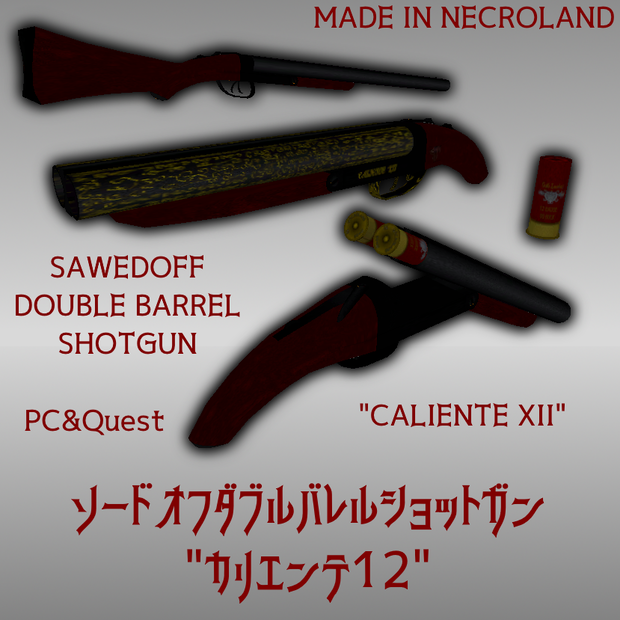
[VRChat想定 Quest対応] ソードオフダブルバレルショットガン "カリエンテ12"
アップデートログ
v1.2 Sunao Shaderを使用したPC用ノーマルマップ設定済み版を追加、音の減衰設定を追加。
Sunao Shader
(揚茄子研究所 https://agenasu.booth.pm/items/1723985)
v1.1 発砲設定済みprefab、アニメーション、効果音、ホルスター追加
v1.0 初公開
ご注意:
既に前Verの当商品をインストールしたアバターにアップデートを適用する際は、
必ずプロジェクトファイルのバックアップを行い、更に既存のprefabをインポート時に
上書きしないよう、上書き更新されるファイルのチェックを外してご使用下さい。
上記の作業を行わない場合、アバターに配置したアクセサリの角度、
位置調整がリセットされてしまいます。
2021/8/14~2021/8/28に開催される
「バーチャルマーケット6」の「九蛇之市」出展しており、
サンプルの展示がございます。是非お試し下さいませ。
製作者:フェリエッタ(FELIETTA)
HP:http://forgotten-nightmare.com/
Twitter:https://twitter.com/FELIETTA_LURU
Booth:https://nightmareshop.booth.pm/
"カリエンテ12"
フェリエッタが悪夢に流れ着いた時、
化物達の多くは最初から味方ではなかった。
他の人間にそうしてきたように、戯れに牙と爪を剥いた。
脆弱な身体で化物と対話する唯一の方法は銃だった。
不死で稲妻の如く駆ける化物達が襲い来る悪夢では、
対人用のタクティカルアドバンテージなど通用しない。
唯一、化物達と対等に戦える銃。
それがソードオフダブルバレルショットガンだ。
壊れた同銃の山から状態の良いパーツを選り抜き、
フェリエッタの手で組み上げられた銃。
それがカリエンテ12、化物になる為の銃。
美しいエングレーブ(彫刻)はルルによるもの。
彼を化物と認めた証に彼女が彫ったのだ。
VRChat向けに調整したソードオフダブルバレルショットガンです。Unity2019対応済み。
オリジナル作品「Forgotten Nightmare」に登場する武器を3Dモデル化しました。
実銃で可動する箇所には全てボーン、シェイプキーを設定しています(分解を除く)。
Quest完全対応で、使用シェーダーはToon Lit、
透過が難しいQuest向けにメッシュとシェイプキーを用いた
マズルフラッシュ(左右バレル)を搭載しています。
彫刻入り(フェリエッタ愛銃モデル)バージョン、彫刻無しバージョン、
ソードオフ前のノーマルダブルバレルショットガン、12ゲージショットシェル単品の4モデル入り。
また、射撃場で実銃のダブルバレルショットガンから録音した発砲音ファイルも付属します。
アバターのみならず、ワールドへの実装、ゲームへの組み込み等にご利用可能です。
アップデートにより、モデルガンと実物空薬莢にて収録したリロード音、
ソードオフショットガンを腰に吊り下げて携帯できるシェルホルダー付きホルスター、
更に「BitActionSwitch」や「RadialInventorySystem」等のアバター3.0メニュー向け
オブジェクト出し入れツールを利用する事により、比較的簡単に疑似的な
発砲&装填、ガンスピンの表現が可能になるアニメーション設定済みPrefabも付属します。
[ご注意]
・組み込みにはUnityの知識が必要になります。
----------------
パッケージ内容
----------------
PC用Sunao Shader仕様版
Sawedoff_Shotgun_Caliente12(PC).unitypackage
Unity用武器モデル5種、発砲&ガンスピンアニメーション入りPrefabセット
Sawedoff_Shotgun_Caliente12.unitypackage
unitypackage直下の各prefabはアニメーション未設定のオブジェクトです。
通常のアクセサリ、上級者向け改変ベースにはこちらをご使用下さい。
-> Animations -> single_animsにはゲーム、ワールド開発向けの発砲のみ、
リロードのみのアニメーションが入っています。
-> Prefab_Shooting -> fireにはBitActionSwitchやRadialInventorySystem等での利用を想定した、
出現と同時に射撃、排莢、装填を繰り返すアニメーション、ライト、効果音設定済みの
Prefabが入っています。
-> Prefab_Shooting -> spinにはBitActionSwitchやRadialInventorySystem等での利用を想定した、
出現と同時にガンスピンを繰り返すアニメーション、効果音設定済みのPrefabが入っています。
FBXモデル
caliente12.fbx 彫刻入りフェリエッタモデルのソードオフダブルバレル
sawedoff.fbx 彫刻無しモデルのソードオフダブルバレル
doublebarrel.fbx ソードオフ前のノーマルダブルバレルショットガン
shotshell.fbx 12ゲージショットシェル単品
holster.fbx 専用ホルスター
テクスチャ
shotgun_engraved.png 彫刻入りソードオフダブルバレル&ショットシェル
shotgun.png ノーマルソードオフ/通常版ダブルバレル&ショットシェル
holster.png ホルスター革
RealGunSoundフォルダ
shotgunfire.mp3 発砲音(mp3)
shotgunfire.ogg 発砲音(ogg)
shotgunfire.wav 発砲音(wav)
caliente_reload_full.mp3 リロード音(mp3)
caliente_reload_full.ogg リロード音(ogg)
caliente_reload_full.wav リロード音(wav)
spin.mp3 ガンスピン風切り音(mp3)
spin.ogg ガンスピン風切り音(ogg)
spin.wav ガンスピン風切り音(wav)
singleフォルダ 各リロード音単体.wav(ゲーム、ワールド開発向け)
[アバターへの簡単な発砲アニメーション実装方法]
1.unitypackageをインポートし、持たせたいアバターの手のRoot内ボーンにSawedoff_Shotgun_Caliente12直下の
銃のprefabを配置し、位置を調整します。
2.Sawedoff_Shotgun_Caliente12 -> Prefab_Shooting -> fire内にある同じ銃のprefabを手に配置し、
上の各種位置の数値をコピー&ペーストします。
3.「BitActionSwitch」「RadialInventorySystem」等のオブジェクト出し入れツールを使用し、
両方の銃の表示、非表示を切り替えられるよう設定して完成です。
※各オブジェクト出し入れツールの操作、基本的なアバターへの実装方法等は各種記事等をご参考にお願いします。
※Questの場合、効果音の再生やライトの点滅等が使用できませんので、
アップロード時にSDKパネルに出るAuto Fixから削除して下さい。
[利用規約]
Boothの字数制限を超えてしまう為、
以下にて必ずご確認の上、お買い求め下さい。
https://note.com/felietta/n/ne972400f1542
[Quest Supported] Sawedoff Double Barrel Shotgun "Caliente 12"
Update log
v1.2 Added preconfigured normal map version for PC using Sunao Shader, added sound attenuation settings.
Sunao Shader
(揚茄子研究所 https://agenasu.booth.pm/items/1723985)
v1.1 Firing prefab, animation, sound effects, holster added
v1.0 first release
important:
When applying the update to an avatar that has already installed this product of the previous version,
Be sure to back up the project file and when importing an existing prefab
Please uncheck the file to be overwritten and updated so that it will not be overwritten.
If you do not do the above, the angle of the accessory placed on your avatar,
The position adjustment will be reset.
製作者:フェリエッタ(FELIETTA)
HP:http://forgotten-nightmare.com/
Twitter:https://twitter.com/FELIETTA_LURU
Booth:https://nightmareshop.booth.pm/
"Caliente 12"
When Felietta fall into a nightmare,
Many of the monsters were not on their side from the beginning.
Playfully stripped fangs and claws, as done to other humans.
The only way to interact with the monsters
with a fragile body was with a gun.
In the nightmare, immortal and lightning-running monsters,
Tactical advantage for anti-personals are does not work.
The only gun that can fight back the monsters on an equal footing.
That is the Sawed-off double barrel shotgun.
Select parts in good condition from the pile of broken guns,
assembled by Felietta's hands.
That is Caliente 12, a Gun to become a monster.
The beautiful engraving is by Luru.
She carved it on the proof that he was recognized as a monster.
A sawed-off double barrel shotgun for VRChat.Unity2019 Supported.
3D model of the weapon that appears in the original work "Forgotten Nightmare".
Bones and shape keys are set for all parts that can be moved with a real gun (excluding disassembly).
Fully compatible with Quest, the shader used is Toon Lit,
muzzle flash made by mesh and shape keys for Quest(left and right barrels),
because difficult to Transparent in Quest.
Includes 4 models.Engraved (FELIETTA'Special model) version, unengraved version,
normal double barrel shotgun before sawed-off,12 gauge shot shell separately.
Also included is a firing sound file recorded from a real-double barrel shotgun at the shooting range.
It can be used not only for avatars, but also for implementation in the world, incorporation into games, etc.
With the update, the reload sound recorded with the model gun and the empty cartridge case,
A holster with a shell holder that allows you to hang a sawed-off shotgun on your waist and carry it around.
and for avatar 3.0 menus such as "BitAction Switch" and "Radial Inventory System"
By using the object loading / unloading tool, it is relatively easy to applying
An animated Prefab that allows you to fire and load and express gun spins is also included.
[please note]
-Knowledge and Skills of Unity is required for Using.
---------------- ----------------
Package contents
---------------- ----------------
Sunao Shader specification version for PC
Sawedoff_Shotgun_Caliente12(PC).unitypackage
5 weapon models for Unity, Prefab set with firing & gun spin animation
Sawedoff_Shotgun_Caliente12.unitypackage
Each prefab directly under the unity package is an unanimated object.
Please use this for normal accessories and modified bases for advanced users.
-> Animations-> single_anims a single animations for games and world development,
-> Prefab_Shooting-> fire is supposed to be used in BitActionSwitch, Radial Inventory System, etc.
Animation, lights, and sound effects that repeat shooting, shell ejection, and loading as soon as they appear are already set.
Contains Prefab.
-> Prefab_Shooting-> spin is supposed to be used in BitActionSwitch, Radial Inventory System, etc.
Contains an animation that repeats gun spins as soon as it appears, and a Prefab with sound effects set.
FBX Models
caliente12.fbx Sawed-off Shotgun with Engrave
sawedoff.fbx Normal Sawed-off Shotgun
doublebarrel.fbx Full size double barrel shotgun
shotshell.fbx Single 12-Gauge Shotshell
holster.fbx Lether Holster
Textures
shotgun_engraved.png Sawed-off Shotgun with Engrave&12-Gauge Shotshell
shotgun.png Normal Sawed-off/Fullsize Double Barrel&12-Gauge Shotshell
holster.png Lether Holster
RealGunSound
shotgunfire.mp3 Gunshot Sound(mp3)
shotgunfire.ogg Gunshot Sound(ogg)
shotgunfire.wav Gunshot Sound(wav)
caliente_reload_full.mp3 Reload Sound(mp3)
caliente_reload_full.ogg Reload Sound(ogg)
caliente_reload_full.wav Reload Sound(wav)
spin.mp3 Gunplay Sound(mp3)
spin.ogg Gunplay Sound(ogg)
spin.wav Gunplay Sound(wav)
single folder Each part of reload sound .wav (for games and world development)
[How to install a simple firing animation on your avatar]
1. Import unitypackage and put it in the root bone of the avatar's hand you want to have Sawedoff_Shotgun_Caliente12 directly under
Place the gun prefab and adjust the position.
2. Place the prefab of the same gun in Sawedoff_Shotgun_Caliente12-> Prefab_Shooting-> fire and place it in your hand.
Copy and paste the values at the various positions above.
3. Use object loading / unloading tools such as "BitAction Switch" and "Radial Inventory System" to
It is completed by setting so that the display and non-display of both guns can be switched.
* Please refer to various articles for the operation of each object loading / unloading tool and the basic implementation method for avatars.
* In the case of Quest, sound effects and blinking lights cannot be used.
Please delete it from the Auto Fix that appears on the SDK panel when uploading.
[Terms of Service]
모든 리뷰
더보기리뷰 등록
리뷰를 작성하려면 로그인이 필요합니다.
로그인하고 리뷰 쓰기