'%3e%3cg%20clip-path='url(%23roundHexB)'%3e%3cpath%20fill='%236D5DFC'%20d='M256%2040%20443%20148%20443%20364%20256%20472%2069%20364%2069%20148Z'/%3e%3cpath%20fill='%239C93FB'%20d='M69%20148%20256%2040%20443%20148%20256%20256Z'/%3e%3cpath%20fill='%234A3FD1'%20d='M256%20256%20443%20148%20443%20364%20256%20472Z'/%3e%3c/g%3e%3c!--%20top%20face:%20filled%20round%20magnifier%20--%3e%3cg%20transform='matrix(0.8660254,-0.5,0.8660254,0.5,69,148)'%3e%3cg%20transform='matrix(0.935,0,0,0.935,7.02,7.02)'%3e%3ccircle%20cx='88'%20cy='88'%20r='52'%20fill='%23FFFFFF'/%3e%3ccircle%20cx='88'%20cy='88'%20r='28'%20fill='%239C93FB'/%3e%3cpath%20d='M124%20124%20164%20164'%20stroke='%23FFFFFF'%20stroke-width='26'%20stroke-linecap='round'/%3e%3c/g%3e%3c/g%3e%3cg%20transform='matrix(0.8660254,0.5,0,1,69,148)'%3e%3cpath%20d='M96.1,61.08%20L45.9,128.92%20Q34,145%2054,145%20L162,145%20Q182,145%20170.1,128.92%20L119.9,61.08%20Q108,45%2096.1,61.08%20Z'%20fill='%23FFFFFF'/%3e%3c/g%3e%3c!--%20right%20face:%20filled%20bubble%20--%3e%3cg%20transform='matrix(0.8660254,-0.5,0,1,256,256)'%3e%3cg%20transform='matrix(0.855,0,0,0.855,15.66,15.66)'%3e%3cpath%20d='M60%2042H156a28%2028%200%200%201%2028%2028V158Q184%20168%20174.47%20164.96L124.53%20149.04Q115%20146%20105%20146H60a28%2028%200%200%201-28-28V70a28%2028%200%200%201%2028-28Z'%20fill='%23FFFFFF'/%3e%3c/g%3e%3c/g%3e%3c/g%3e%3c/svg%3e)
 shadsterwolf
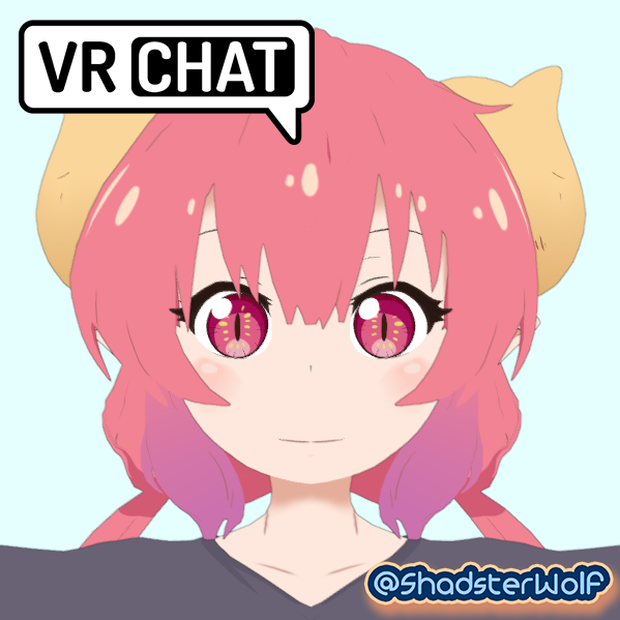
 Ilulu (イルル, Iruru) VRChat Full Body Tracking 3D Model
상품 설명
Ilulu (イルル, Iruru) 3D Model, inspired by the anime Miss Kobayashi's Dragon Maid
Designed specifically for VRChat!
SFW Model!
--Model Specs & Features--
PC & Quest support
Physbone Updated
69k polys
3 Materials
Full Body Tracking
6 Custom Facial Gestures
3 Outfits
Viseme Support
Tail Sway Animation
Breast Size Slider
Toggle Shoes
Toggle Dragon Claws
Toggle Ball Hands
Toggle Orb Particle Effect (PC)
Toggle 3 Outfits
Toggle Tail
SDK3 (+ Unity 2022)
Poiyomi Toon Shader
Independent Body mesh and Clothing
--Changelog--
3.0.0 - Added new Pajamas outfit, optimizations to mesh, texture and weight adjustments to body and outfits, adjustments to physbones, fixes to toggle behavior
3.1.0 - Optimized mesh a ton, Added Outline mesh, Many changes to rig, weights, and physbones
3.2.0 - Updated Gogo Loco 1.8.1 w/Fly
3.3.0 - 2022.3.6f1 Repack, Fixed gesture expression locking issue for some VR controllers
3.3.1 - Added particle effect support for Quest 'Orb Toggle', Fixed upload glitch caused by FX controller having a null/invalid layer
3.4.0 - Updated GogoLoco to 1.8.6
--Files Included--
Blender Raw File (3.6.5)
Textures (PNG only, I don't have any layered files)
Unity Package (2022.3.6f1) with Scene, FBX, animations, and effects. All setup and ready for upload!
--Instructions for VRChat PC--
1. Download Unity Hub:
2. Make a new Avatar project with VRChat Creator Companion (VCC)
https://vrchat.com/home/download
3. (Optional) Import Poiyomi Toon Shader (8.1):
https://github.com/poiyomi/PoiyomiToonShader/releases
4. Import my provided .unitypackage file
Open Avatar.scene, login using the VRchat SDK, build & upload!
--Instructions for VRChat Quest (Cont.)--
1. Copy the Avatar ID that generated after uploading to PC
(In the VRChat SDK, click on the Content Manager tab, you'll see "Copy ID")
2. Click on the _Quest avatar and attach/paste the Avatar ID
(In the Inspector, on the Pipeline Manager component, you'll see "Blueprint ID", then click Attach)
3. Click on File > Build Settings... > Android > Switch Platform
(Delete _PoiyomiShaders folder if you imported to help speed up the process)
4. Open the VRChat SDK and build & upload again!
**Please do not make public**
**Please do not redistribute**
--Contact--
Twitter: https://twitter.com/Shadsterwolf
すみません、にほんご はなせません。(╯°□°)╯︵ ┻━┻
모든 리뷰
더보기리뷰 등록
리뷰를 작성하려면 로그인이 필요합니다.
로그인하고 리뷰 쓰기