'%3e%3cg%20clip-path='url(%23roundHexB)'%3e%3cpath%20fill='%236D5DFC'%20d='M256%2040%20443%20148%20443%20364%20256%20472%2069%20364%2069%20148Z'/%3e%3cpath%20fill='%239C93FB'%20d='M69%20148%20256%2040%20443%20148%20256%20256Z'/%3e%3cpath%20fill='%234A3FD1'%20d='M256%20256%20443%20148%20443%20364%20256%20472Z'/%3e%3c/g%3e%3c!--%20top%20face:%20filled%20round%20magnifier%20--%3e%3cg%20transform='matrix(0.8660254,-0.5,0.8660254,0.5,69,148)'%3e%3cg%20transform='matrix(0.935,0,0,0.935,7.02,7.02)'%3e%3ccircle%20cx='88'%20cy='88'%20r='52'%20fill='%23FFFFFF'/%3e%3ccircle%20cx='88'%20cy='88'%20r='28'%20fill='%239C93FB'/%3e%3cpath%20d='M124%20124%20164%20164'%20stroke='%23FFFFFF'%20stroke-width='26'%20stroke-linecap='round'/%3e%3c/g%3e%3c/g%3e%3cg%20transform='matrix(0.8660254,0.5,0,1,69,148)'%3e%3cpath%20d='M96.1,61.08%20L45.9,128.92%20Q34,145%2054,145%20L162,145%20Q182,145%20170.1,128.92%20L119.9,61.08%20Q108,45%2096.1,61.08%20Z'%20fill='%23FFFFFF'/%3e%3c/g%3e%3c!--%20right%20face:%20filled%20bubble%20--%3e%3cg%20transform='matrix(0.8660254,-0.5,0,1,256,256)'%3e%3cg%20transform='matrix(0.855,0,0,0.855,15.66,15.66)'%3e%3cpath%20d='M60%2042H156a28%2028%200%200%201%2028%2028V158Q184%20168%20174.47%20164.96L124.53%20149.04Q115%20146%20105%20146H60a28%2028%200%200%201-28-28V70a28%2028%200%200%201%2028-28Z'%20fill='%23FFFFFF'/%3e%3c/g%3e%3c/g%3e%3c/g%3e%3c/svg%3e)
 Kitzoomer
상품 설명
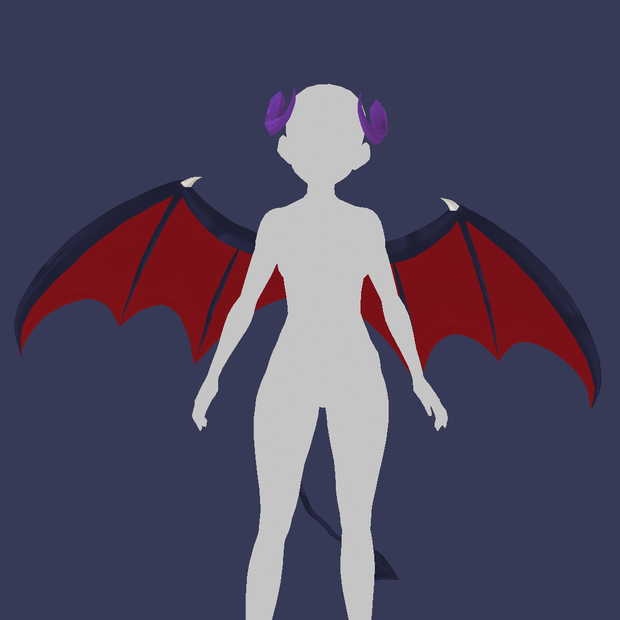
ATENTION!! You have to join the tail with the hips and the wings with shoulders with Unity. Otherwise it will not work well.
If you want me to make these changes to your avatar
buy the "Unity Work" version. This versión have a .pdf with the instructions to start.
Thanks you a lot ^^
Hair Preset files for Vroid
PRESET RIGGED!
---------------------------------------------------
For use it:
On Windows 10, go to C:\Users\(yourUsername)\AppData\LocalLow\pixiv\VRoidStudio\hair_presets.
Inside of this folder are other folders named "Preset0", "Preset1", etc. I recommend you not to change the naming convention. After you download your new hair from the Booth website, you need to create a new folder here (I mean: "Preset2") and dump its contents into it. Those contents include a folder called "materials" and a JSON file called "preset.json". The materials folder contains another folder called "rendered_textures", and that folder contains a b&w .png texture file. VRoid will not recognize these changes until you restart the program.
I wish it help you💖
---------------------------------------------------
Make a good use and don't commercialize it.
Thank you, you will motivate me to do more and better! ^^
Subscribe->
https://www.youtube.com/channel/UCLp7rFHQrCR8FHk1FIy-F6w?sub_confirmation=1
모든 리뷰
더보기리뷰 등록
리뷰를 작성하려면 로그인이 필요합니다.
로그인하고 리뷰 쓰기