'%3e%3cg%20clip-path='url(%23roundHexB)'%3e%3cpath%20fill='%236D5DFC'%20d='M256%2040%20443%20148%20443%20364%20256%20472%2069%20364%2069%20148Z'/%3e%3cpath%20fill='%239C93FB'%20d='M69%20148%20256%2040%20443%20148%20256%20256Z'/%3e%3cpath%20fill='%234A3FD1'%20d='M256%20256%20443%20148%20443%20364%20256%20472Z'/%3e%3c/g%3e%3c!--%20top%20face:%20filled%20round%20magnifier%20--%3e%3cg%20transform='matrix(0.8660254,-0.5,0.8660254,0.5,69,148)'%3e%3cg%20transform='matrix(0.935,0,0,0.935,7.02,7.02)'%3e%3ccircle%20cx='88'%20cy='88'%20r='52'%20fill='%23FFFFFF'/%3e%3ccircle%20cx='88'%20cy='88'%20r='28'%20fill='%239C93FB'/%3e%3cpath%20d='M124%20124%20164%20164'%20stroke='%23FFFFFF'%20stroke-width='26'%20stroke-linecap='round'/%3e%3c/g%3e%3c/g%3e%3cg%20transform='matrix(0.8660254,0.5,0,1,69,148)'%3e%3cpath%20d='M96.1,61.08%20L45.9,128.92%20Q34,145%2054,145%20L162,145%20Q182,145%20170.1,128.92%20L119.9,61.08%20Q108,45%2096.1,61.08%20Z'%20fill='%23FFFFFF'/%3e%3c/g%3e%3c!--%20right%20face:%20filled%20bubble%20--%3e%3cg%20transform='matrix(0.8660254,-0.5,0,1,256,256)'%3e%3cg%20transform='matrix(0.855,0,0,0.855,15.66,15.66)'%3e%3cpath%20d='M60%2042H156a28%2028%200%200%201%2028%2028V158Q184%20168%20174.47%20164.96L124.53%20149.04Q115%20146%20105%20146H60a28%2028%200%200%201-28-28V70a28%2028%200%200%201%2028-28Z'%20fill='%23FFFFFF'/%3e%3c/g%3e%3c/g%3e%3c/g%3e%3c/svg%3e)
 kronok
상품 설명
インストールと使用方法:
- ファイルを解凍します
- AppData\LocalLow\pixiv\VRoidStudio に移動します。
・解凍したフォルダをhair_presetsフォルダに置きます。
VRoidStudioの内部
- VRoidStudio 内で、Hair Editor タブに移動します。
- [プリセット] で、プリセットの名前を選択します
- プリセットからインポートをクリック
- されております!
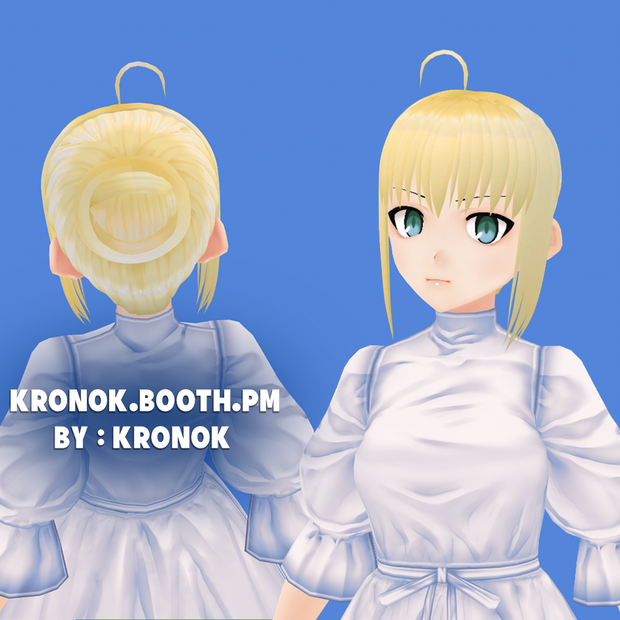
この髪はVRoid用にプリセットされています(テクスチャは含まれていません)
髪のテクスチャ: https://booth.pm/en/items/2845521
データ改変:可
個人的商用利用 : 可
再配布 : 不可
///////////////////////////
How to install and use:
- Unzip the file
- Go to your AppData\LocalLow\pixiv\VRoidStudio
- Place the unzipped folder into the hair_presets folder.
Inside VRoidStudio
- Inside VRoidStudio, go to the Hair Editor tab
- Under Presets, select the name of the preset
- Click Import from Preset
- It is done!
This hair is preset for VRoid(Textures not included)
Hair Textures : https://booth.pm/en/items/2845521
Data modification : Allowed
Personal Commercial use : Allowed
Redistribution : Not allowed
모든 리뷰
더보기리뷰 등록
리뷰를 작성하려면 로그인이 필요합니다.
로그인하고 리뷰 쓰기