'%3e%3cg%20clip-path='url(%23roundHexB)'%3e%3cpath%20fill='%236D5DFC'%20d='M256%2040%20443%20148%20443%20364%20256%20472%2069%20364%2069%20148Z'/%3e%3cpath%20fill='%239C93FB'%20d='M69%20148%20256%2040%20443%20148%20256%20256Z'/%3e%3cpath%20fill='%234A3FD1'%20d='M256%20256%20443%20148%20443%20364%20256%20472Z'/%3e%3c/g%3e%3c!--%20top%20face:%20filled%20round%20magnifier%20--%3e%3cg%20transform='matrix(0.8660254,-0.5,0.8660254,0.5,69,148)'%3e%3cg%20transform='matrix(0.935,0,0,0.935,7.02,7.02)'%3e%3ccircle%20cx='88'%20cy='88'%20r='52'%20fill='%23FFFFFF'/%3e%3ccircle%20cx='88'%20cy='88'%20r='28'%20fill='%239C93FB'/%3e%3cpath%20d='M124%20124%20164%20164'%20stroke='%23FFFFFF'%20stroke-width='26'%20stroke-linecap='round'/%3e%3c/g%3e%3c/g%3e%3cg%20transform='matrix(0.8660254,0.5,0,1,69,148)'%3e%3cpath%20d='M96.1,61.08%20L45.9,128.92%20Q34,145%2054,145%20L162,145%20Q182,145%20170.1,128.92%20L119.9,61.08%20Q108,45%2096.1,61.08%20Z'%20fill='%23FFFFFF'/%3e%3c/g%3e%3c!--%20right%20face:%20filled%20bubble%20--%3e%3cg%20transform='matrix(0.8660254,-0.5,0,1,256,256)'%3e%3cg%20transform='matrix(0.855,0,0,0.855,15.66,15.66)'%3e%3cpath%20d='M60%2042H156a28%2028%200%200%201%2028%2028V158Q184%20168%20174.47%20164.96L124.53%20149.04Q115%20146%20105%20146H60a28%2028%200%200%201-28-28V70a28%2028%200%200%201%2028-28Z'%20fill='%23FFFFFF'/%3e%3c/g%3e%3c/g%3e%3c/g%3e%3c/svg%3e)
 K1 Shop
상품 설명
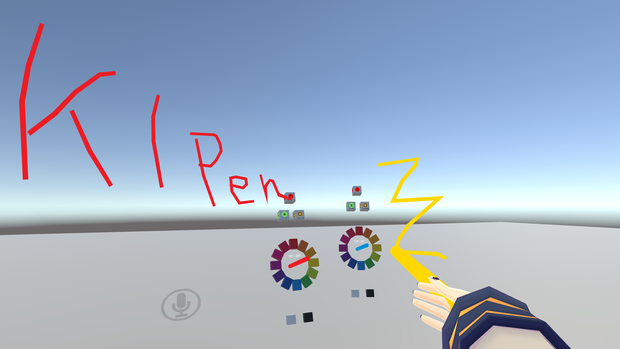
【使用イメージ】下記記事の動画をご覧ください
https://vr-lifemagazine.com/vrchat-world-jam-1/
【導入方法】
・Unityプロジェクトにワールド用SDK3とUdonSharpを入れた後、このパッケージをインポートしてください。
・K1 - Prefab の配下にある「K1Pen_StayRoot」プレハブをシーンに追加します
・【重要】シーンに追加した後で、オブジェクトの位置と回転(TransformのPosition、Rotation)をすべて0にしてください。
ペンの位置を調整する時は、子オブジェクトの「PenBase_MoveOK」を移動してください。
※自動生成される線のコライダーがずれてしまい、消しゴムが線に当たらなくなるためです。
K1Pen_StayRoot <--- Position(0,0,0) Rotation(0,0,0) Scale(1,1,1)
- LinePool_StayRoot <--- Position(0,0,0) Rotation(0,0,0) Scale(1,1,1)
- PenBase_MoveOK <-- You can move !
The prefab "K1Pen_StayRoot" set the position, rotation to 0.
The collider of the automatically generated line will shift and the eraser will not hit the line.
To change the position of the pen, move the child object "PenBase_MoveOK".
【その他】
VRChat内での無償利用において制限はありません。ワールド制作に活かして頂ければとても嬉しいです。
特に連絡もクレジット表記も必要ありません。
【動作確認環境】
■Unity 2018.4.20f1
■VRCSDK3-WORLD-2021.05.21.12.13_Public.unitypackage
-> https://vrchat.com/home/download
■UdonSharp_v0.19.11.unitypackage
-> https://github.com/MerlinVR/UdonSharp/releases
K1911jp(けーいち) 2021.06.02
Twitter@K1911jp
모든 리뷰
더보기리뷰 등록
리뷰를 작성하려면 로그인이 필요합니다.
로그인하고 리뷰 쓰기