'%3e%3cg%20clip-path='url(%23roundHexB)'%3e%3cpath%20fill='%236D5DFC'%20d='M256%2040%20443%20148%20443%20364%20256%20472%2069%20364%2069%20148Z'/%3e%3cpath%20fill='%239C93FB'%20d='M69%20148%20256%2040%20443%20148%20256%20256Z'/%3e%3cpath%20fill='%234A3FD1'%20d='M256%20256%20443%20148%20443%20364%20256%20472Z'/%3e%3c/g%3e%3c!--%20top%20face:%20filled%20round%20magnifier%20--%3e%3cg%20transform='matrix(0.8660254,-0.5,0.8660254,0.5,69,148)'%3e%3cg%20transform='matrix(0.935,0,0,0.935,7.02,7.02)'%3e%3ccircle%20cx='88'%20cy='88'%20r='52'%20fill='%23FFFFFF'/%3e%3ccircle%20cx='88'%20cy='88'%20r='28'%20fill='%239C93FB'/%3e%3cpath%20d='M124%20124%20164%20164'%20stroke='%23FFFFFF'%20stroke-width='26'%20stroke-linecap='round'/%3e%3c/g%3e%3c/g%3e%3cg%20transform='matrix(0.8660254,0.5,0,1,69,148)'%3e%3cpath%20d='M96.1,61.08%20L45.9,128.92%20Q34,145%2054,145%20L162,145%20Q182,145%20170.1,128.92%20L119.9,61.08%20Q108,45%2096.1,61.08%20Z'%20fill='%23FFFFFF'/%3e%3c/g%3e%3c!--%20right%20face:%20filled%20bubble%20--%3e%3cg%20transform='matrix(0.8660254,-0.5,0,1,256,256)'%3e%3cg%20transform='matrix(0.855,0,0,0.855,15.66,15.66)'%3e%3cpath%20d='M60%2042H156a28%2028%200%200%201%2028%2028V158Q184%20168%20174.47%20164.96L124.53%20149.04Q115%20146%20105%20146H60a28%2028%200%200%201-28-28V70a28%2028%200%200%201%2028-28Z'%20fill='%23FFFFFF'/%3e%3c/g%3e%3c/g%3e%3c/g%3e%3c/svg%3e)
 mimiruru
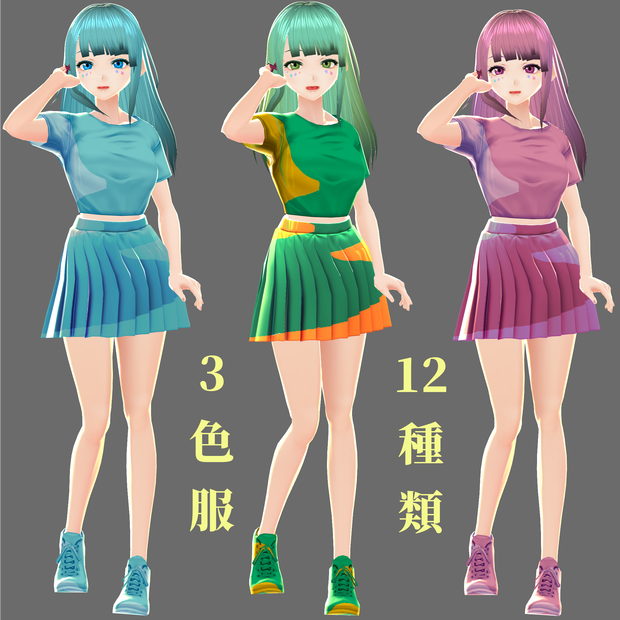
 【無料】VRoid用チアガール衣装3色服【+12種類】セット Cheerleader's Clothes Set
상품 설명
・pixiv社提供の3Dモデリングソフト「VRoid Studio」で使用するテクスチャ素材です。
・テクスチャのみ/モデルは含まれていません。
・無料版と応援版は同じのものです。応援版をご購入いただきありがとうございます。
利用可能なオプション:
・全3色服セット
・黄緑12種類セット【靴を含みます】
・ピンク12種類セット【靴を含みます】
・青い12種類セット【靴を含みます】
⇩推奨される追加⇩
【無料】もっとなアイリス(球彩虹眼)瞳テクスチャ:
セット 01: https://mimiruru.booth.pm/items/2799915
セット 02: https://mimiruru.booth.pm/items/2800157
セット 03: https://mimiruru.booth.pm/items/2800203
【無料】リアルな血走りの白目テクスチャ: https://mimiruru.booth.pm/items/2949099
【無料】髪テクスチャ: https://mimiruru.booth.pm/items/2949314
【無料】リアルな舌テクスチャ: https://mimiruru.booth.pm/items/2909051
【無料】上品な衣装テクスチャ:
メイド2色服セット: https://mimiruru.booth.pm/items/2802964
チアガール3色服セット : https://mimiruru.booth.pm/items/2907251
【無料】美しいネールセット: https://mimiruru.booth.pm/items/3146865
【無料】リアルなまつげ: https://mimiruru.booth.pm/items/2969198
使用方法
①「衣装編集」タブの左側の「プリセット」から制服(スカート)を選択。
②「衣装編集」タブの右側の「上半身」からミニTシャツを選択し、「下半身」から制服スカートを選択してください。
③ 同じく「衣装編集」制服(スカート)の「テクスチャ」タブを選択し、レイヤーにテクスチャをインポートしてください。
※テクスチャのデフォルト画像は非表示に設定してください。
④ 同じく「衣装編集」で「靴」をバスケットボールシューズに設定してください。その後、テクスチャタブでバスケットボールシューズのテクスチャのレイヤーに本品をインポートして使って下さい。
利用規約
・著作権は放棄しません
・データ改変:可
・商用利用:可
・性的表現での利用:可
・暴力表現での利用:可
・このデータを利用する際のクレジット表記を省略すること:不可
・複製・再配布・データ改変した物の配布:不可
・使用によるトラブル等には一切責任を負いません
English
>> TEXTURES ONLY / NO MODEL INCLUDED <<
Description:
- Texture material for VRoid Studio.
- These cheerleader's sets are designed to have simple but cheerful and energetic feel.
What you get:
- 3 color sets of shirts, skirts with matching shoes texture (PNG).
- Green Yellow shirts, skirts with matching shoes texture (PNG).
- Blue shirts, skirts with matching shoes texture (PNG).
- Pink shirts, skirts with matching shoes texture (PNG).
- The Free version and Support version are both having the same content. Thank you for downloading the Support version.
How to use:
1. Open your avatar on VRoid Studio.
2. Go to menu "Clothing Editor"→select "Uniform(Skirt)", then on the right screen choose "Mini T-shirt" for Tops, also choose "Uniform(Skirt)" for the Bottoms.
3. Go to menu "Clothing Editor"→"Texture".
4. Right click "Layer"→"Import"→select the appropriate texture.
5. Right click "Default Image"→"Toggle Visibility".
6. Repeat steps above similarly for the "Shoes" option (select "Basketball Shoes" and "Bare Foot (Flat)" setting).
*RECOMMENDED ADDITIONS*
(free) Realistic Eyeball Irises Texture:
Set 01: https://mimiruru.booth.pm/items/2799915
Set 02: https://mimiruru.booth.pm/items/2800157
Set 03: https://mimiruru.booth.pm/items/2800203
(free) Realistic BloodShot Scleras: https://mimiruru.booth.pm/items/2949099
(free) Hair Texture: https://mimiruru.booth.pm/items/2949314
(free) Realistic Tongue Texture: https://mimiruru.booth.pm/items/2909051
(free) Clothes Wear Texture:
Maid Elegant Dress Set: https://mimiruru.booth.pm/items/2802964
Cheerleader's Clothes Set: https://mimiruru.booth.pm/items/2907251
(free) Beautiful Nails Set: https://mimiruru.booth.pm/items/3146865
(free) Realistic Eyelashes Texture: https://mimiruru.booth.pm/items/2969198
>> Redistribution, sale or transfer of the material is prohibited. <<
모든 리뷰
더보기리뷰 등록
리뷰를 작성하려면 로그인이 필요합니다.
로그인하고 리뷰 쓰기