'%3e%3cg%20clip-path='url(%23roundHexB)'%3e%3cpath%20fill='%236D5DFC'%20d='M256%2040%20443%20148%20443%20364%20256%20472%2069%20364%2069%20148Z'/%3e%3cpath%20fill='%239C93FB'%20d='M69%20148%20256%2040%20443%20148%20256%20256Z'/%3e%3cpath%20fill='%234A3FD1'%20d='M256%20256%20443%20148%20443%20364%20256%20472Z'/%3e%3c/g%3e%3c!--%20top%20face:%20filled%20round%20magnifier%20--%3e%3cg%20transform='matrix(0.8660254,-0.5,0.8660254,0.5,69,148)'%3e%3cg%20transform='matrix(0.935,0,0,0.935,7.02,7.02)'%3e%3ccircle%20cx='88'%20cy='88'%20r='52'%20fill='%23FFFFFF'/%3e%3ccircle%20cx='88'%20cy='88'%20r='28'%20fill='%239C93FB'/%3e%3cpath%20d='M124%20124%20164%20164'%20stroke='%23FFFFFF'%20stroke-width='26'%20stroke-linecap='round'/%3e%3c/g%3e%3c/g%3e%3cg%20transform='matrix(0.8660254,0.5,0,1,69,148)'%3e%3cpath%20d='M96.1,61.08%20L45.9,128.92%20Q34,145%2054,145%20L162,145%20Q182,145%20170.1,128.92%20L119.9,61.08%20Q108,45%2096.1,61.08%20Z'%20fill='%23FFFFFF'/%3e%3c/g%3e%3c!--%20right%20face:%20filled%20bubble%20--%3e%3cg%20transform='matrix(0.8660254,-0.5,0,1,256,256)'%3e%3cg%20transform='matrix(0.855,0,0,0.855,15.66,15.66)'%3e%3cpath%20d='M60%2042H156a28%2028%200%200%201%2028%2028V158Q184%20168%20174.47%20164.96L124.53%20149.04Q115%20146%20105%20146H60a28%2028%200%200%201-28-28V70a28%2028%200%200%201%2028-28Z'%20fill='%23FFFFFF'/%3e%3c/g%3e%3c/g%3e%3c/g%3e%3c/svg%3e)
![【VRoid】パフスリーブのフラワーブラウス [ Flower blouse with puff sleeves ] (B-04)](https://booth.pximg.net/c/620x620/ccf7a112-83cc-4df9-bfba-b7f61ab5cb64/i/2711846/36bd37c4-c7b9-44d0-ac65-d000a23d9fbd.png)
 ° ˖ ❤ • Baby Nuna Shop • ❤ ˖ °
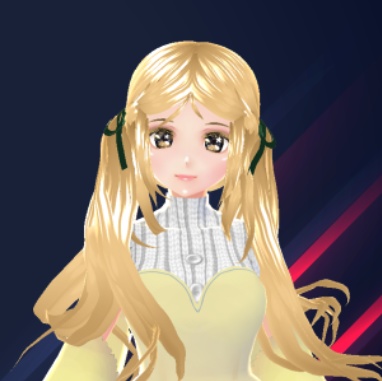
 【VRoid】パフスリーブのフラワーブラウス [ Flower blouse with puff sleeves ] (B-04)
상품 설명
‧͙⁺˚*・༓☾ File given (与えられたファイル) ☽༓・*˚⁺‧͙
- Blouse Pattern (ブラウス柄)
- Skin (肌)
notes : the body part might be missing, i'll provide the body skin for you~
ノート : 体の部分が欠けているかもしれません、私はあなたのために体の皮膚を提供します〜
video (ビデオ) : https://twitter.com/nunachie/status/1355332211248046080
Steps to use pattern (パターンを使用する手順)
- - - - - - - - - - - - ☆:.。.°˖✧◝ (੭ˊᵕˋ)੭ ੈ✩‧₊˚◜✧˖°.。.:*☆ - - - - - - - - - - - -
༶•┈┈⛧┈♛ Clothing (衣類) ♛┈⛧┈┈•༶
1) Clothing editor > Choose "Long Coat"
2) Clothes editing :-
- Shoulder Puff 1 [120]
- Shoulder Puff 2 [33.6]
- Sleeve Crease [46.8]
- Sleeve Thick [31.0]
- Sleeve Short [280]
- Waist Narrowness (Back) [100]
- Waist Narrowness (Tight) [100]
3) Texture > Long Coat > Layers section
4) Default image > right click on it > click "Toggle Visibility"
5) Right click "Layer" > click "Import" > find where you save the download pattern
◇─◇──◇─────◇──◇─◇
1) 衣料品編集者 > 「ロングコート」を選択
2) 服の編集 :-
- ショルダーパフ1 [120]
- ショルダーパフ2 [33.6]
- 袖の折り目 [46.8]
- 袖厚 [31.0]
- 袖ショート[280]
- ウエストの狭さ(裏)[100]
- ウエストナローネス(タイト)[100]
3) テクスチャ > ロングコート > レイヤーセクション
4) デフォルトの画像 > それを右クリック > 「可視性の切り替え」をクリックします
5) 「レイヤー」を右クリック > 「インポート」をクリックします > ダウンロードパターンを保存する場所を見つける
༶•┈┈⛧┈♛ Skin (肌) ♛┈⛧┈┈•༶
1) Body editor > Texture
2) Skin (Long Coat) > Layer's section
3) Default image > right click on it > click "Toggle Visibility"
4) Right click "Layer" > click "Import" > find where you save the download skin
◇─◇──◇─────◇──◇─◇
1) ボディエディター > テクスチャ
2) 肌(ロングコート) > レイヤーのセクション
3) デフォルトの画像 > それを右クリック > 「可視性の切り替え」をクリックします
4)「レイヤー」を右クリック > 「インポート」をクリックします > ダウンロードスキンを保存する場所を見つける
- - - - - - - - - - - - ☆:.。.°˖✧◝ (੭ˊᵕˋ)੭ ੈ✩‧₊˚◜✧˖°.。.:*☆ - - - - - - - - - - - -
·̩̩̥͙**•̩̩͙✩•̩̩͙*˚ New design will coming soon ! ˚*•̩̩͙✩•̩̩͙*˚*·̩̩̥͙
모든 리뷰
더보기리뷰 등록
리뷰를 작성하려면 로그인이 필요합니다.
로그인하고 리뷰 쓰기