'%3e%3cg%20clip-path='url(%23roundHexB)'%3e%3cpath%20fill='%236D5DFC'%20d='M256%2040%20443%20148%20443%20364%20256%20472%2069%20364%2069%20148Z'/%3e%3cpath%20fill='%239C93FB'%20d='M69%20148%20256%2040%20443%20148%20256%20256Z'/%3e%3cpath%20fill='%234A3FD1'%20d='M256%20256%20443%20148%20443%20364%20256%20472Z'/%3e%3c/g%3e%3c!--%20top%20face:%20filled%20round%20magnifier%20--%3e%3cg%20transform='matrix(0.8660254,-0.5,0.8660254,0.5,69,148)'%3e%3cg%20transform='matrix(0.935,0,0,0.935,7.02,7.02)'%3e%3ccircle%20cx='88'%20cy='88'%20r='52'%20fill='%23FFFFFF'/%3e%3ccircle%20cx='88'%20cy='88'%20r='28'%20fill='%239C93FB'/%3e%3cpath%20d='M124%20124%20164%20164'%20stroke='%23FFFFFF'%20stroke-width='26'%20stroke-linecap='round'/%3e%3c/g%3e%3c/g%3e%3cg%20transform='matrix(0.8660254,0.5,0,1,69,148)'%3e%3cpath%20d='M96.1,61.08%20L45.9,128.92%20Q34,145%2054,145%20L162,145%20Q182,145%20170.1,128.92%20L119.9,61.08%20Q108,45%2096.1,61.08%20Z'%20fill='%23FFFFFF'/%3e%3c/g%3e%3c!--%20right%20face:%20filled%20bubble%20--%3e%3cg%20transform='matrix(0.8660254,-0.5,0,1,256,256)'%3e%3cg%20transform='matrix(0.855,0,0,0.855,15.66,15.66)'%3e%3cpath%20d='M60%2042H156a28%2028%200%200%201%2028%2028V158Q184%20168%20174.47%20164.96L124.53%20149.04Q115%20146%20105%20146H60a28%2028%200%200%201-28-28V70a28%2028%200%200%201%2028-28Z'%20fill='%23FFFFFF'/%3e%3c/g%3e%3c/g%3e%3c/g%3e%3c/svg%3e)
 Lily Rue
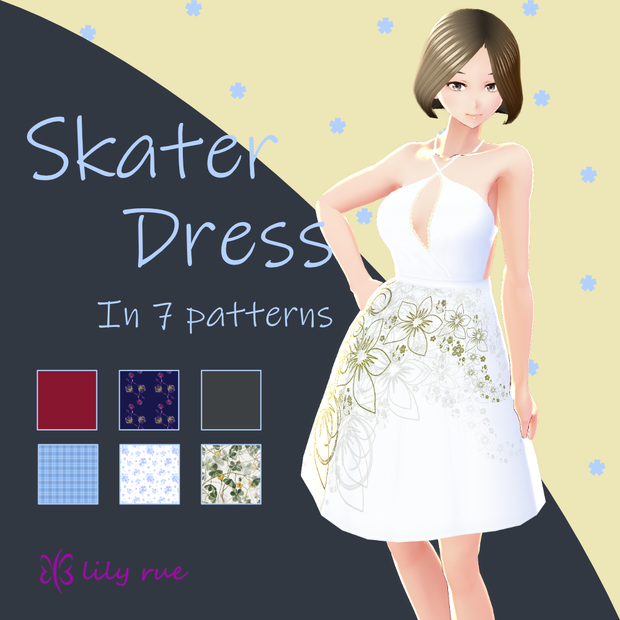
 【無料版あり】VRoid スケータードレス 7種セット / Skater Dress in 7 patterns
상품 설명
------------------------------------------------------------------
【VRoid】スケータードレス 7種セット
version 1.00
------------------------------------------------------------------
See below for the English translation.
Vroid Studioのワンピースにインポートして使用できるテクスチャ素材です。
色(柄)は7種類あります。※試用版は黒1色のみとなります。
ダウンロードしたZIPの中にテクスチャ画像ファイルが入っています。
商品画像にあるモデルデータは含まれておりません。
【内容物】
※試用版は1色のみ(黒)です
・ スケータードレス(黒) x 1
SkaterDress-black_1_0_0.png
・ スケータードレス(チェック) x 1
SkaterDress-checkered_1_0_0.png
・ スケータードレス(花・ブルー) x 1
SkaterDress-flower-blue_1_0_0.png
・ スケータードレス(花・グリーン) x 1
SkaterDress-flower-green_1_0_0.png
・ スケータードレス(花・ホワイト) x 1
SkaterDress-flower-white_1_0_0.png
・ スケータードレス(ネイビー) x 1
SkaterDress-navy_1_0_0.png
・ スケータードレス(赤) x 1
SkaterDress-red_1_0_0.png
・説明書
readme.txt
【使い方】
1) 「衣装編集」タブの中の「上半身」からワンピースを選択。
2) ワンピースの「テクスチャ」タブを選択し、レイヤーにテクスチャをインポートしてください。
3) 「スカートをすぼめる」を100、「スカートを膨らませる」を20に設定(お好みで設定は変更してください)。
※テクスチャのデフォルト画像は非表示に設定してください。
※詳しい操作方法は下記公式ヘルプページをご参照ください。
VRoid Studio 使い方・便利なテクニック集 > 基礎編 - 各編集画面詳細 > 衣装編集
https://vroid.pixiv.help/hc/ja/articles/360012340534-衣装編集
【利用規約】
・著作権は放棄しません。
・データを改変、翻案、編集することや、二次的なデータを作成すること:可
・個人が行う営利目的の活動に利用すること:可
・このデータを利用する際のクレジット表記を省略すること:可
・性的表現での利用:可
・暴力表現での利用:可
・複製・再配布・データ改変した物の配布:不可
・使用によるトラブル等には一切責任を負いません。
・ご使用により発生した損害や損失について、一切の責任を負わないものとします。
------------------------------------------------------------------
【VRoid】Skater Dress in 7 patterns
version1.00
------------------------------------------------------------------
The contents include texture materials for VRoid Studio. The texture images are in the downloaded ZIP file. A model data in the product images are not included.
[Contents]
NOTE: The Trial version includes only 1 color (Black color).
- SkaterDress-black_1_0_0.png
- SkaterDress-checkered_1_0_0.png
- SkaterDress-flower-blue_1_0_0.png
- SkaterDress-flower-green_1_0_0.png
- SkaterDress-flower-white_1_0_0.png
- SkaterDress-navy_1_0_0.png
- SkaterDress-red_1_0_0.png
- readme.txt
[Usage]
1- Go to "Clothing Editor" tab and select "Onepiece" from Tops.
2- Select the "Texture" tab of the "Onepiece" and import the texture into the layer.
3- Set the "Straight Skirt" to 100 and the ”Puffy Skirt” to 20 (You may change the settings as you like).
Note: Default image in Texture tab must be invisible.
Please refer to the official help page below for detailed instructions.
https://vroid.pixiv.help/hc/en-us/articles/360012340534-Clothing-Editor
[Terms of Use]
- The copyright is not abandoned.
- The Data can be modified, adapted, edited, and secondary data can be created.
- You may use this data for personal commercial activities.
- You may omit the credit line when you use this data.
- You may use this data with sexual expressions.
- You may use this data with violent expressions.
- Distribution of duplication, redistribution, and altered data is Not allowed.
- I assume/take no responsibility or liability for any damage or loss caused through our service.
모든 리뷰
더보기리뷰 등록
리뷰를 작성하려면 로그인이 필요합니다.
로그인하고 리뷰 쓰기