'%3e%3cg%20clip-path='url(%23roundHexB)'%3e%3cpath%20fill='%236D5DFC'%20d='M256%2040%20443%20148%20443%20364%20256%20472%2069%20364%2069%20148Z'/%3e%3cpath%20fill='%239C93FB'%20d='M69%20148%20256%2040%20443%20148%20256%20256Z'/%3e%3cpath%20fill='%234A3FD1'%20d='M256%20256%20443%20148%20443%20364%20256%20472Z'/%3e%3c/g%3e%3c!--%20top%20face:%20filled%20round%20magnifier%20--%3e%3cg%20transform='matrix(0.8660254,-0.5,0.8660254,0.5,69,148)'%3e%3cg%20transform='matrix(0.935,0,0,0.935,7.02,7.02)'%3e%3ccircle%20cx='88'%20cy='88'%20r='52'%20fill='%23FFFFFF'/%3e%3ccircle%20cx='88'%20cy='88'%20r='28'%20fill='%239C93FB'/%3e%3cpath%20d='M124%20124%20164%20164'%20stroke='%23FFFFFF'%20stroke-width='26'%20stroke-linecap='round'/%3e%3c/g%3e%3c/g%3e%3cg%20transform='matrix(0.8660254,0.5,0,1,69,148)'%3e%3cpath%20d='M96.1,61.08%20L45.9,128.92%20Q34,145%2054,145%20L162,145%20Q182,145%20170.1,128.92%20L119.9,61.08%20Q108,45%2096.1,61.08%20Z'%20fill='%23FFFFFF'/%3e%3c/g%3e%3c!--%20right%20face:%20filled%20bubble%20--%3e%3cg%20transform='matrix(0.8660254,-0.5,0,1,256,256)'%3e%3cg%20transform='matrix(0.855,0,0,0.855,15.66,15.66)'%3e%3cpath%20d='M60%2042H156a28%2028%200%200%201%2028%2028V158Q184%20168%20174.47%20164.96L124.53%20149.04Q115%20146%20105%20146H60a28%2028%200%200%201-28-28V70a28%2028%200%200%201%2028-28Z'%20fill='%23FFFFFF'/%3e%3c/g%3e%3c/g%3e%3c/g%3e%3c/svg%3e)
 Nejinocraft
상품 설명
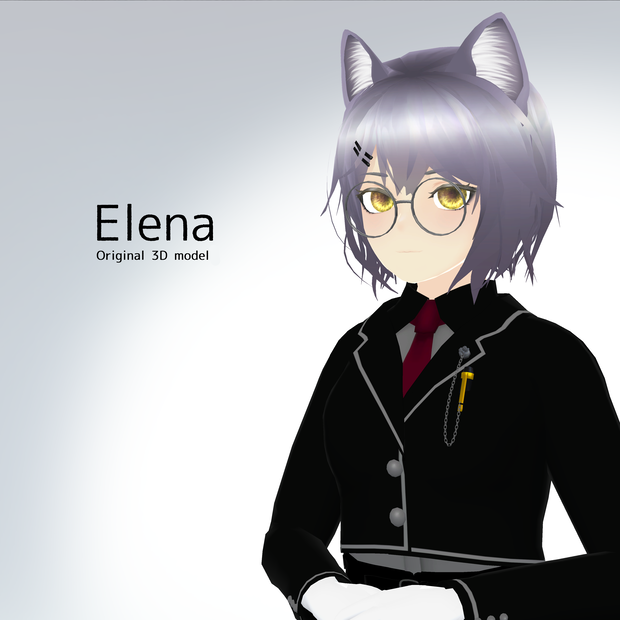
VRChatでの使用を想定した人型3Dモデルです。
2022/04/24現在、PhysBoneには対応しておりません。
Virtual Market 5にて試着できます。
サークル名:ねじねじ (英語表記:NejiNeji)
場所:Virtual Showcase > ruby stage > 2F
作者が見たいがためにtwitter用のハッシュタグを作りました。よろしければお使いください。
I created a hashtag for twitter so that I can see your pictures. Please use it if you like.
#エレーナの紀行
内容物
・VRChat用設定済みunitypackage
・FBXファイル
・各種テクスチャ(.png .psd)
モデル詳細
・対応SDK:Avatars3.0
・LipSync:〇
・EyeLook:〇
・Eyelids:×
・表情アニメーション:14種(ハンドサイン・Expressions Menuに設定済み)
・shape key:
表情:17種
顔パーツ別:27種
リップシンク:15種
その他:9種
・マテリアル数:6個
・シェーダー:UTS2を使用しています(同梱しています)
・ポリゴン数:
素体+水着:△22,533
髪+猫耳+尻尾:△6,458
服:△33,799
利用規約
本モデルはVN3ライセンスが適用されています。
規約全文をご確認の上、ご購入ください。
ダウンロード商品のため、返品・返金には対応しておりません。
ご購入頂いた時点で利用規約に同意したものとみなします。
https://drive.google.com/file/d/1JaZUvtFVPQqHAumrex5pzPWVRD0uFdr0/view?usp=sharing
導入方法
Unity 2019.4.31f1に対応しています。
1. VRChat公式サイトからダウンロードしたVRCSDK3-AVATARのunitypackageをインポート
2. Unity AssetのDynamic Boneをインポート
3. ElenaAvatar_ver3.00.unitypackageをインポート
4. Elena(Prefab Asset)をシーン内にドラッグ&ドロップ
その他
不具合報告・ご要望などございましたら
下記twitterアカウントまでご連絡ください。
https://twitter.com/nejinocraft
制作者:Neji
Product Introduction
This is a humanoid 3D model designed to be used with VRChat.
You can try it on at Virtual Market 5.
Circle name : NejiNeji
Location : Virtual Showcase > ruby stage > 2F
Contents
・Pre-configured unitypackage for VRChat
・FBX file
・textures (.png .psd)
Model Details
Supported SDK : Avatars3.0
・LipSync : ○
・EyeLook : ○
・Eyelids : ×
・Facial expression animations : 14 (already set for hand signs / Expressions Menu)
・Shape keys:
facial expressions : 17 types
separate face parts : 27 types
lip sync : 15 types
the others : 9
・Materials : 6
・Shader : UTS2 is used (included in the package)
・Polygons :
Body + swimsuit : △22,533
Hair + cat ears + tail : △6,458
Clothes : △33,799
Terms of Use
The VN3 license is applied to this model.
Please read the full terms and conditions before purchasing.
As this is a downloadable product, I do not offer returns or refunds.
By purchasing this product, you agree to the Terms of Use.
https://drive.google.com/file/d/1KW4Q14xpy8I3-7BpfL6dq8kGSVA9dMHV/view?usp=sharing
How to Install
This is compatible with Unity 2019.4.31f1.
1. import VRCSDK3-AVATAR unitypackage downloaded from VRChat official website
2. import Dynamic Bone of Unity Asset
3. import ElenaAvatar_ver3.00.unitypackage
4. drag and drop Elena(Prefab Asset) into the scene
Other
If you have any bug reports or requests, please contact us at the following twitter account
https://twitter.com/nejinocraft
Created by Neji
更新履歴
2021/08/05 ver2.00を公開しました(Unity2019対応)
2021/12/01 ver3.00を公開しました。ライセンスをVN3に変更しました。
모든 리뷰
더보기리뷰 등록
리뷰를 작성하려면 로그인이 필요합니다.
로그인하고 리뷰 쓰기