'%3e%3cg%20clip-path='url(%23roundHexB)'%3e%3cpath%20fill='%236D5DFC'%20d='M256%2040%20443%20148%20443%20364%20256%20472%2069%20364%2069%20148Z'/%3e%3cpath%20fill='%239C93FB'%20d='M69%20148%20256%2040%20443%20148%20256%20256Z'/%3e%3cpath%20fill='%234A3FD1'%20d='M256%20256%20443%20148%20443%20364%20256%20472Z'/%3e%3c/g%3e%3c!--%20top%20face:%20filled%20round%20magnifier%20--%3e%3cg%20transform='matrix(0.8660254,-0.5,0.8660254,0.5,69,148)'%3e%3cg%20transform='matrix(0.935,0,0,0.935,7.02,7.02)'%3e%3ccircle%20cx='88'%20cy='88'%20r='52'%20fill='%23FFFFFF'/%3e%3ccircle%20cx='88'%20cy='88'%20r='28'%20fill='%239C93FB'/%3e%3cpath%20d='M124%20124%20164%20164'%20stroke='%23FFFFFF'%20stroke-width='26'%20stroke-linecap='round'/%3e%3c/g%3e%3c/g%3e%3cg%20transform='matrix(0.8660254,0.5,0,1,69,148)'%3e%3cpath%20d='M96.1,61.08%20L45.9,128.92%20Q34,145%2054,145%20L162,145%20Q182,145%20170.1,128.92%20L119.9,61.08%20Q108,45%2096.1,61.08%20Z'%20fill='%23FFFFFF'/%3e%3c/g%3e%3c!--%20right%20face:%20filled%20bubble%20--%3e%3cg%20transform='matrix(0.8660254,-0.5,0,1,256,256)'%3e%3cg%20transform='matrix(0.855,0,0,0.855,15.66,15.66)'%3e%3cpath%20d='M60%2042H156a28%2028%200%200%201%2028%2028V158Q184%20168%20174.47%20164.96L124.53%20149.04Q115%20146%20105%20146H60a28%2028%200%200%201-28-28V70a28%2028%200%200%201%2028-28Z'%20fill='%23FFFFFF'/%3e%3c/g%3e%3c/g%3e%3c/g%3e%3c/svg%3e)
 CSGraphicArt
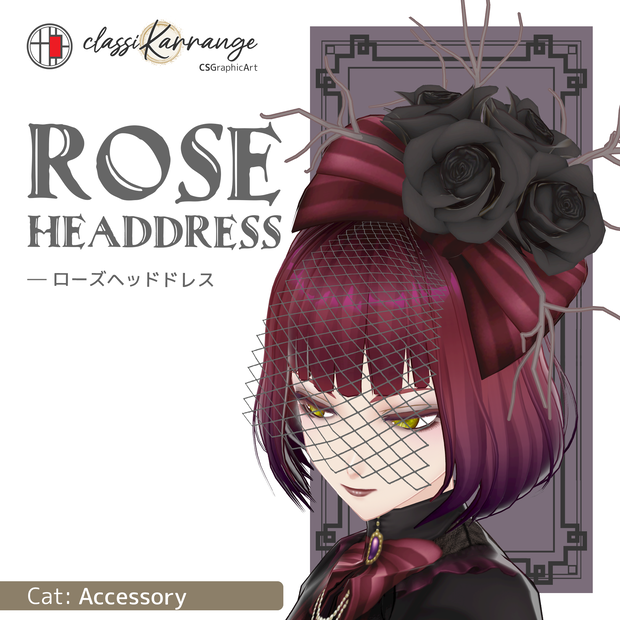
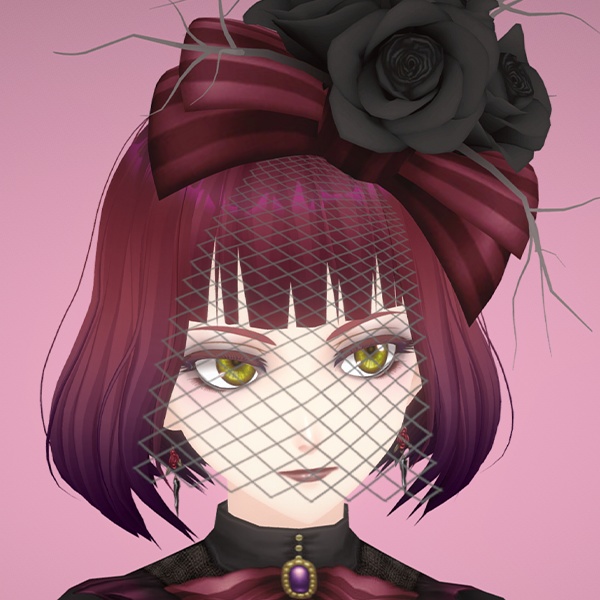
 【FBX・Unity・XWear】ローズヘッドドレス
상품 설명
本アイテムは、ゲーム制作・VRChatアバター等幅広い用途でお使いいただけます。
既存のVRoid衣装との相性も考慮して設計しています。
◆ シェーダー設定について ◆
本アイテムには「Bette」と同じMToonシェーダーを設定済みです。
そのままでもご使用いただけますが、描画環境や好みに合わせて、必要であればご自身でプロパティ等の調整をお願いいたします。
*シェーダーの設定方法についての個別サポートは行っておりません。
◆ 導入方法について ◆
メッシュ部分を揺らす事が出来るよう、ボーン・ウェイトが設定されています。
Unityでキャラモデルに使用する場合:
サイズと位置を調整後、「Bette_Headdress」を頭のボーンの直下に配置(親子付け)してください。
*揺れ物はご自身で設定して下さい。その場合、「SK_Headdess1」以下のボーンを選択してください。
VRoid Studioの着せ替え機能を使用する場合:
アクセサリー設定の際、親ボーンに「Head」を選択してください。.xwearは揺れ物設定済みとなりますが、エクスポート後Unityで好みに合わせてご調整いただくことをお勧めします。
Suitable for game development, VRChat avatars, and various other uses.
Also designed with compatibility for existing VRoid outfits in mind.
◆ Shader Settings ◆
The item features the MToon shader, the same one used in our "Bette". You are also free to adjust the shader settings to suit your specific needs.
*Please note that we do not provide individual support regarding shader configuration.
◆ How to Install ◆
Bone weights have been applied to the mesh to allow for movement/physics (SpringBone, PhysBone etc.).
For Unity:
Adjust the size and position, then parent "Bette_Headdress" under the Head bone.
*Physics (swing/sway) settings must be configured manually. Please apply them to the bones under "SK_Headdess1."
For VRoid Studio (Dress-up Feature):
Select "Head" as the parent bone for the accessory. While the .xwear file includes pre-configured physics, we recommend fine-tuning them in Unity after exporting to achieve.
📌利用規約 / Terms of use
ご購入前に必ず以下のリンクよりご確認いただき、ご理解・承諾いただいた上でダウンロードしてください。
Please make sure to check out the link below before purchasing. And download after understanding and consenting.
https://docs.google.com/document/d/16W--peQTV2n5zLCFBJ0aKgmgnYtoCmoycLo8BmggqbM/edit?usp=sharing
📌 XWearについて / About XWear
本商品は、VRoid Studioの「クローゼット機能」に対応しています。
・ .xwear ファイルはZIPアーカイブには含まれていません。
・ 購入ページのダウンロード一覧から、.xwear ファイルを個別にダウンロードしてください。
・ または、VRoid Studioの着せ替え機能で「クローゼット」を開き、「BOOTHライブラリ」から直接インポートすることもできます。
This product supports the VRoid Studio "Closet" feature.
・ The `.xwear` file is not included in the ZIP archive.
・ Please download the `.xwear` file separately from your BOOTH purchase page.
・ Alternatively, in VRoid Studio's Dress-up Feature, open "Closet" and import the item directly from your "BOOTH Library".
📌データ内容 / Data contents
●通常版 / Normal edition :
.fbx、 .unitypackage、 .png
.xwear
●PSD付属版 / PSD attached edition :
通常版データ、 .psd、色変更用レイヤーについて.txt
.xwear
〇ポリゴン数 / Polygons : 11,247 tris
〇テクスチャサイズ / Texture size : 1024×1024 pixels
※.fbxにマテリアルは設定しておりません。.unitypackage、.xwearで使用しているシェーダーはMToonとなります。
No materials were assigned to .fbx. However MToon shader is set in .unitypackage and .xwear.
📌更新履歴 / Update history
●2024/12/27
.xwearに対応
모든 리뷰
더보기리뷰 등록
리뷰를 작성하려면 로그인이 필요합니다.
로그인하고 리뷰 쓰기