'%3e%3cg%20clip-path='url(%23roundHexB)'%3e%3cpath%20fill='%236D5DFC'%20d='M256%2040%20443%20148%20443%20364%20256%20472%2069%20364%2069%20148Z'/%3e%3cpath%20fill='%239C93FB'%20d='M69%20148%20256%2040%20443%20148%20256%20256Z'/%3e%3cpath%20fill='%234A3FD1'%20d='M256%20256%20443%20148%20443%20364%20256%20472Z'/%3e%3c/g%3e%3c!--%20top%20face:%20filled%20round%20magnifier%20--%3e%3cg%20transform='matrix(0.8660254,-0.5,0.8660254,0.5,69,148)'%3e%3cg%20transform='matrix(0.935,0,0,0.935,7.02,7.02)'%3e%3ccircle%20cx='88'%20cy='88'%20r='52'%20fill='%23FFFFFF'/%3e%3ccircle%20cx='88'%20cy='88'%20r='28'%20fill='%239C93FB'/%3e%3cpath%20d='M124%20124%20164%20164'%20stroke='%23FFFFFF'%20stroke-width='26'%20stroke-linecap='round'/%3e%3c/g%3e%3c/g%3e%3cg%20transform='matrix(0.8660254,0.5,0,1,69,148)'%3e%3cpath%20d='M96.1,61.08%20L45.9,128.92%20Q34,145%2054,145%20L162,145%20Q182,145%20170.1,128.92%20L119.9,61.08%20Q108,45%2096.1,61.08%20Z'%20fill='%23FFFFFF'/%3e%3c/g%3e%3c!--%20right%20face:%20filled%20bubble%20--%3e%3cg%20transform='matrix(0.8660254,-0.5,0,1,256,256)'%3e%3cg%20transform='matrix(0.855,0,0,0.855,15.66,15.66)'%3e%3cpath%20d='M60%2042H156a28%2028%200%200%201%2028%2028V158Q184%20168%20174.47%20164.96L124.53%20149.04Q115%20146%20105%20146H60a28%2028%200%200%201-28-28V70a28%2028%200%200%201%2028-28Z'%20fill='%23FFFFFF'/%3e%3c/g%3e%3c/g%3e%3c/g%3e%3c/svg%3e)
 右から鳩の店
상품 설명
2022/04/22
Phys Boneに対応 シェーダーをlilToonに変更しました。
Newの名前が書いてあるデータに入ってます。
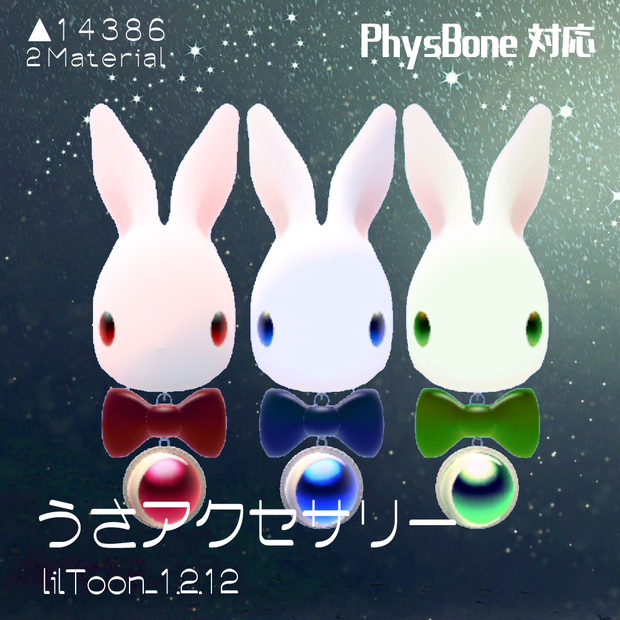
うさアクセサリーはVRChat用の耳に着けるアクセサリーとして制作しました!他、お好きなつけたい部分でお楽しみいただけます。
Unity2018.4.20.f1
揺れ物設定がついてます。
先にDynamicBoneをインポートしてからVRCSDK、UnityChanシェーダーをインポートしてから本データのUnityPackage
をいれてください。USAAccessoriesのファイルの中にそれぞれprefubAssetが入ってます. HierarchyにドロップしてUnpackprefub
して各アバターの階層に組み込んでください。
使わせていただいてるUnityChanシェーダー
ダウンロード先はこちらです。
https://github.com/unity3d-jp/UnityChanToonShaderVer2_Project
何かありましたらBoothのメッセージ機能からおねがいします。
_____________
利用規約 著作権は右の鳩にあります。
画像撮影、動画撮影など幅広くご利用ういただけます。
禁止事項 再配布、政治的利用、迷惑行為
___________________
Apr 22, 2022.
Phys Bone supported Shader changed to lilToon.
It is in the data with the name of New.
The bunny accessory was created as an accessory to wear on your ears for VRChat! You can enjoy it in any other part you want to wear. I'd love it if you'd tag me [#Dove from the Right]! The author will take a look.
Unity2018.4.20.f1
It comes with a shaking object setting.
Please import DynamicBone first, then VRCSDK, then UnityChan shaders, then UnityPackage for this data.
You can find the prepubAsset in the USAccessories file. Drop them into the Hierarchy and Unpackprefub
and put it into each avatar's hierarchy.
The UnityChan shaders that we are using
You can download it here.
https://github.com/unity3d-jp/UnityChanToonShaderVer2_Project
If you have any questions, please use the message function in Booth.
_____________
Terms of Use All rights reserved by the pigeon on the right.
You can use this site for a wide range of purposes, including image and video shooting.
Prohibited items Redistribution, political use, annoying behavior
___________________
Translated with www.DeepL.com/Translator (free version)
모든 리뷰
더보기리뷰 등록
리뷰를 작성하려면 로그인이 필요합니다.
로그인하고 리뷰 쓰기