'%3e%3cg%20clip-path='url(%23roundHexB)'%3e%3cpath%20fill='%236D5DFC'%20d='M256%2040%20443%20148%20443%20364%20256%20472%2069%20364%2069%20148Z'/%3e%3cpath%20fill='%239C93FB'%20d='M69%20148%20256%2040%20443%20148%20256%20256Z'/%3e%3cpath%20fill='%234A3FD1'%20d='M256%20256%20443%20148%20443%20364%20256%20472Z'/%3e%3c/g%3e%3c!--%20top%20face:%20filled%20round%20magnifier%20--%3e%3cg%20transform='matrix(0.8660254,-0.5,0.8660254,0.5,69,148)'%3e%3cg%20transform='matrix(0.935,0,0,0.935,7.02,7.02)'%3e%3ccircle%20cx='88'%20cy='88'%20r='52'%20fill='%23FFFFFF'/%3e%3ccircle%20cx='88'%20cy='88'%20r='28'%20fill='%239C93FB'/%3e%3cpath%20d='M124%20124%20164%20164'%20stroke='%23FFFFFF'%20stroke-width='26'%20stroke-linecap='round'/%3e%3c/g%3e%3c/g%3e%3cg%20transform='matrix(0.8660254,0.5,0,1,69,148)'%3e%3cpath%20d='M96.1,61.08%20L45.9,128.92%20Q34,145%2054,145%20L162,145%20Q182,145%20170.1,128.92%20L119.9,61.08%20Q108,45%2096.1,61.08%20Z'%20fill='%23FFFFFF'/%3e%3c/g%3e%3c!--%20right%20face:%20filled%20bubble%20--%3e%3cg%20transform='matrix(0.8660254,-0.5,0,1,256,256)'%3e%3cg%20transform='matrix(0.855,0,0,0.855,15.66,15.66)'%3e%3cpath%20d='M60%2042H156a28%2028%200%200%201%2028%2028V158Q184%20168%20174.47%20164.96L124.53%20149.04Q115%20146%20105%20146H60a28%2028%200%200%201-28-28V70a28%2028%200%200%201%2028-28Z'%20fill='%23FFFFFF'/%3e%3c/g%3e%3c/g%3e%3c/g%3e%3c/svg%3e)
 Sirius Blu3
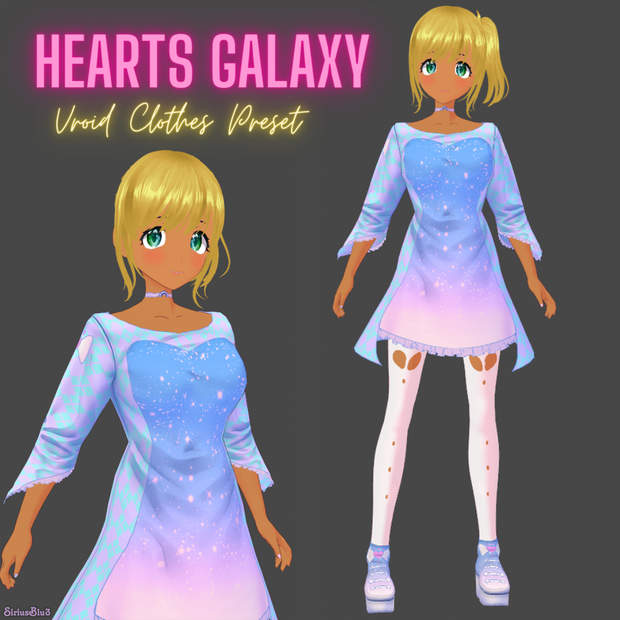
 VRoid Clothes Set Hearts Galaxy / VRoid custom item preset and textures
상품 설명
【VRoid texture】 Hearts Galaxy by Sirius Blu3
Created by http://twitter.com/SiriusBlu3
Hearts Galaxy clothes texture for use in the program VRoid
Unzip your download
VRoid
You can import the outfit as a custom item by selecting the custom tab in the clothes menu and clocking on the import option.
To import manually:
Please select the Outfit tab then click the corresponding item selection to import the textures in the program.
Top - Custom - Long Coat (High Neck) - Edit Texture - import the texture here - hide the default design texture
Shoes - Custom - Shoes (Dress) - Edit Texture - import the texture here - hide the default design texture
To Import the Body texture select the Body tab and create a new custom item import it here
If you have issues with transparent on the top click the skin mask when importing your texture then colour in white any areas of skin you want to show and black any areas you want to hide or make transparent.
VRoid BETA
Please select the following clothes then click the "texture" tab
to import the textures to your model in the VRoid program.
1, Long Coat (High Neck) = Hearts Galaxy Dress
2, Shoes (Onepiece) = Hearts Galaxy Shoe
3, Body Texture = Hearts Galaxy Nails
The following acts are prohibited.
• Redistribution and sale of materials
• Redistribution and sales after modifying materials
• Claiming that you created or made any of our textures/models/etc is forbidden
You are welcome to change the hue/colour yourself to better suit your model.
No credit is required for use on your model however it is appreciated.
Please note that the character model is NOT included.
Prices are subject to change
모든 리뷰
더보기리뷰 등록
리뷰를 작성하려면 로그인이 필요합니다.
로그인하고 리뷰 쓰기