'%3e%3cg%20clip-path='url(%23roundHexB)'%3e%3cpath%20fill='%236D5DFC'%20d='M256%2040%20443%20148%20443%20364%20256%20472%2069%20364%2069%20148Z'/%3e%3cpath%20fill='%239C93FB'%20d='M69%20148%20256%2040%20443%20148%20256%20256Z'/%3e%3cpath%20fill='%234A3FD1'%20d='M256%20256%20443%20148%20443%20364%20256%20472Z'/%3e%3c/g%3e%3c!--%20top%20face:%20filled%20round%20magnifier%20--%3e%3cg%20transform='matrix(0.8660254,-0.5,0.8660254,0.5,69,148)'%3e%3cg%20transform='matrix(0.935,0,0,0.935,7.02,7.02)'%3e%3ccircle%20cx='88'%20cy='88'%20r='52'%20fill='%23FFFFFF'/%3e%3ccircle%20cx='88'%20cy='88'%20r='28'%20fill='%239C93FB'/%3e%3cpath%20d='M124%20124%20164%20164'%20stroke='%23FFFFFF'%20stroke-width='26'%20stroke-linecap='round'/%3e%3c/g%3e%3c/g%3e%3cg%20transform='matrix(0.8660254,0.5,0,1,69,148)'%3e%3cpath%20d='M96.1,61.08%20L45.9,128.92%20Q34,145%2054,145%20L162,145%20Q182,145%20170.1,128.92%20L119.9,61.08%20Q108,45%2096.1,61.08%20Z'%20fill='%23FFFFFF'/%3e%3c/g%3e%3c!--%20right%20face:%20filled%20bubble%20--%3e%3cg%20transform='matrix(0.8660254,-0.5,0,1,256,256)'%3e%3cg%20transform='matrix(0.855,0,0,0.855,15.66,15.66)'%3e%3cpath%20d='M60%2042H156a28%2028%200%200%201%2028%2028V158Q184%20168%20174.47%20164.96L124.53%20149.04Q115%20146%20105%20146H60a28%2028%200%200%201-28-28V70a28%2028%200%200%201%2028-28Z'%20fill='%23FFFFFF'/%3e%3c/g%3e%3c/g%3e%3c/g%3e%3c/svg%3e)
 神城工業 / Kamishiro Industry
 一括圧縮ツール・AssetsCompressor
상품 설명
2024/06/23 Ver1.5に更新
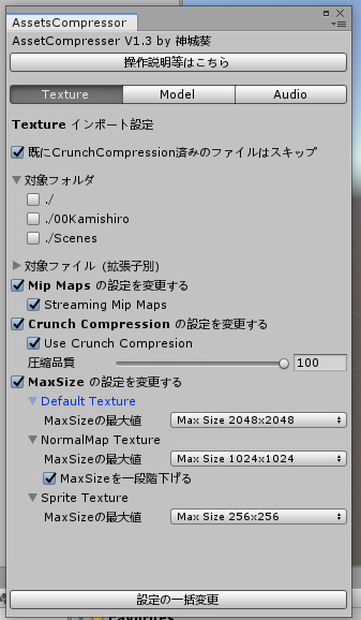
一個づつやると面倒なテクスチャなどの圧縮をまとめてやてくれるUnityのエディタ拡張です。
数が多いと処理に時間がかかるので、空き時間に実行することをお勧めします。
詳細はGithub ( https://github.com/AoiKamishiro/UnityCustomEditor_AssetsCompressor )をご確認ください。
※更新の際は、以前のバージョンを削除してからインポートしてください。
Special Thanks / まいたけ
利用規約
このスクリプトは神城葵が作成し、zlib ライセンスの下で運用されます。
このスクリプトを使用・改変されたことによって生じた如何なる問題も神城葵は責任を負いかねるものとします。
ライセンス
Zlib License
Copyright (c) 2024 AoiKamishiro
This software is provided 'as-is', without any express or implied warranty.
In no event will the authors be held liable for any damages arising from the use of this software.
Permission is granted to anyone to use this software for any purpose,
including commercial applications, and to alter it and redistribute it
freely, subject to the following restrictions:
1. The origin of this software must not be misrepresented; you must not
claim that you wrote the original software. If you use this software
in a product, an acknowledgment in the product documentation would be
appreciated but is not required.
2. Altered source versions must be plainly marked as such, and must not be
misrepresented as being the original software.
3. This notice may not be removed or altered from any source distribution.
更新履歴
[2020-06-19: v1.0] 初版
[2020-06-20: v1.1] 処理済みのテクスチャをスキップする機能の追加・Blendファイルの対応
[2020-07-24: v1.2]ファイルパスを変
更・Assets直下を処理対象に追加・フォルダの選択を、デフォルトでオフに設定
・Githubへのリンクボタンを追加
[2020-08-31: v1.3] Sprite Texture の対応
[2024-04-20: v1.4] Unity2022への対応
[2024-06-23: v1.5] メニューアイコンの画像を判定し、256に強制
[2024-06-23: v1.6] VRCSDKへの依存箇所を書き換え
[2024-06-23: v1.6.2] 最大サイズがすでに小さ目に設定されているテクスチャが、元画像のサイズによっては大きなサイズになっていしまっていた問題の修正
모든 리뷰
더보기리뷰 등록
리뷰를 작성하려면 로그인이 필요합니다.
로그인하고 리뷰 쓰기