'%3e%3cg%20clip-path='url(%23roundHexB)'%3e%3cpath%20fill='%236D5DFC'%20d='M256%2040%20443%20148%20443%20364%20256%20472%2069%20364%2069%20148Z'/%3e%3cpath%20fill='%239C93FB'%20d='M69%20148%20256%2040%20443%20148%20256%20256Z'/%3e%3cpath%20fill='%234A3FD1'%20d='M256%20256%20443%20148%20443%20364%20256%20472Z'/%3e%3c/g%3e%3c!--%20top%20face:%20filled%20round%20magnifier%20--%3e%3cg%20transform='matrix(0.8660254,-0.5,0.8660254,0.5,69,148)'%3e%3cg%20transform='matrix(0.935,0,0,0.935,7.02,7.02)'%3e%3ccircle%20cx='88'%20cy='88'%20r='52'%20fill='%23FFFFFF'/%3e%3ccircle%20cx='88'%20cy='88'%20r='28'%20fill='%239C93FB'/%3e%3cpath%20d='M124%20124%20164%20164'%20stroke='%23FFFFFF'%20stroke-width='26'%20stroke-linecap='round'/%3e%3c/g%3e%3c/g%3e%3cg%20transform='matrix(0.8660254,0.5,0,1,69,148)'%3e%3cpath%20d='M96.1,61.08%20L45.9,128.92%20Q34,145%2054,145%20L162,145%20Q182,145%20170.1,128.92%20L119.9,61.08%20Q108,45%2096.1,61.08%20Z'%20fill='%23FFFFFF'/%3e%3c/g%3e%3c!--%20right%20face:%20filled%20bubble%20--%3e%3cg%20transform='matrix(0.8660254,-0.5,0,1,256,256)'%3e%3cg%20transform='matrix(0.855,0,0,0.855,15.66,15.66)'%3e%3cpath%20d='M60%2042H156a28%2028%200%200%201%2028%2028V158Q184%20168%20174.47%20164.96L124.53%20149.04Q115%20146%20105%20146H60a28%2028%200%200%201-28-28V70a28%2028%200%200%201%2028-28Z'%20fill='%23FFFFFF'/%3e%3c/g%3e%3c/g%3e%3c/g%3e%3c/svg%3e)
 Lyuma
Lyuma상품 설명
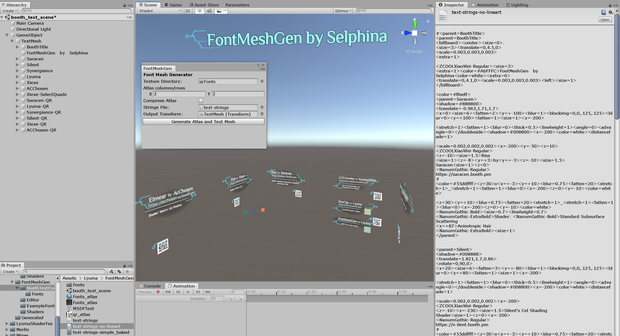
FontMeshGen allows you to build high quality MSDF text, complete with a wide range of styles and features, including blurred outlines, multiple fonts, italics, 3d transformations, billboard and backface flip, and lineart.
This is an early pre-release, and minimal documentation is present, but an example scene is included. **PLEASE READ THE INCLUDED README FILE!!!** Access the tool from Tools->Lyuma->FontMeshGen in the menu bar.
To generate new font atlases, or access non-ASCII letters (such as Hiragana or Kanji), you *must* also download my fork of Merlin's Unity-MSDF-Atlas tool from https://github.com/lyuma/Unity-MSDF-Fonts
Requires Unity 2018.4 or Higher.
While it's nothing like fully functional HTML and CSS, this includes a markup language with many more fun features than what you would find in Unity Text or TextMeshPro.
List of supported tags
** Per-letter settings
- <color=HTMLCOLOR>
(Set a color in unity format: red, white, #ccccffff, etc.)
(Please include an alpha component (8 letter hexcode))
- <colgrad=HTMLCOLOR>
(Color gradient: per-letter gradient, sets color= to this after the next character.)
- <shadow=HTMLCOLOR>
(Background shadow/glow around text)
- </shadow>
(Clear shadow, same as <shadow=#00000000> with 0 alpha.)
- <space=FLOAT>
(Scale size of space character)
- <size=FLOAT>
(Scale size of text or image)
- <blur=FLOAT>
(Create blurred text like shadow (1), normal (0) or extra sharp (-0.5))
- <lineheight=FLOAT>
(Line height multiplier, affects the next line)
- <stretch=FLOAT>
(Stretch text vertically, like size only on y axis)
- <fatten=FLOAT>
(Stretch text horizontally, like size only on x axis)
- <corrupt=FLOAT>
(Stretch one triangle in each quad, producing funny text)
- <extra=FLOAT>
(Activate custom shader feature, for example, float up and down slowly)
- <italic=FLOAT>
(Skew text by amount given: -0.25 = oblique, 0 = normal, 0.25 = italic, 1 = ??)
- <i>, </i>
(Same as italic=0.25 and italic=0)
- <thick=>
(Set letter thickness: 0=extremely thin, 0.5=normal, 1.0=bold)
- <b>, </b>
(Same as thick=1.0 and thick=0.5)
- <sep>, </sep>
(Broken: Please use fatten= instead, combined with _ for nice separators)
** Per-character positioning:
- <center>
- <left>
- <right>
- <align=FLOAT>
(Align text left (0) or right (1))
- <x=FLOAT>, <y=FLOAT> <z=FLOAT>
(Set the current x, y or z position of the text cursor, relative to the node.)
- <x=+FLOAT>, <y=+FLOAT> <z=+FLOAT>
(Set the current x, y or z position of the text cursor, relative to the previous value.)
- <angle=FLOAT>
(Set the angle of the text, relative to the node.)
- <anglexlate=FLOAT,X,Y,Z>
(Reset the angle and position of the cursor, relative to the node)
- <advangle=FLOAT>
(Set the angle of the cursor, affecting newly written characters.)
** Per-node commands:
- <parent=NAME>, </parent>
(Create a new game object to hold everything inside. No nesting!)
- <translate=X,Y,Z>
(Translate the game object.)
- <rotate=X,Y,Z>
(Rotate the game object in euler degrees.)
- <scale=X,Y,Z>
(Scale the game object.)
- <distancefade=FLOAT>
(Fade this object away as the user reaches this distance from the text on X/Z, ignoring Y.)
- <billboard>, </billboard>
(Billboard the current node towards the player camera)
- <doubleside>, </doubleside>
(Text will be correctly flipped from both sides.)
- <img=X1,Y1,X2,Y2>
(Reference an image from the Alternate Graphics slot in the material)
(X1,Y1 is bottom left; X2,Y2 is top right).
(The image will be scaled according to <size=>, <stretch=> and <fatten=> commands.)
- <blockimg=X1,Y1,X2,Y2>
(Like <image=> but the image will be centered on the cursor, instead of appended.)
모든 리뷰
더보기리뷰 등록
리뷰를 작성하려면 로그인이 필요합니다.
로그인하고 리뷰 쓰기